

Running a WooCommerce store is not just about getting people to your website. You also need to make sure you are not losing potential customers along the way.
A visitor may come to your store and leave without buying. Someone may add a product to the cart but never complete the checkout. And even after someone buys from you, there is no guarantee they will come back and buy again.
So, if you are already spending money to bring people to your store, losing these opportunities can mean leaving a lot of revenue on the table.
This is where a WooCommerce marketing automation funnel can help.
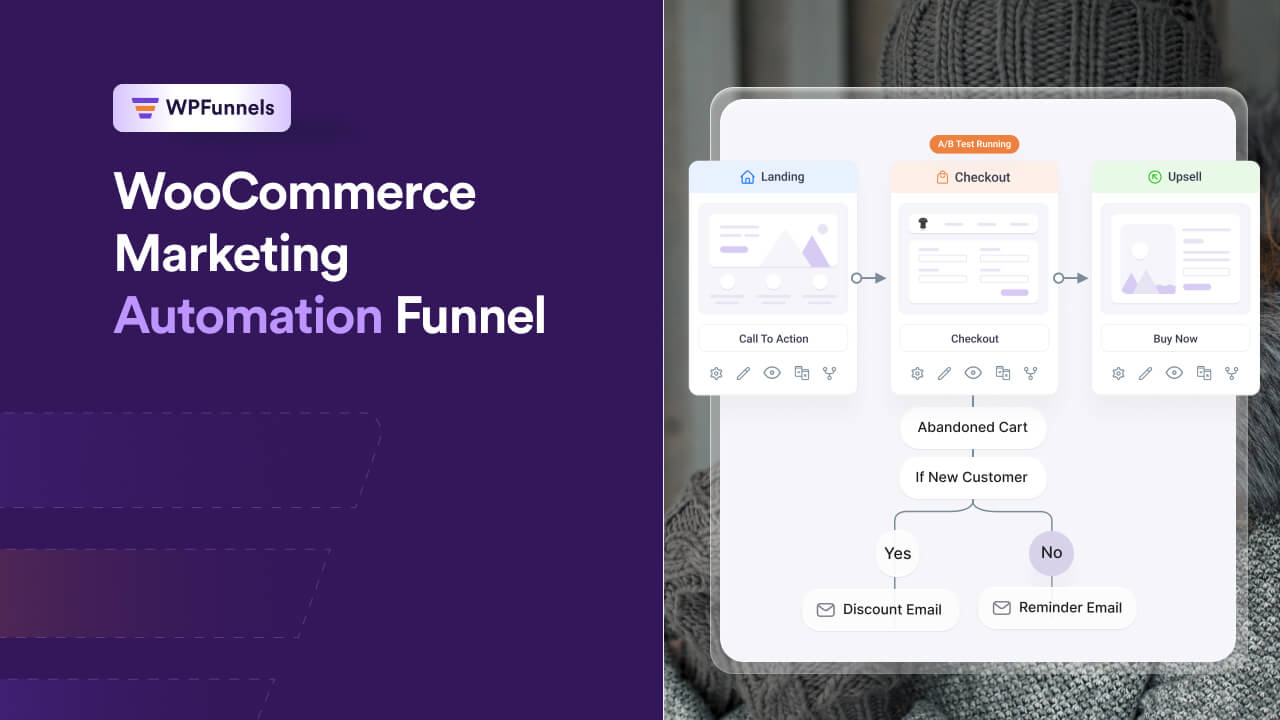
The idea is simple. You set up automated actions based on what your customers do in your store, so you can respond to them at the right time without having to do everything manually.
In this article, you will learn what a WooCommerce marketing automation funnel is, where your store may be losing revenue, and how you can use WPFunnels and Mail Mint together to recover more sales and get more value from the customers you already have.
So let’s begin.
TL:DR – WooCommerce Marketing Automation Funnel
- You can recover more sales and get more value from the traffic and customers you already have with a WooCommerce marketing automation funnel.
- What you can use it for:
- Increase conversions
- Recover abandoned checkouts
- Increase AOV with order bumps and upsells
- Follow up with customers after an order
- Bring back customers who haven’t purchased again
- How it works: customer behavior → WooCommerce event → automated response → next step
- How you can start: find your biggest revenue leak → build one funnel or automation → let it run → measure the result → add the next one
- Pro tip: don’t try to automate everything at once. Start with the revenue leak that’s costing your store the most.
- Final verdict: Use WPFunnels to guide the buying journey and Mail Mint to automate the follow-up around your WooCommerce activity.
Before setting up any funnel or automation, it helps to know where your store is actually losing money. Once you know the gaps, it becomes much easier to decide what you should automate first.
Where WooCommerce Stores Actually Lose Revenue
Think about what usually happens when someone visits your WooCommerce store. They may look around, add a product to their cart, and start checkout. But then things can go in different directions.
They may complete the purchase and leave. They may abandon the checkout. Or they may buy it once and never come back.
And each of these situations gives you a different chance to recover or grow revenue.
| Revenue opportunity | What happens | How the funnel responds |
|---|---|---|
| Increase conversions | Shopper visits but doesn’t buy | Guide them through a focused buying journey |
| Recover lost sales | Shopper abandons checkout | Trigger an automated recovery sequence |
| Increase AOV | Customer buys only the initial product | Present an order bump or upsell |
| Capture missed opportunities | Customer takes an action but gets no relevant follow-up | Trigger product or order-based automation |
| Generate more future sales | Customer becomes inactive after their first order | Trigger a relevant re-engagement sequence |
Bottom Line: The goal is to make more revenue from the customers you already have. The funnel helps guide them toward the next step, while automation helps you follow up based on what they do.
Now that you know where your store can lose revenue, let’s look at how a marketing automation funnel can help you handle each of these situations automatically.
How a Marketing Automation Funnel Connects the Journey to a Response
Think about what happens when someone visits your WooCommerce store. They may come from an ad, look at a product, add it to their cart, and start checking out.
But what happens if they leave?
Without any automation, that’s usually where the journey ends.
Ad → Product page → Checkout → Leave.
You paid to bring that person to your store, they showed some interest in what you sell, and then they disappeared. You can always hope they come back on their own, but you don’t have to leave it at that.
With a marketing automation funnel, you can build the next step into the journey.
Ad → Product page → Offer → Checkout → Order bump → Purchase.
The funnel helps guide the customer toward the purchase. For example, you can show them a relevant offer before checkout or give them a small order bump that makes sense with what they’re already buying.
And if they don’t complete the checkout, you can handle that too.
Checkout started → Checkout abandoned → Recovery email → Return to checkout.
That’s where the automation comes in. You decide what should happen when a customer takes a certain action, and the workflow takes care of the follow-up for you.
The same idea can work after someone places an order. You could follow up based on what they bought, recommend another relevant product, or remind them to reorder when they are likely to need it.
So the basic idea is pretty simple: the funnel guides the customer toward a purchase, while automation helps you respond when something happens along the way.
Here are a few common examples:
- Abandoned cart: Checkout started → Cart abandoned → Recovery email → Return to checkout.
- Order-based follow-up: Order completed → Product purchased → Follow-up email → Relevant next action.
- AOV growth: Checkout → Order bump → Purchase → One-click upsell.
What This Looks Like Inside WooCommerce
You’ll often see a marketing funnel broken down into Awareness, Interest, Decision, and Action. There’s nothing wrong with that, but for a WooCommerce store, those stages can feel a little too broad.
You already have much more specific information about what shoppers are doing in your store. They can view a product, add it to their cart, start checkout, place an order, or become inactive after buying.
So you can look at the funnel this way:
| Funnel stage | What happens in your WooCommerce store |
|---|---|
| Awareness | Someone visits a landing page or product page |
| Interest | They view a product or add it to their cart |
| Decision | They start checkout or abandon their cart |
| Action | They complete the order |
| Post-purchase | They buy a product, their order status changes, or they become inactive |
This is what makes WooCommerce useful for automation. You don’t have to rely on a general idea of where someone is in the funnel. You can use the actual activity happening in your store to decide what should happen next.
For example, someone who has abandoned checkout can be treated differently from someone who just viewed a product. A customer who has already purchased can also get a different follow-up from someone who has never ordered.
Good to Know: Not everyone who visits your store will be ready to buy. An email opt-in gives you another way to stay in touch with those shoppers, but for a WooCommerce store, it’s usually a secondary path rather than the main one.
Once you start looking at the funnel this way, it becomes easier to see where WPFunnels and Mail Mint fit into the picture.
The Two-Layer WooCommerce Automation System
There are really two parts to this setup, and each one has a different job.
WPFunnels handles the buying side. It takes care of things like your funnel, checkout offers, order bumps, one-click upsells, and A/B testing. The goal is pretty straightforward: help more shoppers complete their purchase and increase the value of each order.
Mail Mint handles what happens around those purchases. You can use it for abandoned cart recovery, order and product-based emails, post-purchase follow-up, and win-back campaigns.
And don’t think of Mail Mint as something you only use after a customer buys. Take abandoned cart recovery. The customer hasn’t purchased yet, but they’ve already started checkout. That’s enough to trigger a follow-up and give you another chance to recover the sale.
So, in simple terms, WPFunnels helps guide the customer through the buying process, while Mail Mint helps you follow up based on what the customer does.
Here’s what that looks like when you put the two together in an actual order.
A Real Example: One Funnel, Start to Finish
Let’s put all of this together with a simple example.
For Example: Say you sell a $45 skincare set.
A customer sees your Instagram ad, clicks through to your WPFunnels landing page, and adds the skincare set to their cart.
So far, everything is going as expected. They like the product enough to start checkout, but then they see the shipping cost and leave without placing the order.
That’s an abandoned checkout, but it doesn’t have to be the end of the sale.
Mail Mint can trigger an abandoned cart workflow and send a reminder about the product they left behind. You might start with a simple reminder and follow up later with a small incentive if they still haven’t completed the order. The exact timing will depend on your store and what works for your customers.
Let’s say the customer comes back and completes the checkout.
Before they pay, WPFunnels can show an order bump for a $12 travel-size cleanser. If they take the offer, the order value goes from $45 to $57.
After payment, you can offer a complementary serum through a one-click upsell, so the customer doesn’t have to enter their payment details again.
And the journey doesn’t have to end there. When the customer is getting close to the time they would normally need another skincare set, Mail Mint can send a reorder reminder.
So the full journey looks something like this:
Instagram ad → Product page → Checkout → Abandoned cart → Recovery email → Purchase → Order bump → One-click upsell → Reorder reminder
One customer has now given you several opportunities to recover the sale, increase the order value, and encourage another purchase.
It won’t happen this neatly with every customer, of course. The point is to show how WPFunnels and Mail Mint can work together around the different things a customer does in your store.
Building Your First Funnel: A Practical Sequence
You don’t need to build every automation we’ve talked about right away. In fact, it’s probably better if you don’t.
Start with the part of your store that’s losing you the most money. If abandoned checkouts are a big problem, start there. If customers are buying but your AOV is low, start with an order bump or upsell.
1. Start with your biggest leak
Look at your WooCommerce numbers and figure out where you’re losing the most revenue. A high cart abandonment rate is a good reason to start with Mail Mint, while a low AOV may point you toward WPFunnels.
2. Keep your first funnel simple
Don’t build five different funnels at once. Start with one landing page, one checkout, and one order bump in WPFunnels. That’s enough to see whether the offer makes sense for your products.
3. Add abandoned cart recovery
Once your funnel is working, set up abandoned cart recovery in Mail Mint. Start with a simple two-email sequence and see how many of those lost checkouts you can bring back.
4. Add an upsell
If the basic funnel is converting, add a one-click upsell after the purchase. You already have the customer buying, so this is a natural place to test whether you can increase the order value.
5. Bring back inactive customers
Not every customer will buy again right away. Decide how long someone can go without ordering before you consider them inactive, then use Mail Mint to send a win-back email around that point.
6. Test before changing everything
Once the funnel is running, test one thing at a time. Try a different subject line, change the order bump price, or test another offer. Give the test enough orders to tell you something before changing it again.
7. Check the numbers regularly
You don’t need to sit inside your automation dashboard every day. Review the results monthly and look for anything that needs attention, especially workflows that have stopped sending or aren’t producing the results you expected.
Pro Tip: Don’t try to build everything at once. Get one automation working, see whether it actually recovers or generates revenue, and then move on to the next opportunity.
Building the funnel is one thing. Knowing whether it’s actually making you money is what matters next.
Mistakes That Quietly Kill Automation ROI
Automation can save you a lot of time, but setting up a workflow doesn’t automatically mean it’s going to make you more money. A few common mistakes can quietly eat into the results.
- Automating before fixing the funnel itself. If your checkout is confusing or something is broken, sending more emails won’t solve the real problem. Fix the buying experience first, then use automation to follow up with the people who still drop off.
- Using the same AOV offer everywhere. An order bump that works well with a $150 product may not make much sense on a $20 product. The offer should fit what the customer is already buying and what they’re likely to need next.
- Using the same re-engagement timing for every product. A customer buying something they use up every month shouldn’t get the same win-back timing as someone buying a product they’ll only purchase once or twice a year. Set the timing around how your products are actually used.
- Ignoring transactional emails. Order confirmations and shipping updates are emails your customers are already expecting to receive. Leaving them as the basic WooCommerce emails means you’re missing a chance to keep the customer engaged after the purchase.
- Turning every recovery email into a discount. If the first thing you send after an abandoned checkout is a discount, customers may start waiting for one. Start with a simple reminder and see if that brings them back before adding an incentive.
Related read: We’ve covered checkout-specific mistakes in more depth in 10 Critical Landing Page Mistakes to Avoid Right Now.
Avoiding these mistakes is a good start. But you still need to know whether the funnel is actually recovering revenue.
Measure Revenue Impact, Not Vanity Metrics
Once your funnel is running, don’t get too caught up in how many emails you’ve sent or how many people opened them. Those numbers can be useful, but they don’t tell you whether the automation is actually making you more money.
Instead, look at the numbers connected to the revenue opportunities we talked about earlier:
- Cart recovery rate: How many abandoned checkouts came back and resulted in a purchase after your recovery emails?
- AOV lift: Are your order bumps and upsells actually increasing the average value of each order?
- Funnel conversion rate: Of the people who enter your funnel, how many end up completing the purchase?
- Repeat purchase rate: How many customers come back and place another order within the time period you’ve defined?
- Revenue from automation: How much revenue can you directly connect to your recovery emails, order bumps, upsells, and win-back campaigns?
You don’t need to track dozens of numbers to know whether your automation is working. Start with these, compare them over time, and pay attention to which workflows are actually bringing in more revenue.
Remember: If you don’t measure what your automation is recovering or generating, you won’t know whether it’s actually worth keeping.
Conclusion
You’ve now seen how a customer can move through your WooCommerce store, where that journey can break down, and how an automated response can keep it moving.
The next step isn’t to build everything we covered. Look back at your own store and ask yourself one question: where are you losing the most opportunity right now?
If customers are leaving during checkout, start with recovery. If you’re getting orders but missing opportunities to follow up, start there. Once that first workflow is working, you can build on it instead of trying to automate the entire customer journey at once.
That’s where WPFunnels and Mail Mint work well together. WPFunnels gives you the funnel and the steps you want the customer to take, while Mail Mint handles the automated communication based on what happens in your WooCommerce store.
You’ve already got the customer activity and order data. Now you can use it to make sure the next step doesn’t depend on you remembering to send an email or manually follow up.
Ready to Put This Into Your WooCommerce Store?
You’ve already figured out where your funnel can lose customers. Now you can start with that one gap and build the workflow around it.
Frequently Asked Questions
What is a WooCommerce marketing automation funnel?
It’s a connected customer journey where store events, like a cart abandoned, an order placed, or a customer going inactive, trigger the next automated marketing action aimed at recovering or growing revenue. On WooCommerce, WPFunnels typically handles the guided buying journey, while Mail Mint automates the communication triggered by that activity.
How does WooCommerce customer journey automation work?
It connects a shopper’s actions with the next relevant marketing action. An abandoned checkout can trigger a recovery email, a completed order can trigger post-purchase communication, and customer inactivity can trigger a re-engagement workflow, all based on real store events rather than a manual send.
Where do WooCommerce stores typically lose the most revenue?
The most common leaks are low conversion at checkout, cart abandonment, low average order value, missed follow-up after a purchase, and customers who never return for a second order. Each one calls for a different automation response rather than one generic fix.
What’s the difference between a marketing automation funnel and a sales funnel?
A marketing automation funnel automates the marketing tasks that move someone from first visit to purchase and beyond. A sales funnel refers to a sales team’s manual process for converting a qualified lead into a customer, often involving calls or demos. Many WooCommerce stores can run their customer journey primarily through marketing automation, since purchases happen directly through the online store.
Do I need a CRM to run a WooCommerce marketing automation funnel?
Not necessarily. A CRM becomes useful once you need to track long, multi-touch B2B-style relationships. For a WooCommerce store reacting to order and cart events, plugins that read WooCommerce data directly, like WPFunnels and Mail Mint, can cover the funnel without adding a separate contact database to maintain.
What tools can I use to build a marketing automation funnel on WooCommerce?
For the guided buying journey, WPFunnels handles funnels, order bumps, one-click upsells, and A/B testing. For the automated response to customer activity, Mail Mint handles abandoned cart recovery, email automation workflows, and transactional email customization. Both are WordPress-native, so they don’t require exporting your WooCommerce data to a third-party platform.
How do I measure whether my marketing automation funnel is actually working?
Track cart recovery rate, AOV lift, funnel conversion rate, repeat purchase rate, and revenue generated directly by automation. Avoid stopping at open rates and click-through rates alone; they show engagement, not recovered or incremental revenue.