

I’ve been working with email marketing for a few years now, and through actually running campaigns, I’ve picked up a few things that matter more than they get credit for.
This is one of those things. Click-through rate and click-to-open rate get treated like they’re the same number wearing two different names.
They’re not, and mixing them up means fixing the wrong thing.
Let’s say you sent two campaigns this month, to two different segments of your list.
Campaign A: 5,000 delivered, 1,500 opened, 60 clicked.
Campaign B: 5,000 delivered, 900 opened, 60 clicked.
Same list size, same clicks. Check CTR alone, and both tie at a forgettable 1.2%.
You’d probably treat them the same way: rewrite the subject line on both, or scrap the offer on both.
Now check click-to-open rate. Campaign A converted openers at just 4%, despite reaching far more people. Campaign B converted openers at 6.7%, despite reaching fewer.
Same CTR. Completely different problem.
Campaign B’s email did its job. It just didn’t reach enough of the right people. Campaign A reached plenty of people, but the content didn’t land.
Key Takeaway: CTR is the percentage of everyone who received your email who clicked. CTOR is the percentage of people who opened it who then clicked. CTR tells you about reach. CTOR tells you about the content, once someone’s already looking at it.
TL;DR: Click Through Rate vs Click To Open Rate
- Which of the two numbers to actually trust for each type of email your WooCommerce store sends.
- What a normal CTR and CTOR look like for ecommerce specifically in 2026.
- Why a rising CTOR isn’t good news if your list is shrinking underneath it.
Let’s start with the two definitions, since the rest of this only makes sense once these are locked in.
What is Click-Through Rate?
Click-through rate measures the percentage of everyone you sent an email to who clicked a link inside it.
It’s the broadest engagement number you have. It counts your entire delivered list as the denominator, whether someone opened the email or scrolled past it in their inbox without a second look.
Say you’re a WooCommerce store selling skincare, and you send a restock announcement. If your CTR is high, your subject line, your timing, and your offer are all working together. If it’s low, one or all of those three could be the reason, but CTR alone won’t tell you which.
Formula: CTR = (Total Link Clicks ÷ Total Delivered Emails) × 100

For example, if you deliver 1,000 emails and 12 people click a link, your CTR is 1.2%.
That’s close to the current ecommerce click rate benchmark of 1.07%, based on MailerLite’s 2026 analysis of 3.6 million campaigns sent between December 2024 and November 2025.
A high CTR tells you the whole chain worked, from inbox to click. A low one just tells you something broke somewhere in that chain. You’ll need CTOR to find out where.
What Is Click-to-Open Rate (CTOR)?
Click-to-open rate narrows that same click count down to a smaller, more honest denominator: only the people who actually opened the email.
This is the number that tells you whether your content did its job once someone gave you their attention. Deliverability, subject lines, and send time already did their part by the time CTOR gets calculated. What’s left is the body of the email itself.
Formula: CTOR = (Unique Clicks ÷ Unique Opens) × 100

Suppose you send a cart recovery email campaign to 500 shoppers who left items behind. 400 open it, and 100 click through to finish their order.
Your CTOR is (100 ÷ 400) × 100 = 25%.
That’s a genuinely strong number, well above the 2026 all-industry median of 6.81% and the ecommerce-specific median closer to 4%.
Good to Know: A lot of older articles still quote CTOR averages of 20% to 30%. That figure comes from outdated benchmark methodology. MailerLite’s more recent dataset of 3.6 million campaigns puts the real median at 6.81% across all industries, and ecommerce specifically runs lower, around 4%, since promotional blasts pull the average down.
So you have two numbers built from the exact same click count, just divided by two different things. That difference is where the useful information lives, and it’s worth slowing down on.
Why the Same Click Number Can Mean Two Different Things
This is the part people tend to skim past, and it’s worth slowing down for.
Both metrics start with the same raw click count. CTR divides it by everyone you sent to. CTOR divides it by only the people who opened. That single difference in the denominator changes what each number is actually diagnosing.
| Aspect | Click-Through Rate (CTR) | Click-to-Open Rate (CTOR) |
|---|---|---|
| Denominator | Total emails delivered | Total unique opens |
| What it measures | Reach across your whole list, subject line and CTA combined | Content and offer quality, once someone opened |
| A low number usually means | Weak subject line, poor list health, or bad send time | Weak body copy, offer, or CTA once inside the email |
| Best used for | Comparing overall campaign performance and list quality | Judging whether your content resonates with engaged readers |
| Affected by open rate | Not directly | Directly, since opens are the denominator |
If CTR is low, look upstream: your subject line, your list health, or whether the email even matches your campaign goals in the first place. If CTOR is low, look at what’s inside the email itself: the offer, the layout, and the call to action.
Pro Tip: CTR isn’t actually independent of CTOR.
It’s the product of two things: CTR = Open Rate × CTOR.
If your open rate is 30% and your CTOR is 4%, your CTR will land right around 1.2%, every time.
That’s why fixing open rate alone can lift CTR even if your content never changes, and it’s why the two metrics are always worth reading together.
Here’s roughly where those numbers should sit for a WooCommerce store specifically:
| Metric | Ecommerce Average | Strong |
|---|---|---|
| CTR | 1.07% | 2-3%+ |
| CTOR | ~4% | 7%+ |
Source: MailerLite, 2026 Email Marketing Benchmarks (3.6 million campaigns, Dec 2024 to Nov 2025).
One thing that quietly distorts the CTOR side of that table: Apple’s Mail Privacy Protection pre-loads remote content, including tracking pixels, on emails opened in Apple Mail, and hides whether a message was actually opened.
That means a chunk of your “opens” are counted whether anyone actually looked or not.
It inflates the denominator in the CTOR formula, which can make your real content performance look weaker than it is. Worth keeping in mind before you assume a dip in CTOR means your content got worse.
Tracking marketing metrics like these side by side, rather than picking one to obsess over, is what actually tells you which lever to pull next.
Some stores hand this analysis off entirely, which is part of why outsourcing email marketing services has become common for teams that don’t have the bandwidth to sit with both numbers every week.
Once you know which number is misbehaving, the next question is what’s actually causing it, and that’s where most factor-lists online get too vague to act on.
What Actually Moves These Two Metrics
Here’s the tricky part. The same email can have a healthy CTR and a weak CTOR, or the other way around, since not everything moves both metrics equally in the same email marketing send.
1. Email Subject Line
Your subject line decides whether someone opens at all. That means it shapes CTR heavily, but CTOR only indirectly.
A weak subject line drags CTR down before the content ever gets a chance. An over-promising one does the opposite: opens climb, then CTOR craters, because openers feel misled and don’t click.
Checking open rate and CTR together, rather than either alone, is how you tell which of those two is happening.
2. Call to Action (CTA)
Your CTA decides what happens next. A vague link labeled “click here” underperforms something specific like “Finish Your Order.”
CTA wording and placement move both numbers, but the effect shows up faster in CTOR, since that’s the number measuring engagement after someone’s already reading. A weak click rate versus open rate usually traces back to the CTA more than anything else.
3. Content Relevance
This one works on a lag. Sending a promo for something a subscriber already bought last week won’t hurt CTR much if the subject line earned the open, but it will crater CTOR, since the content doesn’t match what the reader expected.
Personalizing based on real purchase history, not just a first-name merge tag or a birthday greeting, pays off specifically in CTOR. Relevant content also helps drive more clicks and repeat visits while keeping your unsubscribe rate down.
4. Design and Send Time
A clean, consistent layout lifts both numbers by making the email easier to act on at every stage.
Send time mostly shows up in CTR. An email sent at 3 AM competes with nobody’s attention, while one sent in the late morning or right after lunch tends to catch people mid-inbox-check.
5. Send Frequency
This is the one that sneaks up on stores. Send too often, and you’ll see high opens with low clicks at first, since people still recognize your name.
Keep it up and opens start dropping too, along with a rising unsubscribe rate, because the frequency itself becomes the complaint.
None of this changes by email type, in theory. In practice, it does, and this is where most comparisons stop short, so it’s worth walking through directly.
Which Metric to Trust for Each WooCommerce Email You Send
Now flip the lens. Say you grade every email you send by the same number: cart recovery, order confirmations, the weekly newsletter, the big sale blast, all judged against one CTR taped to your monitor.
Your cart recovery email “underperforms” next to your sale blast, since the blast pulled more raw clicks.
So you rewrite the cart email copy for the fifth time this quarter, chasing a number it was never built to hit, while the campaign that’s actually working sits there unnoticed.
Most guides, this one included until a minute ago, treat CTR and CTOR as if one answer applies to every email you send.
It doesn’t.
A cart recovery email and a Tuesday newsletter aren’t playing the same game, and grading them on the same scoreboard was never going to be fair.
A store owner running WooCommerce sends several different kinds of email, and each one earns a different read on CTR versus CTOR.
| Email Type | Metric to Prioritize | Why |
|---|---|---|
| Abandoned cart recovery | CTOR | Small, high-intent list. Opens are already likely; the click is what matters. |
| Order confirmation / shipping update | Neither closely | Open intent is already near 100%. Track clarity and click-through to tracking instead. |
| Win-back / re-engagement | CTR | You’re trying to prove the list is still alive, not just impress the few who open. |
| Weekly newsletter | CTOR | Judges whether your regular content still earns attention from loyal readers. |
| Promotional blast / sale announcement | CTR | Reach across the full list matters more than depth with a small engaged slice. |
Here’s what that looks like with real numbers.
Say your abandoned cart email goes out to 400 shoppers who left something in their cart this month. That’s a small list, but everyone on it already showed buying intent.
If 45% open it, that’s 180 opens, and if 14 of them click through to finish checkout, your CTR is 3.5% but your CTOR is 7.8%, well above the all-industry median.
We’ve covered cart recovery in more depth elsewhere:50 Irresistible Abandoned Cart Email Subject Lines walks through the subject lines that tend to earn that first open.
Now compare that to a weekly newsletter sent to your full list of 4,000 subscribers.
At the ecommerce-average open rate of roughly 32.67% and click rate of 1.07%, you’d land around 1,307 opens and 43 clicks, giving you a CTOR closer to 3.3%.
Look at raw click counts and the newsletter wins, 43 versus 14. But that comparison is misleading. The cart email reached a much smaller, warmer list and converted openers at more than double the rate.
Those 14 clicks are sitting closer to an actual purchase decision than the 43 newsletter clicks are, since everyone on that list already had a product in their cart.
At a $60 average order value, even half of those 14 clicks converting is roughly $420 in recovered revenue, from a list of just 400 people. That’s the kind of return a bigger, colder click count on a newsletter usually can’t match.
This is exactly why automated, behavior-triggered emails tend to outperform one-off blasts on CTOR: the list itself is already self-selected for intent.
This deserves its own guide, and we’ve written one:Email Marketing Automation Best Practices for 2026 goes deeper into building these triggered flows.
Order confirmations and shipping updates are worth calling out separately.
Open intent on a transactional email is already close to guaranteed, someone wants to know their order status, so neither CTR nor CTOR tells you much about persuasion.
What you can still measure is whether people click through for order tracking or a related product suggestion.
Related read: 50+ Thank You Email Subject Line Examples To Trigger More Opens if you’re trying to add a soft upsell to that moment without hurting the transactional feel.
Where Mail Mint Shows You Both Numbers Side by Side
I’d rather you see both numbers in thirty seconds than build a spreadsheet to compare them.
Mail Mint calculates CTR and CTOR automatically for every campaign, right inside the same dashboard where you set the campaign up, since it reads delivery and click data straight from your WordPress database rather than syncing it in from an outside tool.
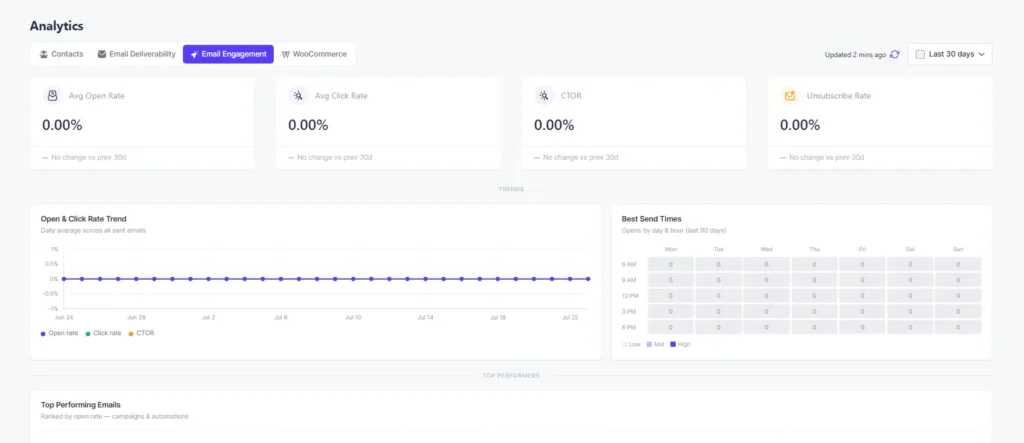
Seeing both numbers next to each other, rather than exporting them into a spreadsheet separately, makes the comparison from the last section something you can actually do right after a campaign goes out.
Let AI Crunch the Numbers For You
If you’ve got a handful of recent campaigns and you’re not sure which ones have a list problem versus a content problem, this is a genuinely good use for ChatGPT or Claude.
Pull your delivered, opens, and clicks for your last 5 to 10 campaigns from your dashboard, note what type of email each one was (cart recovery, newsletter, win-back, promo blast, or order confirmation), and paste it all into a prompt like this:
You are helping me analyze email campaign performance for my WooCommerce store.

Here is the data for my last several campaigns. For each one I'm giving you:
- Campaign name or date
- Email type (cart recovery, order confirmation, win-back/re-engagement, newsletter, or promotional blast)
- Emails delivered
- Unique opens
- Unique clicks

[Paste your campaigns here, one per line, for example:]
1. Weekly Newsletter, July 14, Newsletter, Delivered: 4000, Opens: 1300, Clicks: 40
2. Cart Recovery Flow, July 16, Cart Recovery, Delivered: 380, Opens: 165, Clicks: 11
3. Flash Sale, July 18, Promotional Blast, Delivered: 4500, Opens: 1100, Clicks: 70

For each campaign:
1. Calculate CTR (clicks ÷ delivered × 100) and CTOR (clicks ÷ opens × 100).
2. Based on the email type, tell me whether CTR or CTOR is the more important number to judge that campaign by. Cart recovery and newsletters should be judged mainly on CTOR. Win-back and promotional blasts should be judged mainly on CTR. Order confirmations should not be judged closely on either.
3. Compare the relevant metric against these ecommerce benchmarks: CTR average 1.07%, CTR strong 2 to 3%+, CTOR average 4%, CTOR strong 7%+.
4. Flag whether the campaign looks like it has a list/reach problem (weak opens, but a decent CTOR once people did open) or a content problem (decent opens, but a weak CTOR).
5. Rank all the campaigns from weakest to strongest, using the metric that actually matters for each one's email type, not raw click count.

Then, for the single weakest campaign:
- Suggest one specific, testable change (a subject line rewrite, a different CTA, a list segment change, or a send-time change).
- Explain in one sentence why that's the most likely fix given the numbers.

Present this as a table with the columns: Campaign, Email Type, CTR, CTOR, Metric to Judge By, Diagnosis. Follow the table with your recommended fix for the weakest campaign.
This turns a spreadsheet full of percentages into a short, prioritized list of what to fix first, which is usually the harder part than the math itself.
Best Practices to Raise Both Numbers Together
A few habits move CTR and CTOR at the same time, rather than trading one for the other.
1. Craft compelling subject lines and CTAs for higher click rates
Your subject line and your CTA aren’t doing separate jobs. Personalization, curiosity, or real urgency earn the open. A specific, matching CTA is what turns that open into a click. Keep both short, clear, and free of anything that reads as spammy.
A subject line like “Last Chance: 50% Off Ends Tonight” paired with a CTA like “Claim Your Discount” improves click-to-open rate precisely because they’re saying the same thing. The subject line earns the open. The CTA earns the click. One without the other leaves a gap between your CTR and your CTOR.
2. Conduct A/B testing based on CTR and CTOR data insights
Run tests that isolate a single change: subject line, CTA wording, layout, or send time. That’s the only way to know which number actually moved, and why.
Test two subject lines, and you’ll see which one lifts CTOR once people open. Test two CTAs, and you’ll see which one lifts clicks without touching your open rate at all. Change several things in the same send, and you won’t know which one did the work.
3. Personalization strategies to enhance CTR and overall campaign success
A merge tag with someone’s first name does very little on its own. Recommending products based on what someone actually bought, and segmenting your list by purchase history instead of just location, is what actually lifts both CTR and CTOR at the same time.
Remember, personalized emails build a stronger connection with the reader, and that connection is exactly what gives you the edge when you’re comparing click rate against open rate on the same campaign.
Final Thoughts
Go back to Campaign A and B. Same CTR, same list size, same number of clicks.
If you’d stopped there, you’d have made the same fix twice, when really one needed a better subject line and the other needed better content.
That’s really all CTR and CTOR are for.
CTR tells you if the email reached enough people. CTOR tells you if it was worth their time once they opened it. You need both, because a good number on one side can easily be hiding a bad number on the other.
Where people usually go wrong is judging every email by the same number, no matter what kind of email it is.
A cart recovery email and a sale blast aren’t trying to do the same job, so grading them the same way was never going to work.
If you’re doing this math by hand every time, Mail Mint tracks CTR and CTOR automatically for every campaign, right next to your WooCommerce order data.
Frequently Asked Questions
What is a good click-through rate for email marketing in 2026?
Across all industries, the median CTR is around 2.09%, based on MailerLite’s 2026 benchmark of 3.6 million campaigns. Ecommerce specifically runs a little lower, closer to 1.07%, so compare your numbers against your own industry rather than a blended average.
What is a good click-to-open rate for a WooCommerce store specifically?
The all-industry median CTOR sits around 6.81%, based on the same MailerLite dataset, but ecommerce brands typically land closer to 4%, partly because promotional blasts pull the average down. Automated, behavior-triggered emails like cart recovery tend to run well above that.
Should I track CTR or CTOR for abandoned cart emails?
CTOR is the more useful number here. The list is small and already high-intent, so most of the work is getting the click once someone opens, not getting the open itself.
Why does Apple’s Mail Privacy Protection affect my CTOR numbers?
Apple’s Mail Privacy Protection pre-loads remote content on emails opened in Apple Mail and hides from senders whether a message was actually opened, which counts as an “open” whether a person actually looked at it or not. That inflates your open count, which lowers your calculated CTOR even if actual engagement didn’t change.
Can I have a high CTR and a low CTOR at the same time, or the reverse?
Yes, and it’s common. A high CTR with a low CTOR usually means your subject line is doing more work than your content. A low CTR with a high CTOR usually means your content is strong, but not enough of your list is opening to see it.
What tools track CTR and CTOR automatically?
Mail Mint tracks both natively for WooCommerce stores, since it reads order and campaign data directly from WordPress. Most standalone ESPs, including Mailchimp and ActiveCampaign, also report both, though they won’t have direct access to your store’s order data the way a WooCommerce-native tool does.