



If you have been looking for a WordPress email marketing plugin for more than 5 minutes, you already know the problem.
Every plugin looks the same on the surface. Drag-and-drop builder. Automation workflows. WooCommerce integration. Analytics dashboard. The feature lists blur together after the third tab.
And somewhere around the fifth plugin, you start wondering, are these actually different? Or am I just reading the same product described twelve different ways?
Trust me. They are different. But not in the ways most comparison pages explain.
The difference that actually matters, the one that affects what you pay in year one versus year three, comes down to one thing.
Where does the plugin live?
- WordPress-native plugins keep everything inside your dashboard. Your contacts, your campaigns, your automation. Flat annual fee. Your bill stays the same whether you have 500 contacts or 50,000.
- SaaS-connected plugins link your WordPress site to a cloud platform. Strong infrastructure, managed deliverability—but your monthly cost grows every time your list does.
That single difference is why two plugins with similar feature lists can cost $150 a year versus $1,500 a year by the time your list reaches 10,000 contacts.
Now you know what to look for.
Here are the 10 best WordPress email marketing plugins in 2026, what each one actually does, what it costs as your list grows, and which type of site it was built for.
Here is what this guide covers. Jump to the section most relevant to you:
- Top 10 WordPress Email Marketing Plugins
- Side-by-Side Feature Comparison
- Side-by-Side Pricing Comparison
- How to Match the Right Plugin to Your Site
- Simple Ways to Grow Your Email List on WordPress
Within the next 30 seconds, I hope you find the best match for your situation.
Find the Best WordPress Email Marketing Plugin in 30 Seconds
Whether you’re a blogger, WooCommerce store owner, or course creator, this quick finder points you to the plugins that best match your needs.
| Your Goal | Best Plugin | Why It’s a Good Fit |
|---|---|---|
| Manage email marketing, automation, and contacts directly inside WordPress | Mail Mint | Combines email campaigns, automation, lead management, forms, and ChatGPT integration in one WordPress plugin |
| Connect your website to Mailchimp and grow your subscriber list | MailChimp for WordPress | Deep Mailchimp integration with flexible signup forms and broad plugin compatibility |
| Send newsletters and manage subscribers without leaving WordPress | MailPoet | Built specifically for WordPress with subscriber management and native email sending capabilities |
| Use email marketing alongside CRM and transactional emails | Sendinblue (Brevo) | Combines email marketing, automation, CRM features, and reliable email delivery |
| Manage email marketing as part of a complete marketing and CRM platform | HubSpot | Includes CRM, lead management, email marketing, forms, and reporting tools |
| Combine lead generation, popups, and email automation in one plugin | MailOptin | Helps capture leads and automate email engagement directly from WordPress |
| Run a self-hosted CRM with visual automation inside WordPress | FluentCRM | Combines CRM, email automation, and deal pipeline tracking — all stored inside your WordPress database |
| Manage email automation around a sales pipeline inside WordPress | Groundhogg | Combines pipeline management, contact timelines, and email automation for service businesses, coaches, and agencies. |
| Send unlimited free newsletters with no external account needed | The Newsletter Plugin | Free forever with unlimited contacts and unlimited sends — no SaaS account required |
| Run a WooCommerce store and coordinate email, SMS, and push notifications | Omnisend | Multi-channel ecommerce automation with pre-built flows for abandoned cart, SMS, and push — free plan includes all features |
Before you jump to the reviews, spend two minutes on the next section. It covers the decisions most people miss before installing and regret after.
Before You Pick a Plugin: What Actually Matters
Most comparison articles focus on features, but those aren’t always what you’ll notice after installing a plugin. Before comparing the tools, think about these four factors. They can affect your costs, workflow, and overall experience far more than an extra feature or two.
1. Do You Want Everything Inside WordPress?
Some plugins run entirely inside your WordPress dashboard, while others connect your site to an external email marketing platform.
A WordPress-native plugin keeps your contacts, campaigns, and automations in one place. A SaaS solution gives you a separate platform to manage, but usually handles email delivery for you.
Neither approach is better. It simply depends on how you prefer to work.
2. How Will Your Emails Be Sent?
Email marketing plugins don’t all send emails the same way.
Some include their own sending service. Others require you to connect to an SMTP provider such as Amazon SES or SendGrid. SaaS platforms handle delivery on their own servers.
Knowing how a plugin sends emails helps you avoid deliverability issues later.
3. How Will Pricing Change as You Grow?
A plugin that feels affordable today may become expensive as your subscriber list grows.
Some charge a flat yearly fee, while others increase their price based on contacts or monthly email volume. Comparing pricing models now can save you money later.
4. Where Will Your Subscriber Data Be Stored?
Some plugins keep your contacts in your WordPress database. Others store everything on their own platform.
If data ownership, privacy, or long-term flexibility matters to you, it’s worth checking where your subscriber information will live before making a decision.
5 Things to Look for in a WordPress Email Marketing Plugin
Before comparing individual plugins, it’s worth knowing which features actually matter. Every plugin has a different set of tools, but the best ones make it easier to create emails, automate repetitive tasks, manage subscribers, and measure results. As you read the reviews below, use these five features as your checklist.
1. An Easy-to-Use Email Builder
Creating an email campaign shouldn’t take hours. Look for a drag-and-drop builder with ready-made templates, customizable content blocks, and personalization options. A good builder lets you create professional emails without touching code.
2. Marketing Automation
One of the biggest benefits of email marketing is automation. The right plugin should let you send welcome emails, recover abandoned carts, follow up after purchases, and nurture leads automatically based on customer actions. Once you build a workflow, it should continue running with little or no manual effort.
3. Contact Management and Segmentation
As your subscriber list grows, sending the same email to everyone becomes less effective. Choose a plugin that lets you organize contacts with tags, segments, or behavioral filters so you can send more relevant emails to different groups of customers.
4. Built-in Forms and Integrations
Growing your email list should be just as easy as sending campaigns. Built-in signup forms are a plus, while integrations with popular WordPress plugins, WooCommerce, form builders, and learning management systems give you more flexibility as your website grows.
5. Reporting and Analytics
The best email marketing plugins help you understand what’s working. Look for reports that track open rates, click rates, conversions, and subscriber growth so you can improve future campaigns based on real data.
Now that you know what to look for, let’s compare the best WordPress email marketing plugins available today. We’ll look at each plugin’s features, pricing, strengths, limitations, and the type of website it’s best suited for.
Top 10 WordPress Email Marketing Plugins
The following are 10 WordPress email marketing plugins that you can start using right away without having to spend hours Many of these plugins look similar at first, but they’re built for different needs. Here’s what each one does best and the type of website it’s designed for.
Let’s start with Mail Mint.
1. Mail Mint — Run Your Entire Email Marketing From Inside WordPress
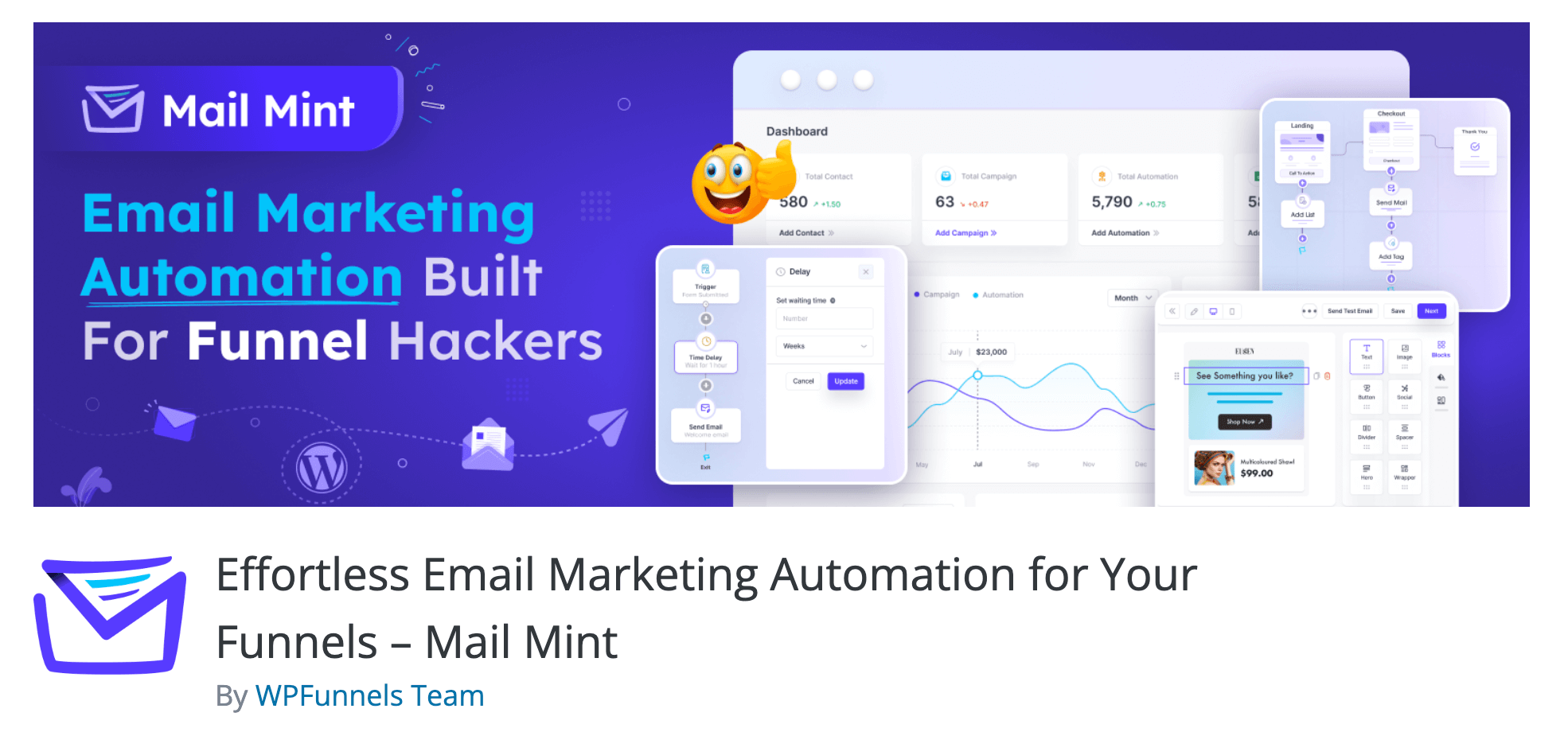
Imagine opening one dashboard and finding everything you need to run your email marketing. Your subscriber list. Your campaigns. Your automations. Your forms. All in one place, without logging into anything else.
That is what Mail Mint gives you.
It is a WordPress plugin — which means it installs like any other plugin and lives inside your WordPress admin. There is no separate platform to learn. No external account to manage. Everything happens where you already work.
This matters more than it sounds. A typical email marketing setup involves at least three separate tools talking to each other. A form plugin to capture emails. An email platform to send them. An SMTP service to deliver them. Each one needs its own login. Each one can break when another updates.
Mail Mint brings all of that into one place.
What you get when you install Mail Mint:
- A visual automation builder that runs email sequences automatically based on what your subscribers do — fill a form, make a purchase, register on your site
- A drag-and-drop email builder with pre-built templates you can customize without touching any code
- A built-in form builder for embedded forms, popups, fly-ins, and notification bars — so you do not need a separate lead capture plugin
- Native WooCommerce connection that reads your store data in real time — no sync delays, no external API
- An AI writing assistant built into the editor that helps you write subject lines and email copy
- Direct WPFunnels integration — the only email plugin that lets you build funnel pages and email automation on the same visual canvas
Mail Mint Works with the tools you probably already use:
Gravity Forms, Fluent Forms, Elementor Forms, Contact Form 7, JetFormBuilder, LearnDash, MemberPress, Tutor LMS, Easy Digital Downloads
A real example of how it works:
Someone visits your site and fills out your contact form. Mail Mint adds them to your list automatically and sends a welcome email. Three days later, a follow-up goes out. Seven days after that a third email with your best content. You set it up once and it runs on its own — whether you are online or not.
For WooCommerce stores, it goes further. A customer adds products to their cart and leaves without buying. Mail Mint detects that directly from your WooCommerce order data and sends a recovery email an hour later. No external plugin. No sync delay. It reads your store in real time because it lives in the same WordPress environment.
What to know before you install Mail Mint:
Mail Mint is WordPress-only. To send emails, you need to connect to an SMTP service. SendGrid and Amazon SES are the two most commonly used options. Both have free tiers, and the setup takes about 10 minutes — create an account, copy an API key, and paste it into Mail Mint settings. That is it.
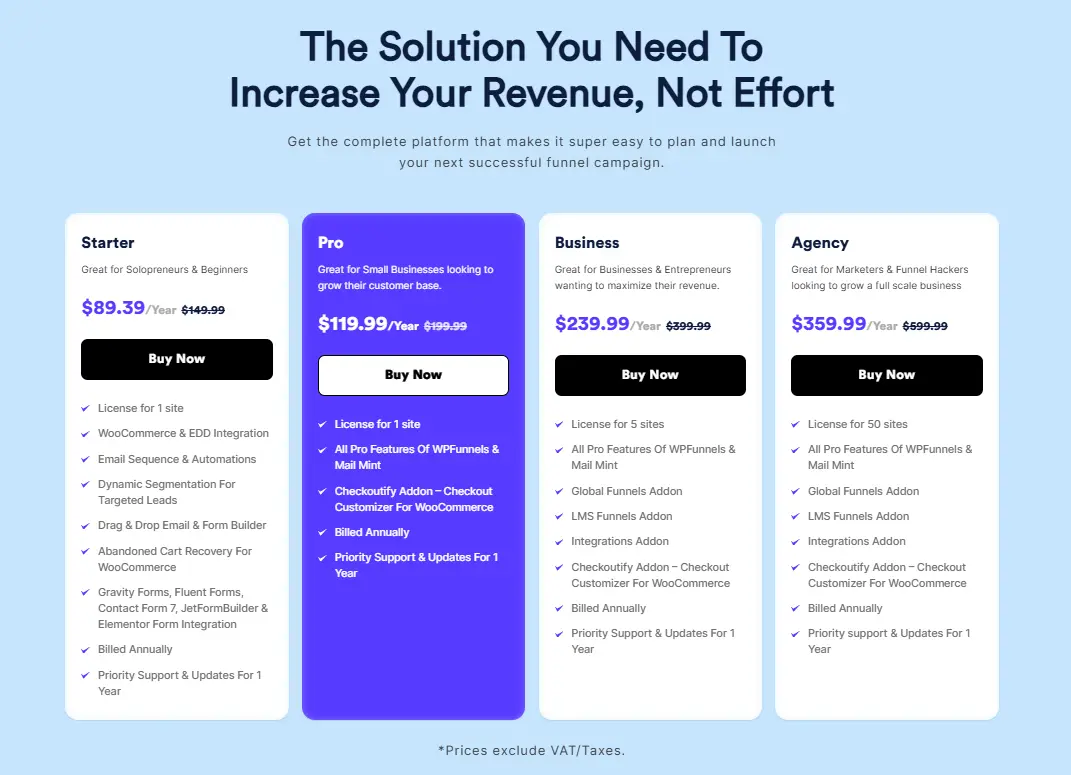
Mail Mint Pricing:
- Free: unlimited contacts, core features — available on WordPress.org
- Starter: $149.99/year — 1 site
- Business: $399.99/year — 5 sites
- Agency: $599.99/year — 50 sites
No contact limits at any tier. Your price stays the same whether you have 500 subscribers or 50,000.
Best for: WordPress users who want a complete email marketing setup inside one dashboard — campaigns, automation, forms, and WooCommerce integration — without a monthly bill that grows with their list.
Not for: Anyone not on WordPress. Anyone who needs SMS marketing or a built-in landing page builder.
How to Get Mail Mint?
To start using Mail Mint, you can easily give it a try at no cost. It’s available for free on the WordPress repository. This free version includes essential features like lead capture forms, lead management, and an email campaign builder, allowing you to get a feel for its capabilities.
2. Mailchimp for WordPress

Mailchimp is one of the most widely used email marketing platforms in the world. This plugin connects your WordPress site to it.
You create a free Mailchimp account, install this plugin, and anyone who fills a form on your WordPress site gets added to your Mailchimp list automatically. You build and send your actual campaigns inside Mailchimp. The plugin handles the connection between your WordPress site and your account.
What Mailchimp does:
- Adds subscription forms to your WordPress site
- Connects those forms to your Mailchimp lists and tags
- Works with Contact Form 7, Gravity Forms, WPForms, Ninja Forms, and WooCommerce checkout
- Adds customers to your Mailchimp welcome sequence the moment they complete a purchase
- Tracks WooCommerce revenue per campaign on the premium plan
What to know before you install:
This plugin does not send emails on its own. You need a Mailchimp account. Mailchimp’s free plan covers 500 contacts and 1,000 monthly sends — enough to get started. Pricing scales with your list from there.
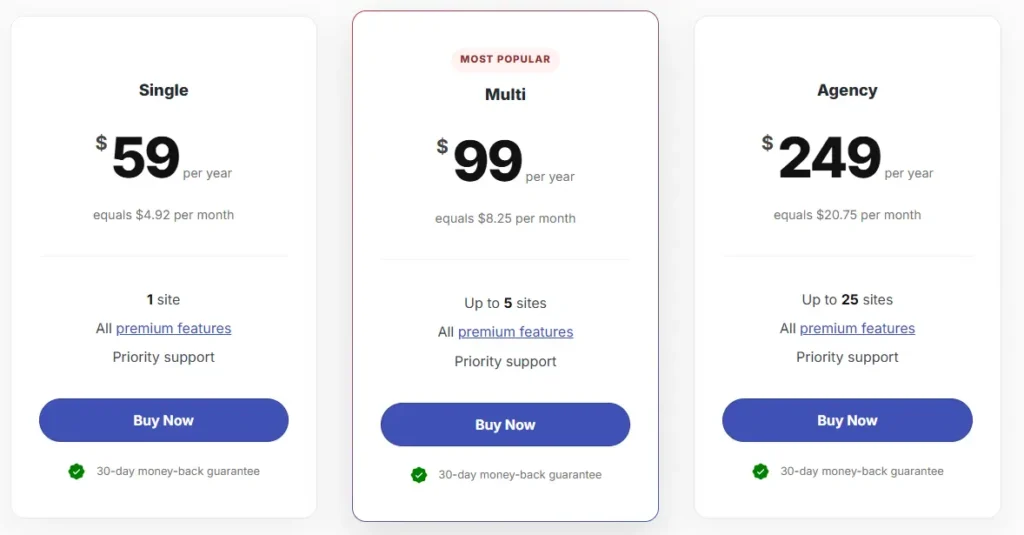
Mailchimp for WordPress Pricing:
- Single: $59/year (1 site)
- Multi: $99/year (up to 5 sites)
- Agency: $249/year (up to 25 sites)
Best for: Anyone starting out who wants to use Mailchimp and needs a reliable way to collect subscribers from their WordPress site.
Not for: Anyone who wants to manage everything inside WordPress. Anyone looking to move away from Mailchimp.
3. MailPoet
MailPoet installs inside WordPress and stays there. Your subscriber list, your email editor, and your sending service all live inside your WordPress admin. Over 600,000 WordPress sites use it.
It includes its own email sending service, so you do not need to set up SMTP to get started. Publish a post, and MailPoet sends it to your subscribers automatically. No campaign to create. No scheduling. It just goes.
What MailPoet does:
- Drag-and-drop email builder with 50+ responsive templates
- Automatic post notifications when you publish new content
- Welcome email sequences for new subscribers
- Basic WooCommerce sequences — abandoned cart and post-purchase
- Segmentation by engagement and purchase history
- Built-in sending service — no SMTP configuration needed
What to know before you install:
Pricing scales with your subscriber count. The free plan covers up to 500 subscribers. Costs increase as your list grows — check the pricing page against your expected list size before committing.
MailPoet Pricing:
- Free: up to 500 subscribers, 5,000 emails/month
- Creator (your own SMTP): from $8/month
- Business (MailPoet sending): from $10/month
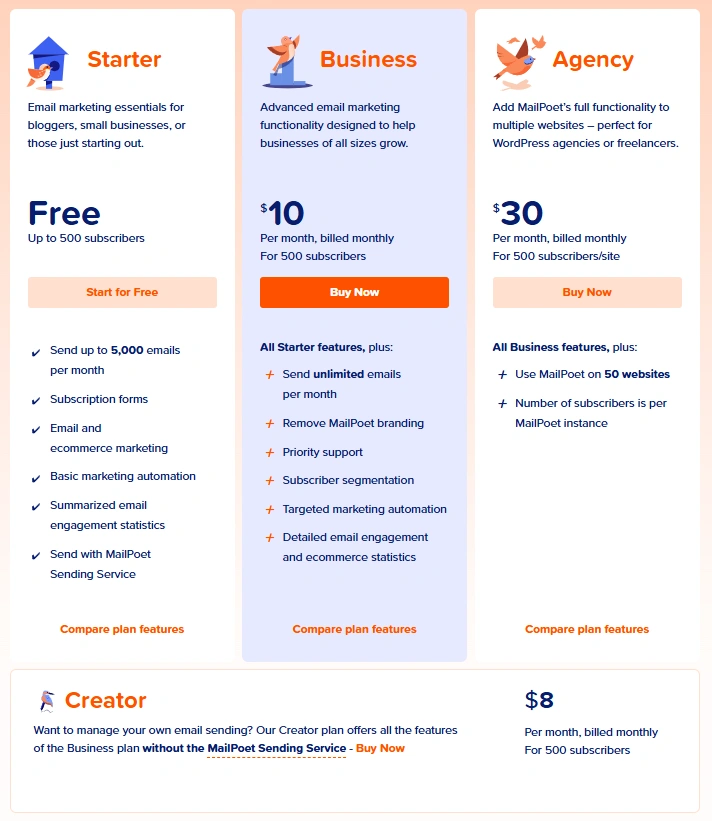
Best for: Bloggers and small site owners who want newsletters sent from inside WordPress with minimal setup.
Not for: High-volume senders who need advanced automation or flat-cost pricing as the list grows.
4. Brevo
Brevo charges based on how many emails you send — not how many contacts you have. The free plan stores up to 100,000 contacts. You are not charged until you start sending.
Your campaigns are built inside Brevo’s web platform. The WordPress plugin handles the form and contact sync between your site and your Brevo account. Beyond email, the same account covers SMS, WhatsApp, and live chat.
What Brevo does:
- Stores up to 100,000 contacts free
- Email campaigns built inside Brevo’s platform
- SMS and WhatsApp campaigns from the same account
- Live chat widget for your WordPress site
- Transactional emails alongside marketing campaigns
- EU-based servers for GDPR compliance
What to know before you install:
Campaign management happens inside Brevo’s platform — not inside WordPress. The free plan limits you to 300 emails per day. Removing Brevo branding from outgoing emails costs extra on the entry plan.
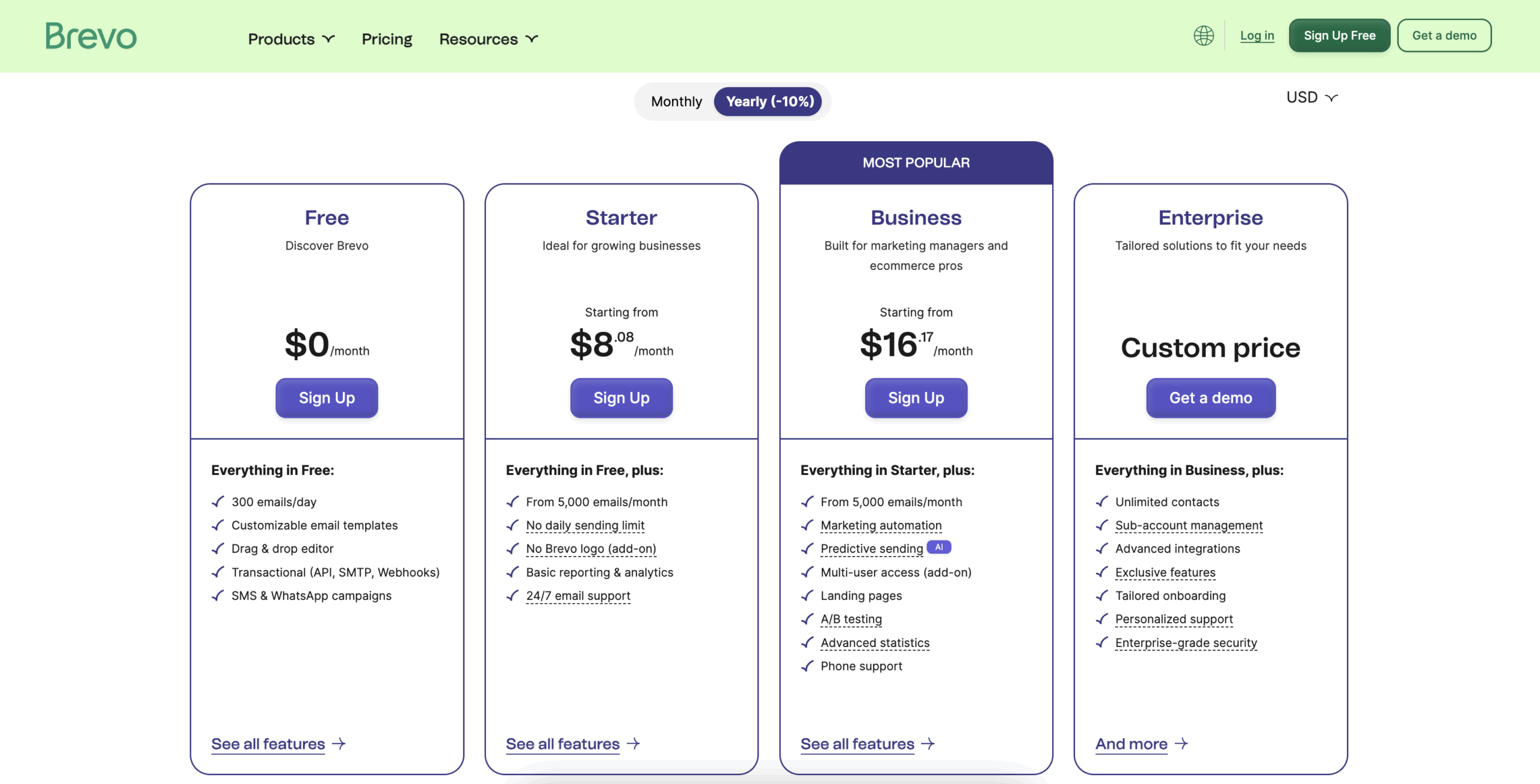
Brevo Pricing:
- Free: 300 emails/day, unlimited contacts
- Starter: from $9/month
- Standard: from $18/month (full automation included)
Best for: WordPress sites building a large list who want to start for free without paying per contact stored.
Not for: Anyone who wants campaigns managed inside WordPress. Anyone who needs native WordPress automation triggers.
5. Hubspot
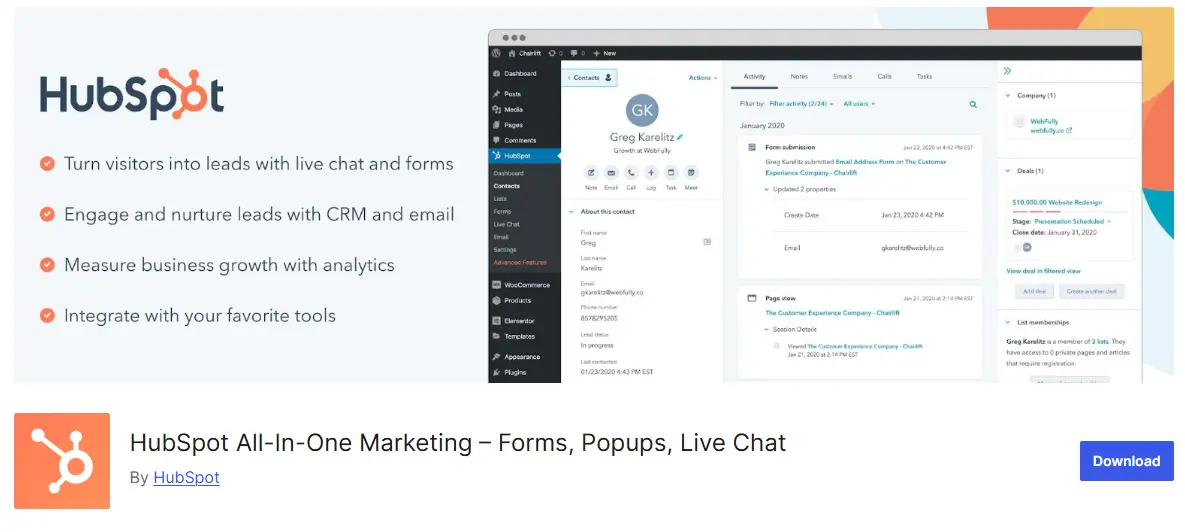
HubSpot connects your WordPress site to a platform that covers email marketing, contact tracking, live chat, and a full CRM — all from one free account.
Every form a visitor fills, every email they open, every page they visit ties to a single contact record. You get a full picture of how each person found your site and what they did after subscribing — without managing separate tools for each function.
What the free plan includes:
- Unlimited contacts
- 2,000 emails per month
- Full CRM with contact history and activity tracking
- Live chat widget for your WordPress site
- Forms that feed directly into the CRM
- Basic email automation
- Reporting that connects email performance to contact activity
What to know before you install:
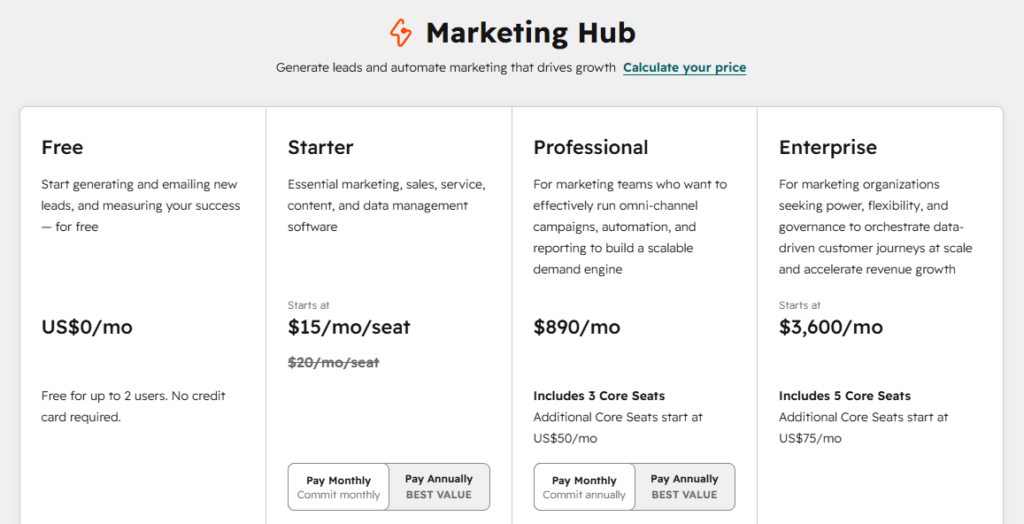
Everything important happens inside HubSpot’s platform, not inside WordPress. The plugin connects the two. Paid plans escalate sharply — Professional starts at $890/month.
HubSpot Pricing:
- Free: up to 2 users
- Starter: from $20/month per seat
- Professional: from $890/month (includes 3 Core Seats)
Best for: WordPress sites that want email marketing and contact tracking connected without paying for three separate tools.
Not for: Anyone who wants everything managed inside WordPress. Anyone who only needs email.
6. MailOptin
MailOptin gives you two things in one plugin: smart forms to grow your email list and a newsletter tool to send to that list.
The form builder covers lightbox popups, slide-ins, scroll boxes, notification bars, and inline forms. Each type supports display rules — show after a time delay, on exit intent, at a scroll depth, on specific pages, or based on where the visitor came from. On the premium plan, you can send broadcast newsletters directly from WordPress without connecting a separate email platform.
What MailOptin does:
- Lightbox popups, slide-ins, scroll boxes, notification bars, and inline forms
- Display rules controlling when and where each form appears
- Welcome email automation for new subscribers
- Broadcast newsletter sending on the premium plan
- Connects to Mailchimp, Brevo, HubSpot, and FluentCRM if you want to use one
What to know before you install:
The free plan captures leads and passes them to a connected email platform. To send newsletters directly from MailOptin without a separate platform, you need the premium plan.
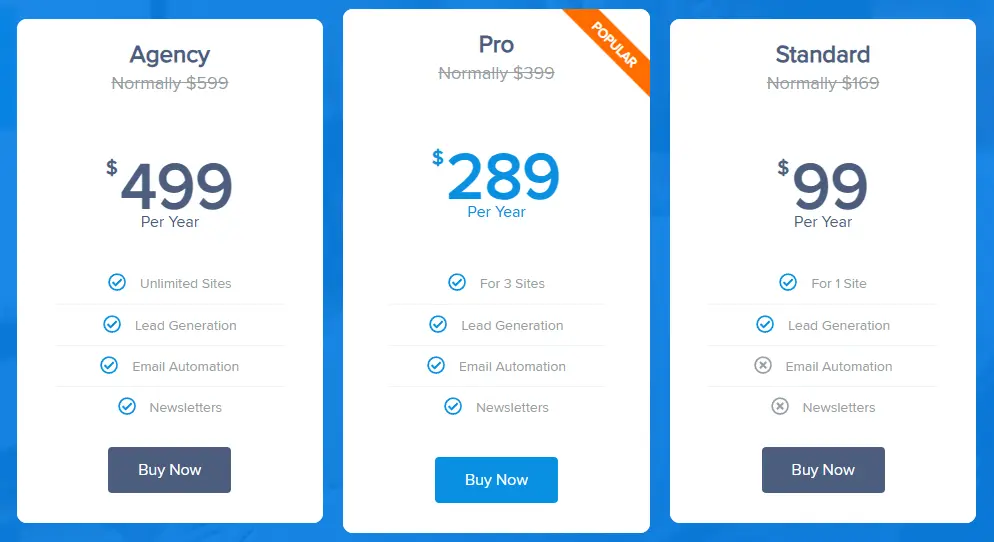
MailOptin Pricing:
- Standard: from $99/year for 3 sites
- Pro: $199/year — adds WooCommerce integration
- Agency: $399/year — unlimited sites
Best for: WordPress users who want smart lead capture forms and newsletter sending without connecting multiple tools.
Not for: Anyone who needs a full CRM or advanced behavioral automation.
7. FluentCRM

FluentCRM stores your subscribers as full contact profiles — every email they opened, every link they clicked, every purchase they made, all in one view inside WordPress.
That level of detail changes what you can automate. You can send a specific sequence to people who bought one product but not another, or who completed a course three months ago but have not returned since. Everything stays in your WordPress database. You pay once a year and your contacts can grow without your bill changing.
What FluentCRM does:
- Full contact profiles with email history, purchase history, and course activity in one timeline
- Visual automation builder with if/else branching logic
- Dynamic segmentation based on subscriber behavior and purchase history
- Drag-and-drop email builder with merge fields
- Connects to WooCommerce, Easy Digital Downloads, LearnDash, LifterLMS, MemberPress
What to know before you install:
FluentCRM has more depth than simpler tools on this list. There is no built-in sending service — you need to connect an SMTP service to send email.
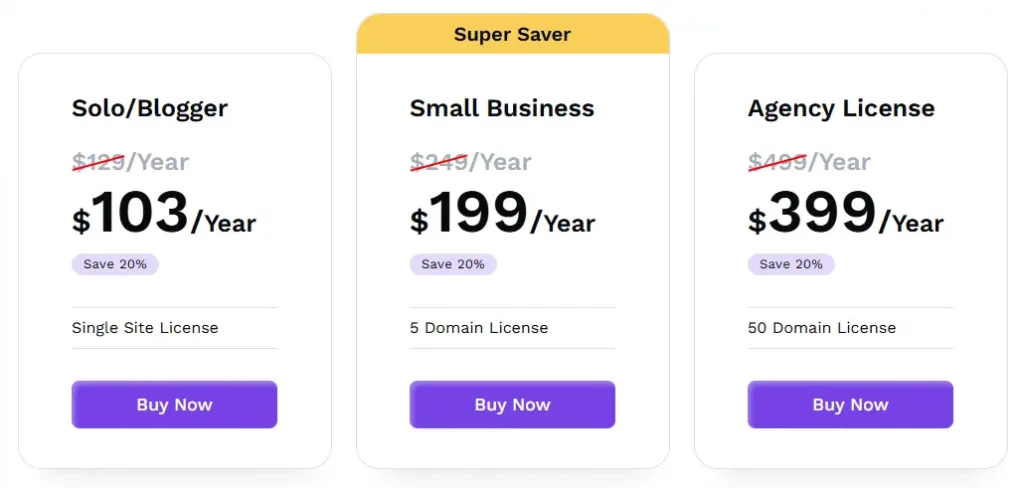
FluentCRM Pricing:
- Free version available on WordPress Repo
- Solo Entrepreneur: $129/year, 1 site
- Small Business: $249/year, 5 sites
- Agency: $499/year, 50 sites
Best for: WordPress users who want a genuine CRM alongside email marketing with full data ownership and a flat annual cost.
Not for: Beginners who want something running quickly. Anyone who wants a managed sending service included.
8. Groundhogg
Groundhogg is built for businesses where email marketing follows a sales process. Contacts move through pipeline stages. Automations fire based on where someone is in that journey — not just what list they are on.
It is self-hosted, flat-priced, and native to WordPress. Your contact data, your pipeline stages, and your email sequences all live in your WordPress database.
What Groundhogg does:
- Pipeline-stage interface that organizes automation around your sales process
- Contact timeline showing every touchpoint in order
- Built-in deal stages — no separate CRM extension needed
- Email sequences triggered by pipeline position
- Connects to WooCommerce, WPForms, and LearnDash
What to know before you install:
Some features that come standard in other tools require separate paid extensions in Groundhogg. Check the extension library against your specific needs before committing.
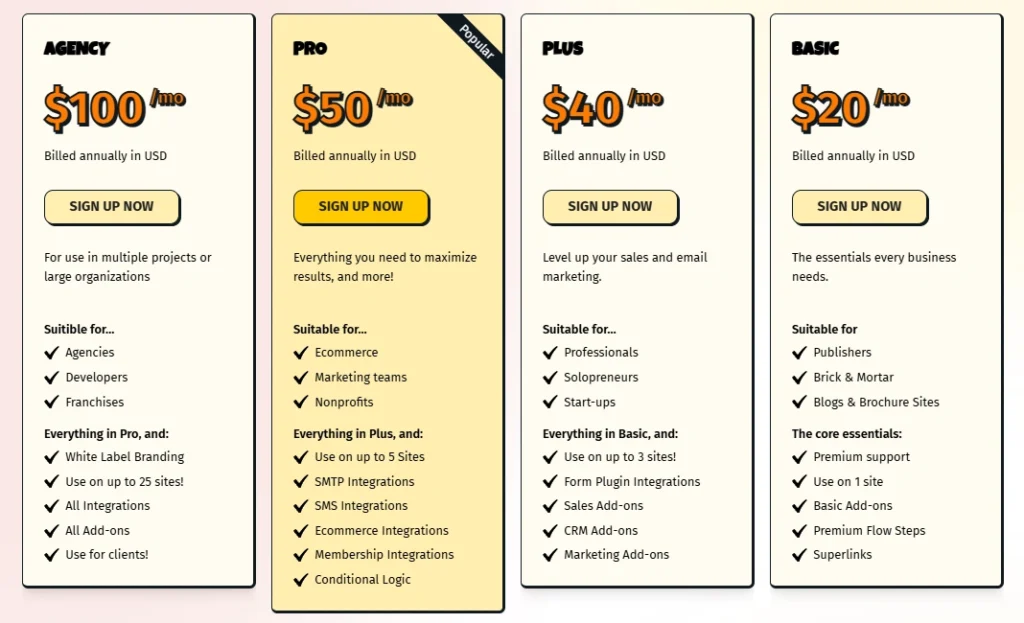
Groundhogg Pricing:
- Basic: ~$20/month, 1 site
- Plus: ~$40/month, 3 sites
- Pro: ~$50/month, 5 sites
- Agency: ~$100/month, 25 sites
Best for: Service businesses, coaches, and agencies who want email automation tied to a sales pipeline without a monthly SaaS fee.
Not for: Bloggers or store owners who just need a newsletter tool.
9. The Newsletter Plugin

The Newsletter Plugin is free, runs entirely inside WordPress, has no limits on contacts or sends, and needs no external account. It focuses on one job — sending newsletters to your readers — and does that reliably.
What Newsletter does:
- Drag-and-drop editor with text, image, button, and recent post blocks
- Welcome email for new subscribers
- Scheduled and recurring campaign options
- Open rates, click rates, and unsubscribes reported per campaign
- No external account needed
What to know before you install:
The plugin sends from your WordPress hosting by default. For small lists, this works fine. As your list grows, connecting to an SMTP service keeps your emails out of spam folders.
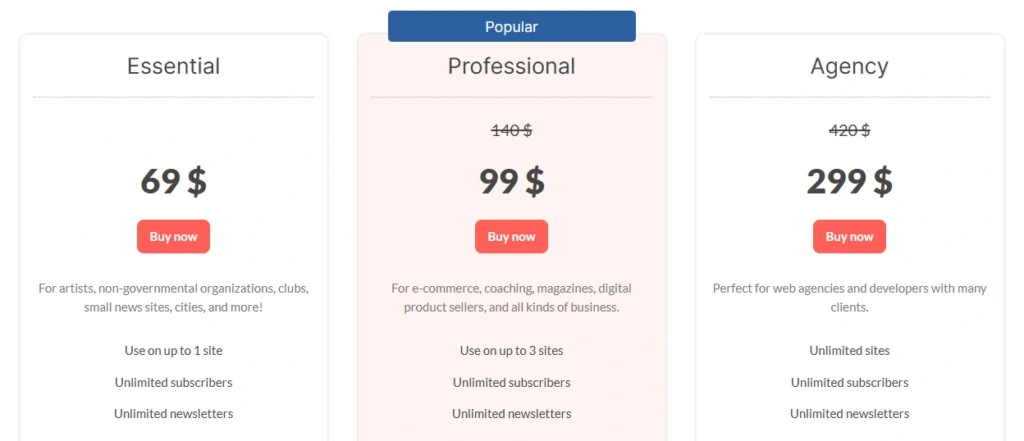
The Newsletter Plugin Pricing:
- Free: unlimited contacts, unlimited sends — available on WordPress.org
- Essential: $69/year — 1 site
- Professional: $140/year — 3 sites
- Agency: $420/year — unlimited sites
Best for: Bloggers and content publishers who want a completely free self-hosted newsletter tool with no subscriber limits and no external account.
Not for: Anyone who needs automation beyond welcome emails. High-volume senders without an SMTP service connected.
10. Omnisend
Omnisend is built for WooCommerce store owners who want to reach customers through email, SMS, and push notifications from one account — with ecommerce automations that are ready to turn on from day one.
The pre-built flows cover abandoned cart recovery, order confirmations, post-purchase sequences, win-back campaigns, and browse abandonment. Each flow can coordinate across all three channels inside the same automation.
What Omnisend does:
- Pre-built ecommerce flows ready to activate: abandoned cart, order confirmation, post-purchase, win-back, browse abandonment
- Email, SMS, and push notifications coordinated in one workflow
- Popups, flyouts, and landing pages for list growth
- Segmentation by purchase history, order value, and engagement
- Revenue reporting per campaign
What to know before you install:
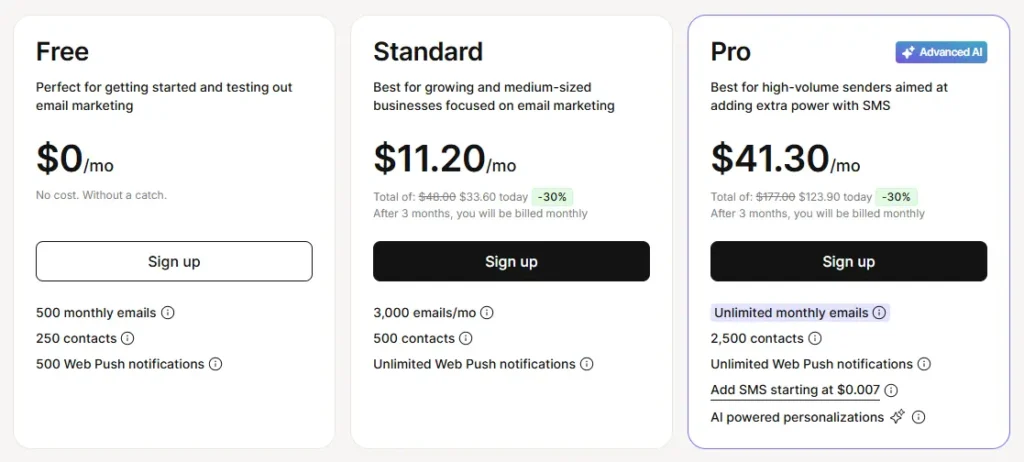
Omnisend is a SaaS platform. Your contacts and campaigns live on Omnisend’s servers — not inside WordPress. The free plan covers 250 contacts with full feature access, including monthly SMS credits.
Omnisend Pricing:
- Free: 250 contacts, 500 emails/month
- Standard: From $16/month (currently $11.20/month for the first 3 months)
- Pro: from $59/month (currently $41.30/month for the first 3 months)
Best for: WooCommerce store owners who want email, SMS, and push notifications coordinated from one platform with ecommerce automations ready from day one.
Not for: Anyone who wants contact data stored inside WordPress. Anyone who only needs email.
Side-by-Side Feature Comparison
Where it lives tells you whether the plugin runs inside WordPress (Native) or connects WordPress to an external platform.
| Plugin | Where it lives | Unlimited contacts free | Visual automation | Built-in CRM | WooCommerce triggers |
|---|---|---|---|---|---|
| Mail Mint | Native | Yes | Yes | No | Yes |
| MC4WP | Connector | No | No | No | Partial |
| MailPoet | Native | No | Basic | No | Yes |
| Brevo | Connector | Yes | Yes | Basic | Yes |
| HubSpot | Connector | Yes | Yes | Yes | Yes |
| MailOptin | Native | No | No | No | Yes (Pro) |
| FluentCRM | Native | Yes | Yes | Yes | Yes (Pro) |
| Groundhogg | Native | No | Yes | Yes | Yes |
| Newsletter Plugin | Native | Yes | No | No | No |
| Omnisend | Connector | No | Yes | No | Yes |
Features tell you what each plugin can do, but pricing determines how affordable it remains as your business grows. Since every provider uses a different pricing model, it’s worth comparing the costs before making your final decision.
Side-by-Side Pricing Comparison
Every plugin uses a different pricing model. Some charge a flat annual fee, some scale with your subscriber count, while others charge by email volume or user seats. Compare the free plans, starting prices, and pricing models before you choose.
| Plugin | Free Plan | Entry Paid Price | Pricing Model |
|---|---|---|---|
| Mail Mint | Unlimited contacts | $149.99/year | Flat annual |
| MC4WP | Plugin only | $59/year + Mailchimp plan | Mailchimp pricing |
| MailPoet | Up to 500 subscribers | $13/month | Subscriber-based |
| Brevo | Unlimited contacts | $9/month | Email volume |
| HubSpot | Up to 2 users | $20/month per seat | Per seat |
| MailOptin | Forms only | $169/year | Flat annual |
| FluentCRM | Unlimited contacts | $129/year | Flat annual |
| Groundhogg | Limited | ~$20/month | Tiered by plan |
| The Newsletter Plugin | Unlimited | $69/year | Flat annual |
| Omnisend | Up to 250 contacts | $16/month | Subscriber-based |
While pricing is an important factor, it shouldn’t be the only one. The right plugin also depends on your website, marketing goals, and the way you prefer to manage your email campaigns. Here’s how to match a plugin to your specific situation.
How to Match the Right Plugin to Your Site
There isn’t a single best plugin—only the one that best fits your website and marketing goals.
If you’re a blogger or content creator
Your goal: Send newsletters and notify readers about new content without paying more as your list grows.
Best picks:
- The Newsletter Plugin – Free newsletters with no subscriber limits.
- MailPoet – Better email builder with WooCommerce support.
- Mail Mint – Best if you also want automation inside WordPress.
If you run a WooCommerce store
Your goal: Recover abandoned carts, send post-purchase emails, and automate customer journeys.
Best picks:
- Mail Mint – Native WooCommerce automation inside WordPress.
- Omnisend – Powerful ecommerce automation with email, SMS, and push notifications.
If you already use an email marketing platform
Your goal: Connect WordPress to your existing email service.
Best picks:
- MC4WP – For Mailchimp users.
- Brevo – If you already use Brevo.
- HubSpot – If your marketing runs on HubSpot.
If you need a CRM inside WordPress
Your goal: Manage customer relationships alongside email marketing.
Best picks:
- FluentCRM – Best for advanced automation and data ownership.
- Groundhogg – Best if you prefer managing leads through a sales pipeline.
Choosing the right plugin is only the first step. Next, let’s look at a few practical ways to grow your email list.
Simple Ways to Grow Your Email List on WordPress
Choosing the right plugin is only half the equation. You also need a steady flow of subscribers. Here are a few strategies that consistently work on WordPress sites.
- Use a lead magnet on your highest-traffic pages. Offer a checklist, template, or guide that’s directly related to the page. “Download the 5-step checklist” is far more compelling than “Join our newsletter.”
- Add signup forms where visitors actually land. Most people don’t start on your homepage. Place forms on popular blog posts, landing pages, and other high-traffic content.
- Use exit-intent popups. Give visitors one last opportunity to subscribe before they leave. Plugins like MailOptin and Mail Mint make this easy to set up.
- Start emailing before your list feels “big enough.” A small, engaged audience is more valuable than a large list that rarely opens your emails.
- Stay consistent. A helpful email sent every week builds more trust than occasional campaigns with clever subject lines.
Build your list consistently, pair it with the right plugin, and you’ll have a foundation for email campaigns that continue to grow your business over time.
Conclusion
The right WordPress email marketing plugin comes down to how you want to run your email marketing.
If you prefer managing everything inside WordPress, a native plugin may be the right fit. If you already use a cloud email platform, choosing a plugin that integrates with it will usually make more sense. And if your priority is growing your list first, a lead generation plugin like MailOptin can fit neatly into either approach.
No matter which direction you choose, focus on the pricing model, features, and workflow that fit your business today and can continue to support it as your email list grows.
If your search has already narrowed down to a specific platform, you may also find these guides helpful:
- 11 Best MailerLite Alternatives To Get Better Email Marketing Experience
- Top 6 ActiveCampaign Alternatives: Features, Pricing, Pros & Cons [2026]
With the right solution, you can take your email marketing efforts to the next level and achieve success in your marketing campaigns.
Frequently Asked Questions
What is the best free WordPress email marketing plugin?
It depends on what free means for you. Mail Mint and The Newsletter Plugin both offer unlimited contacts at no cost. MailPoet’s free plan covers up to 500 subscribers using its own sending service. HubSpot’s free plan includes unlimited contacts, 2,000 emails/month, and a full CRM.
Do I need a separate SMTP plugin alongside my email marketing plugin?
Some plugins require it, others do not. Mail Mint, FluentCRM, and Groundhogg need an SMTP service like SendGrid or Amazon SES to send email. MailPoet has its own sending service built in. Brevo, HubSpot, and Omnisend handle delivery through their own infrastructure, so no SMTP setup is needed.
What is the difference between a WordPress-native plugin and a SaaS connector?
A native plugin stores contacts, campaigns, and automations inside your WordPress database. You manage everything from your dashboard. A SaaS connector links WordPress to a cloud platform where your data actually lives. Native plugins give you data ownership and predictable pricing. SaaS platforms give you managed infrastructure and often stronger deliverability at high volume.
Can I switch plugins later without losing my subscribers?
Yes. Most plugins let you export contacts as a CSV. You import it into the new tool. Automations and campaign history do not transfer and need to be rebuilt, but your contact list comes with you.
Which plugin works best for a WordPress blog with no WooCommerce?
MailPoet and The Newsletter Plugin are the strongest options for content-first sites. MailPoet has a more polished editor and a built-in sending service. The Newsletter Plugin is completely free with no limits. Both send automatic post notifications when you publish.
Does Mail Mint work on WordPress sites without WooCommerce?
Yes. WooCommerce features like abandoned cart recovery and order triggers only activate if you have WooCommerce installed. Core features — campaigns, automation, forms, sequences, and analytics — work on any WordPress site.