

Loyal customers are incredibly valuable for eCommerce stores.
You’ve already put in the work to bring a customer to your store and get that first order, so getting them to come back can make each new customer more valuable over time.
But how many of those customers are actually coming back?
Customers may forget about your store, find another brand, or simply need a reminder when they’re ready to buy again.
According to Gorgias, repeat customers make up about 21%of ecommerce customers but generate nearly 44% of revenue and 46% of orders.
That’s a relatively small group of customers driving a large share of sales.
So, where does your store stand?
This guide will show you how to put a real number on your own retention using an actual formula you can run this week, rather than relying on a guess.
You’ll also see what it could be costing you to leave that number where it is and learn about three automations that can help close most of the gap without needing an enterprise marketing stack you don’t need.
Quick Answer
WooCommerce customer retention means actively bringing customers back through automated follow-up, rather than relying on product quality alone to do the work. You calculate your retention rate with
((customers at period end − new customers) ÷ customers at period start) × 100, then close the gap with three automations: win-back sequences for lapsed buyers, post-purchase follow-up after every order, and repeat-purchase triggers based on your store’s actual order data.
TL: DR – WooCommerce Customer Retention: The Key Takeaways
- Repeat customers are roughly a fifth of your customer base, but they typically drive close to half your revenue. You can’t afford to leave that group unmanaged.
- Customer retention rate and repeat purchase rate are two different numbers, and most retention advice online blends them together. Run both, and you’ll see exactly where your gap is.
- The retention cost formula, spend ÷ customers retained, will almost always come out cheaper than what you’re already paying to bring in a new customer.
- Three WooCommerce automations, win-back, post-purchase follow-up, and repeat-purchase triggers, recover most of what a “set it and forget it” approach misses.
- You don’t need a customer data platform for this. Your store already has the order history. You need a tool that reads it and acts on it automatically.
- Discounts help, but timing and relevance do more of the heavy lifting than price cuts do.
For easy automation and personalized funnels, try WPFunnels and Mail Mint to keep your customers coming back.
Why “They’ll Come Back If They Like It” Doesn’t Hold Up
You’ve probably told yourself some version of this: the product is good, the experience was smooth, so when they need something again, they’ll think of you.
Here’s the catch. That only works if the customer happens to remember you at the exact moment they’re ready to buy again.
There’s no reminder, no nudge, and you’re competing with every other brand landing in their inbox that same week. You’re basically leaving your repeat revenue to chance.
And while that’s happening, the cost of replacing that customer with a brand-new one keeps climbing. Acquisition costs across paid channels have been rising for years as more brands compete for the same ad inventory.
Every customer who quietly drifts away is another customer you’ll have to pay to replace, instead of getting a second, third, or fourth order from someone who already trusted you enough to buy once.
You don’t have to take my word for any of this, though. Run your own numbers, and you’ll see the gap yourself.
How to Calculate Your Customer Retention Rate (With a Real Example)
Customer retention rate (CRR) and repeat purchase rate are often used interchangeably, but they answer different questions. If you mix them up, you may end up fixing the wrong problem.
Your customer retention rate tells you what percentage of your existing customers stayed active during a specific period. It takes into account both the customers you gained and the customers you lost.
Your repeat purchase rate tells you what percentage of your customers made more than one purchase during that period.
You need both. CRR helps you understand how well you’re keeping your existing customers, while repeat purchase rate shows how well you’re turning first-time buyers into returning customers. Looking at both gives you a better idea of which retention strategy to focus on first.
The formula for Customer Retention Rate
Customer Retention Rate = ((E − N) ÷ S) × 100
Where:
- S = your customers at the start of the period
- E = your customers at the end of the period
- N = new customers you acquired during the period
Let’s run this formula in a real-sized store
Say you’re running a WooCommerce store in the $20–$150 range, doing a few hundred orders a month. The store is live and selling, but retention hasn’t been systemized yet.
Let’s say you have:
- Start of quarter: 500 active customers
- New customers acquired during the quarter: 90
- End of quarter: 520 customers
Now plug those numbers into the formula:
- CRR = ((520 − 90) ÷ 500) × 100
- CRR = (430 ÷ 500) × 100
- CRR = 86%
An 86% retention rate looks pretty solid at first glance. But now let’s look at the repeat purchase rate for those same customers.
Say only 120 of those 500 customers placed a second order during the quarter. That gives you a 24% repeat purchase rate, which sits below the 25–30% range most ecommerce categories treat as healthy.
And this is where the numbers get interesting.
Your store retained 86% of its customers, but only 24% actually placed another order. That gap is where you’re leaving money on the table.
You have 380 customers who didn’t churn but also never placed a second order. They’re already in your database, they already trusted your store enough to buy once, and right now nobody’s talking to them.
That’s the part of customer retention you can actually do something about.
You Can Check Your Own Numbers with the WooCommerce Customer Retention Calculator
Rather than doing this math by hand every time, plug your own numbers into the calculator below. It runs both formulas at once and tells you which automation to prioritize based on your specific result.
WooCommerce Customer Retention Calculator
Enter your numbers for any period (a month, a quarter, a year) to see your retention rate and repeat purchase rate.
Want to compare this against what you’re spending to acquire new customers? Try our free CAC calculator.
What This Gap Is Actually Costing You
Once you know the gap, you can put a dollar figure on it, and this is the part most retention content skips entirely.
The retention cost formula
Customer Retention Cost = Total Retention Spend ÷ Number of Customers Retained or Reactivated
Let’s stick with the store from the example above. Say a win-back and post-purchase automation setup increases the repeat purchase rate from 24% to 30%.
That means 30 more customers place a second order, giving you 150 repeat buyers instead of 120.
If your average order value is $50, that’s:
30 additional orders × $50 = $1,500 in incremental revenue per quarter
$1,500 × 4 = $6,000 per year
Now let’s look at what it costs to make that happen.
A WooCommerce-native email automation tool that reads your order data and automatically handles win-back, post-purchase, and repeat-purchase sequences can cost around $12.50 a month.
That’s $150 a year on a paid plan. You can also start with Mail Mint’s unlimited-contacts free tier if you want to test the automations before upgrading.
So:
Your retention cost per reactivated customer would be: $150 ÷ 30 = $5
You’re spending $5 to bring back a customer who has already bought from you once, while those 30 additional orders generate $6,000 in annual revenue.
That’s roughly a 40x return before you even count what those customers might spend on their next orders.
Now compare that with acquiring a stranger through paid Ads. You have to spend money to reach them, convince them to visit your store, and get them comfortable enough to place their first order.
With an existing customer, that first purchase has already happened.
That gives you a much clearer idea of where to put your next hour of marketing effort.
Instead of jumping from one tactic to another, you can see what it costs to bring an existing customer back and what that customer can bring back to your store.
Pro Tip: We built a free CAC calculator that shows exactly what you’re spending to bring in a new customer, so you can compare it directly against the retention cost you just calculated above.
The 3 WooCommerce Automations Worth Setting Up First
Everything we’ve looked at so far comes down to three simple things. Set these up, and you can cover the main points where customers usually need a little push to come back.
1. Win-Back Sequences
This is for customers who bought from you once and then went quiet. Remember the gap between the 86% retention rate and 24% repeat purchase rate? This is where you can start working on it.
Set this to trigger automatically once a customer passes your store’s natural repurchase window without ordering again.
For a lot of WooCommerce stores selling consumable or mid-frequency products, that window sits somewhere between 30 and 90 days. You’ll know your own number once you’ve pulled the data.
Keep the sequence to two or three emails. Start with a simple, no-offer check-in. If that doesn’t get them back, follow up with a stronger nudge using a relevant product or a modest incentive.
Use this: Trigger it from the customer’s last order date, not a fixed calendar date. A customer who ordered 10 days ago and one who ordered 80 days ago shouldn’t get the same win-back timing.
Here’s what the win-back journey looks like in Mail Mint:
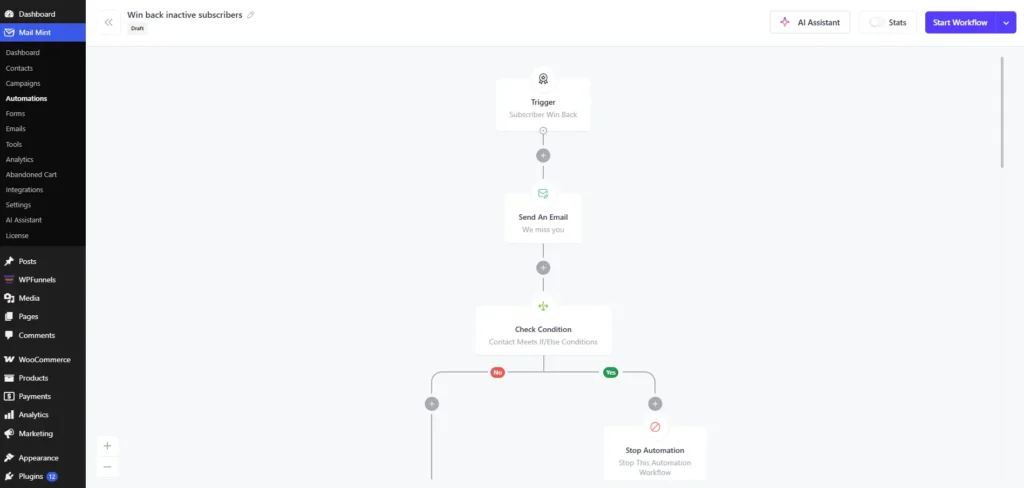
The journey starts when a customer enters the Subscriber Win Back trigger. It then sends the “We miss you” email and checks whether the customer should continue.
If they do, the workflow waits 3 days and sends the “Value reminder.” It then waits another 7 days before sending the “Incentive offer.” The workflow checks the customer after each email, so anyone who meets your condition can leave the journey instead of receiving the remaining emails. Customers who stay through the full sequence are marked as Inactive and exit the workflow.
This deserves its own guide, and we’ve written one: 7 Customer Retention Email Ideas to Reduce Churn in 2026.
2. Post-Purchase Follow-Up
Once someone places an order, don’t let the conversation end with the receipt. This is one of the cheapest retention automations to set up, and it’s a good time to stay in touch while the purchase is still fresh in their mind.
Following basic email marketing best practices, start with a simple thank-you email and help the customer get more out of what they bought.
Start with a simple thank-you email and help the customer get more out of what they bought. If they need help after the purchase, you can use Help Scout to manage customer support and keep those conversations organized.
Then, once they’ve had enough time to receive and use the product, you can ask for a review. If you have something that naturally goes with their purchase, you can also recommend it for their next order.
The timing matters here. A customer who bought from you a few days ago is already familiar with your store. You don’t have to start from scratch and remind them who you are.
Months later, when a win-back email lands in their inbox, you have to work harder to get their attention again.
You can build the follow-up around the product they bought, what they’re likely to need next, and how customers can get help when they need it.
For stores that handle customer questions over the phone, AI receptionists can also help improve response times and make sure customers aren’t left waiting for support.
- After purchase: Thank them for the order and help them get more out of what they bought.
- After delivery: Give them time to receive and use the product, then ask for a review.
- Before the next purchase: Recommend a relevant product or remind them when it may be time to order again.
This is retention you do before you need a win-back sequence. Keep the conversation going after the first order, and make it easy for customers to get help when they need it.
Tools such as AI-powered customer service software from Zendesk can help you manage support conversations and respond to customer questions more efficiently.
This can reduce the number of customers who drift far enough away that you have to win them back later.
You can also connect this with WPFunnels and Mail Mint. WPFunnels can handle the checkout and post-checkout journey, while Mail Mint can follow up with the right emails based on what the customer does.
So the customer can move from the first purchase to the next offer and then into a follow-up email sequence without you managing each step manually.
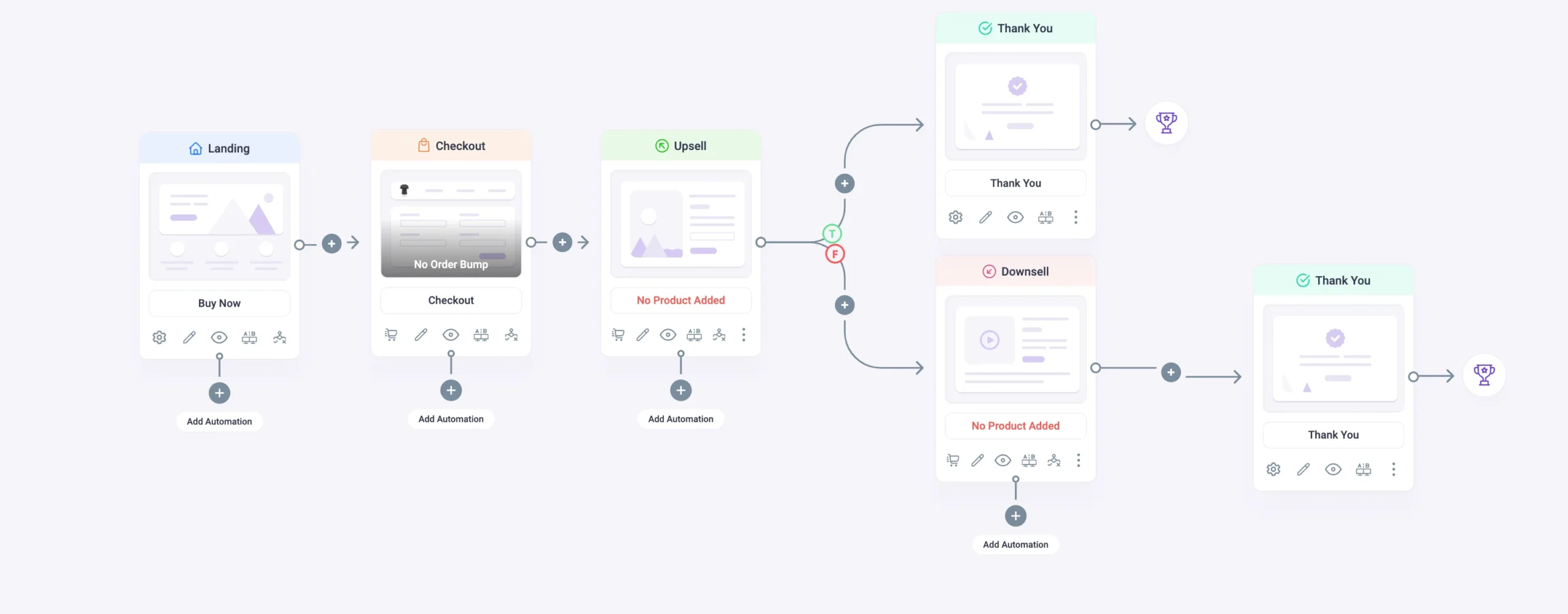
Related read: We go deeper on turning that first touchpoint into a retention asset in How To Customize WooCommerce Thank You Page For Customer Retention.
3. Repeat-Purchase Automation
This one works a little differently because it uses your store’s actual order data instead of relying on the same timing for every customer.
Say a customer bought a product that normally runs out after 60 days. Instead of sending them a general “come back” email, you can remind them when they are likely to need that product again. You can also recommend something that naturally goes with what they bought.
The important part is that the automation knows what the customer bought, when they bought it, and what products they purchased.
That’s where being native to WooCommerce matters. A tool that can read your order history, product categories, and purchase timing can use that information to send something that actually makes sense for that customer.
A tool that only has a list of email addresses doesn’t have that same context, so it can’t make those recommendations or reminders for you automatically.
Beyond the 3: Worth Knowing, Lower Priority
You’ll see loyalty programs, community groups, and gamification come up a lot when looking for customer retention ideas. They can work, but I’d put them after the three automations above, not ahead of them.
Loyalty Programs That Actually Reward Users
A loyalty program can give customers a reason to keep buying from your store by rewarding repeat purchases. Points, member-only offers, or rewards after a certain number of orders can all work well when customers are already buying regularly.
The thing is, a loyalty program doesn’t do much for the 380 customers who never placed a second order. It mainly gives your existing repeat buyers another reason to stay engaged.
So get your win-back, post-purchase, and repeat-purchase automations working first. Once customers are coming back, a loyalty program can give them another reason to keep buying.
Build a Community Around Your Brand
Building a community can help if your products naturally give customers something to talk about, share, or learn together. Depending on what you sell, that could be a Facebook group, customer community, or another place where customers can interact with your brand and each other.
But the community takes time to build, and it won’t automatically bring back customers who have already gone quiet. If the goal right now is simply to get more first-time buyers to place another order, the three automations above are a more direct place to start.
Once you have customers coming back and engaging with your brand, a community can help strengthen that relationship over time.
Gamification
Gamification adds things like points, badges, challenges, or progress rewards to make customers more interested in interacting with your store. It can make repeat purchases or other actions more engaging, especially when your products and audience fit that type of experience.
But it can also add another layer to your retention strategy without solving the basic problem of customers not coming back. If a customer hasn’t placed a second order yet, giving them a badge isn’t necessarily going to change that.
That’s why I’d treat gamification as something to add later, once the basic retention automations are already working.
Choosing a Customer Retention Platform for Your Store
Once those three automations are the goal, choosing a platform gets a lot simpler. You don’t need to get distracted by a long list of features. Look for a tool that can read your WooCommerce order data and trigger automations from it without needing a manual sync.
| Your store size | What you actually need | Where it gets complicated |
|---|---|---|
| 10–200 orders/month | Native WooCommerce email automation with win-back, post-purchase, and repeat-purchase triggers. At this volume, a free tier is usually enough to get started. | Some generic SaaS tools put these automation triggers behind paid plans even with a small list. |
| 200–2,000 orders/month | The same three automations, plus segmentation so you can separate first-time buyers from repeat customers and send more relevant emails. | If your order data is delayed or only partially synced, your triggers can start working with outdated customer information. |
| 2,000–10,000+ orders/month | Everything above, plus reporting that shows which automations are actually bringing customers back and recovering revenue. | This is where enterprise CDPs often get pitched, but for a single WooCommerce store, that can mean adding more infrastructure than you actually need. |
When you’re evaluating a vendor, ask whether the tool lives inside WooCommerce and reads your live order data, or sits outside it and depends on a periodic sync.
That connection matters more than the price tag because your retention automations need to work with what’s actually happening in your store.
Mail Mint, for example, runs natively inside WordPress and pulls your WooCommerce order history, cart data, and purchase behavior directly. So a win-back trigger can fire based on your store’s actual last-order date, rather than a delayed export from yesterday.
With that kind of connection, you can get the three automations above running in a weekend, instead of turning the setup into an integration project that stretches across a quarter.
Final Thoughts – Retention Is an Ongoing Game
If you take one thing from this guide, run your own retention rate and repeat purchase rate this week. The formulas above take about ten minutes with a quick WooCommerce export, and once you see your own numbers, you’ll have a much clearer idea of where customers are dropping off.
From there, start with the automation that fits the gap. Use win-back for customers who have gone past their usual repurchase window, post-purchase follow-up to keep the relationship going after an order, and repeat-purchase automation to send relevant reminders based on what customers actually bought.
You don’t need a bigger Ad budget or an enterprise data platform to start working on retention. Your WooCommerce store already has useful order and customer data. You just need a tool that can use that data automatically, so you can keep the follow-ups running without managing every email by hand.
For that, WPFunnels and Mail Mint can work together across the customer journey. WPFunnels helps manage the funnel side, while Mail Mint can handle the campaigns and automations that keep customers coming back.
Ready to Improve Your WooCommerce Customer Retention?
Start automating your post-purchase, win-back, and repeat-purchase campaigns with Mail Mint.
Frequently Asked Questions
What is a good customer retention rate for a WooCommerce store?
It depends on what you sell and how often people naturally repurchase from you. As a rough range, a repeat purchase rate of 25–30% is considered solid for general ecommerce. Consumable products can run higher, while big-ticket or one-time-purchase categories will sit lower. Your own trend over time matters more than any single external benchmark you find online.
How do you calculate customer retention rate?
Use ((customers at end of period − new customers acquired) ÷ customers at start of period) × 100. This is a different number from repeat purchase rate, which measures the percentage of your customers who bought more than once. Run both. Retention rate tells you if you’re losing customers, while repeat purchase rate tells you if your one-time buyers are coming back to buy again.
How much does it cost to retain a customer versus acquire a new one?
Use the retention cost formula: your total retention spend divided by the number of customers you retained or reactivated. In practice, this can come out much lower than what you’re paying to acquire the same number of new customers through paid channels, since you’re re-engaging someone who’s already trusted your store enough to buy once.
Do I need a separate customer data platform, or can WooCommerce handle retention automation natively?
For a single WooCommerce store, a native WordPress email automation tool that reads your order data directly is usually enough. You don’t necessarily need an enterprise CDP for the three automations covered in this guide. What matters is whether your tool can trigger automations from live order data without relying on a delayed sync.
How long before I see results from retention automation?
Your post-purchase follow-up sequence can show engagement within days, since it’s timed close to the purchase itself. Win-back sequences take longer to show revenue impact because they only trigger once a customer passes your repurchase window. Give it a full purchase cycle, typically 30 to 90 days depending on your product, before judging performance.
Can I improve customer retention without relying on discounts?
Yes. Post-purchase follow-up, relevant product recommendations based on order history, and a simple reminder that you exist can all help drive repeat purchases without touching your margin. Save discounts for a later step in your win-back sequence if your first no-offer message doesn’t land, rather than using them as your default opener.