

You write a good email, send it to your whole list, and half the replies feel like they came from a different planet than the offer you sent. That’s not a copywriting problem.
It’s a targeting problem, and fixing it changes what you send, not just how you word it.
Quick answer: Targeted email marketing means sending a different message, offer, or campaign structure to different groups on your list instead of one broadcast to everyone. You can target by demographics like location or gender, by purchase actions like product category or order count, or by specific interests through quizzes and lead magnets.
TL;DR: Targeted Email Campaigns
- Lead quality starts at collection, before you ever think about segments.
- Three targeting axes cover most WooCommerce use cases: demographics, purchase actions, and specific interests.
- The campaign itself has to change per segment, not just the subject line.
- AI tools like ChatGPT or Claude draft campaign copy fast, but expect to give feedback and refine the first output.
- A native WordPress tool like Mail Mint can trigger campaigns off real store data with no separate sync step.
What is Targeted Email Marketing?
Targeted email marketing is the practice of matching your email to what you already know about the person receiving it, instead of sending one message to everyone.
For example, loyal customers who often buy winter apparel, they send personalized emails showcasing new winter collections and special offers. Meanwhile, first-time buyers receive emails with welcome discounts and trending items.
Same store, same week, two completely different emails. That’s the outcome. Getting there means paying attention to a specific set of things every time you plan a campaign.
What to Target with Your Email Campaigns
To make your email campaigns effective, here’s what you should target:
- Segmentation: Divide your audience based on characteristics like purchase history, demographics, or behavior. Tailor content to each segment’s interests and needs.
- Personalization: Use data to customize emails with relevant product recommendations, personalized offers, and addressing recipients by their names.
- Timing: Send emails at times when your audience is most likely to engage, based on their past behavior or industry trends.
- Relevance: Ensure that the content matches the recipient’s interests. For example, offer winter apparel to those who frequently buy winter clothes and trending items to first-time buyers.
- Engagement: Focus on content that encourages interaction, such as special promotions, surveys, or exclusive previews.
- Feedback: Regularly gather and analyze feedback to understand what works and adjust your strategies accordingly.
By targeting these six areas, you can create more engaging and effective email campaigns that resonate with your audience. Segmentation sits at the top of that list for a reason, get it wrong, and the other five don’t matter much.
Why the Same Campaign Fails Half Your List
Go into any store owner community and search “segment customers by product.” You’ll find the same complaint over and over.
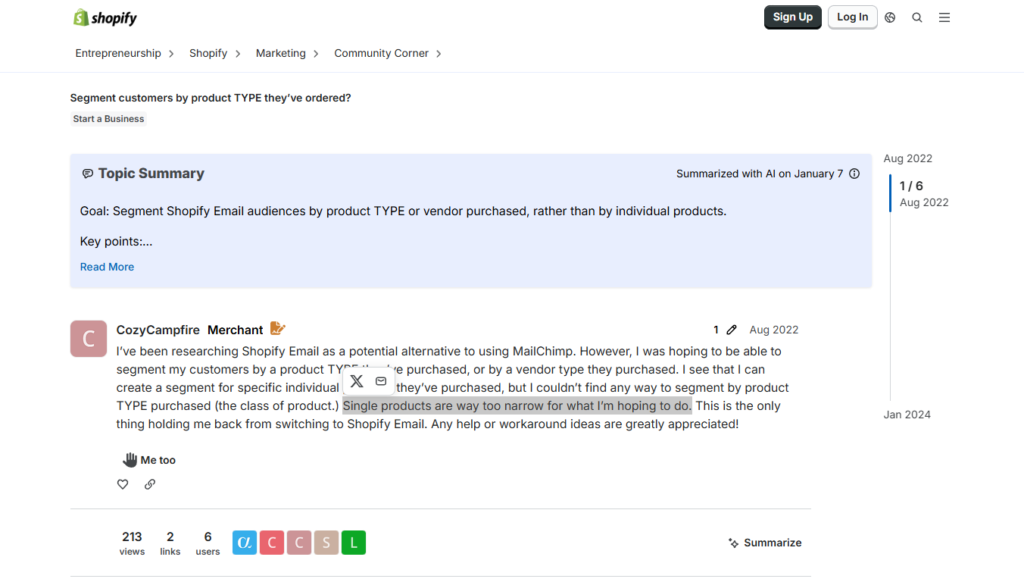
On the Shopify Community forum, a store owner named CozyCampfire wanted to group customers by product category, not by single product. Her exact words: “single products are way too narrow for what I’m hoping to do.“
Eighteen months later, someone else on that same thread hit the exact same wall. LoraineIreland tried to build that segment herself and ended up, in her words, with “a complete mish-mash of customers across all product categories.“
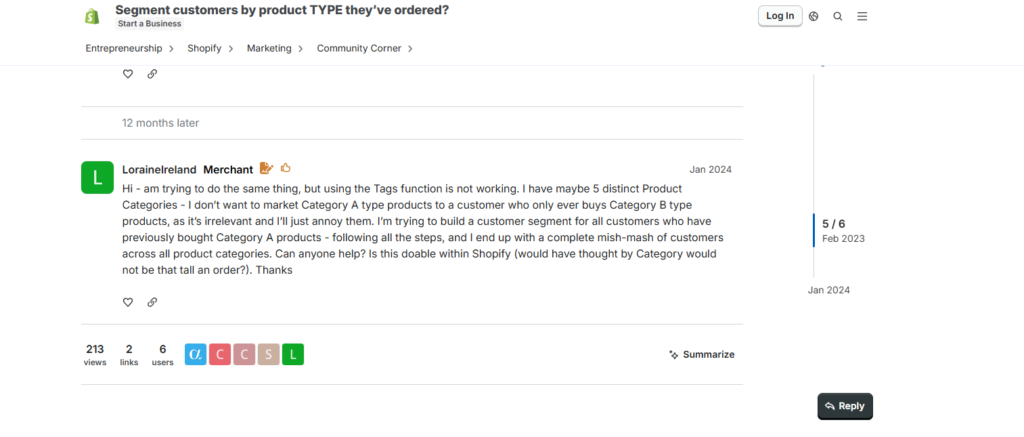
Two different people. Same problem. A year and a half apart. That’s a gap in the tools, not bad luck.
Your gut is right to be annoyed by this, too. Sending your whole list one email really does waste the relationship you’ve built with the people who’ve actually bought from you.
Mailchimp checked this on their own users, not as a sales pitch, just internal research. They looked at 2,000 businesses and compared each one’s segmented campaigns against its own regular blasts. Segmented emails got 54.79% more clicks. Same business, same list, just split up smarter.
A separate academic study of 5,765 real marketing emails found the same thing: segmentation was the single biggest lever after simply not over-emailing people.
Here’s what it looks like inside WooCommerce specifically. Chris Lema, who runs product at Liquid Web, a hosting company that works with a lot of WooCommerce stores, shared a real example once.
One store’s average order value looked like $68 across the board. Except 32 customers were actually spending $195 on average. And the customers who’d ordered three or more times? Barely 2% of the list, but a quarter of all the revenue.
Send that store’s list one generic email and you’re writing for a customer who doesn’t exist. You’re averaging your best buyers with your one-time visitors and hoping the middle ground works on everyone.
This deserves its own guide, and we’ve written one: eCommerce Customer Segmentation: The Right Email to the Wrong Customer Is Still the Wrong Email. It covers the specific signals worth tracking and how to build segments that update themselves automatically.
None of that changes until the list you’re sending to is actually worth splitting up in the first place.
It Starts With How You Collect Your Leads
Here’s something you probably skip past: your email marketing is only as good as the leads sitting on your list. And that comes down to how you got them in the first place.
Think about a plain “Subscribe to my newsletter” form. Someone signs up. You know almost nothing about them beyond an email address.
Now compare that to a free course called “How to Plan Discounts for Your E-Commerce Store.”
Anyone who opts into that is almost certainly running an online store. You’ve learned something real about them before you’ve sent a single email.
That’s the whole difference. The second person, you can personalize for right away. You already know what they care about, so you can build a sharper offer instead of guessing.
So when you’re collecting leads, collect them on purpose. Know what you’re going to do with them before the signup even happens, don’t just watch the list grow and figure it out later.
If you run an e-commerce store, you get one extra advantage here. You don’t always need a lead-generation campaign first. Often the smarter move is an automated email that fires the moment a customer does something in your store, no separate opt-in required.
Related read:What Is An Email Campaign Goal – Setting Clear Expectations
Once you’ve got a lead worth emailing, the next question is what you’re actually going to target them on.
The 3 Ways to Achieve Greater ROI Using Lead Segmentation & Targeted Email Campaigns
There are 3 main factors you can look at to segment your leads or run successful targeted email campaigns.
| Target Type | Best For | Key Signal |
|---|---|---|
| Demographics | Stores with a real age, gender, or location split | Signup location, gender, age range |
| Purchase actions | Any WooCommerce store with multiple product categories | Category purchased, order count |
| Specific interests | High-ticket, interest-driven offers alongside products | Quiz answer, webinar attendance |
Let us look at each of them more closely.
1. Lead Segmentation & Email Campaigns Based on Demography
Demography mainly refers to the age, location, or gender.
And if you sell products that are exclusive to a certain type of demography, then you can segment leads accordingly and run relevant promotional campaigns for them.
For example, you sell home decor with two locations, Germany and England, under the same brand. You run a lead-generation campaign asking people to sign up for a discount coupon, then segment them by signup location into two separate lists.
Once you have enough leads on each, you run promotional campaigns featuring products popular locally, even sending emails in the local language.
Similarly, a t-shirt store selling both men’s and women’s designs can segment customers by gender after their first purchase.
During Black Friday, you might design one email template that feels right for the women’s list and another for the men’s list, using the same discount but a different visual tone for each.
Demographic segmentation works well when your catalog naturally splits along those lines. Where it falls short is when your catalog doesn’t divide neatly by age or gender at all. In that case, purchase actions give you a sharper signal.
2. Targeted Email Campaigns Based on Purchase Actions
If you run an e-commerce store with several product categories, segmenting by what people actually bought usually pays off more than demographic segmentation does.
You set up automation so anyone who purchases under “Computer Accessories” lands on one list, while anyone purchasing “Home Appliances” lands on another.
When new computer-accessory stock arrives, you run a discount campaign specifically for that list, since you already know these buyers own computers and like buying accessories online.
A customer can sit on more than one list at once, and that’s a good thing. It just means more opportunities to sell to them across different category-specific promotions.
The same logic applies to first-time buyers. A coupon aimed at a second purchase works differently on someone who’s never ordered than on a five-time repeat customer.
Good to Know: Abandoned cart recovery needs no segmentation at all, it just targets anyone who added a product and left. The timing mechanics for that, including why the first hour matters more than the first day, are covered in the segmentation guide linked above.
Purchase-action segmentation is usually the strongest signal for a WooCommerce store, since it’s already sitting in your order data with no extra collection step required.
3. Qualifying Leads Based on Specific Interests
For high-ticket businesses like personal trainers, business coaches, or course creators, generating qualified leads is crucial. To identify prospects who are genuinely interested, focus on their specific needs and interests.
- Offer Free Resources: Create content that addresses common problems or interests. For example, a fitness trainer could offer a free guide on effective shredding techniques. This approach helps attract leads genuinely interested in your services, making your targeted emails more impactful.
- Set Up a Quiz: Use a quiz to determine your prospects’ specific needs.
For instance, a fitness trainer could run a quiz to identify goals like weight loss or muscle gain. This way, you can segment leads based on their answers and send personalized email campaigns.
- Showcase Expertise: Provide a free demonstration of your skills to build trust. A digital marketing agency may use a website audit tool to deliver a free website audit that identifies key areas for improvement. This helps attract high-quality leads and allows for targeted marketing campaigns.
- Host Live Sessions: Offering free webinars or sessions can be very effective. A counselor might provide a free 30-minute consultation, while a self-development trainer could host a free webinar. Attendees are likely to be interested in your services, making them prime candidates for targeted email marketing.
These strategies work alongside purchase-action segmentation, not instead of it. A store selling both products and courses can run both at once.
Key Takeaway: If two customer groups would respond to different offers, they should get different campaigns, not just different subject lines on the same one.
Knowing who you’re targeting is half the job. Getting the campaign itself right for each group is the other half.
Tips to Make Your Targeted Email Campaigns More Effective

So far, you have seen how you can segment your customers and run email campaigns accordingly. But that’s just half the task.
The success of your campaigns will depend largely on your email copy, the offer, and the USP you offer.
Following are some ways you can optimize your emails to get higher conversions.
1. Deep Personalization in Your Emails
Since you already know what your prospects are interested in, you should ensure your email subject line and your email copy are properly personalized.
For example, in the subject line, you could highlight the end result he will get (or, rather, he desires). “Double your conversion rates in only 2 weeks.”
And in the email copy, try to use ‘suspense’ and psychological triggers effectively. For example, if it’s a unique strategy you are selling through a challenge funnel, you could include the following in the email copy,
ou’ve probably tried a lot of ways to improve your conversion rates
“You probably tried a lot of ways to improve your conversion rates. But I promise you, this one strategy will change everything.
– No need to work 8 hrs a day – rather work 8 hrs a week!
– Stop spending thousands of dollars on tools you don’t understand!
– Never regret your business decisions again!
The idea is to make sure you are hitting all the right keywords that your clients need help with.
If they see that you can understand their dreams and seem to have a plan to help them succeed, they will at least look into your offer.
2. Use AI to Speed Up Your Email Writing Process
This is an obvious one. Like you, many of us aren’t that good at writing emails. It’s genuinely hard to say enough in so few words, since the whole point of a good promotional email is to keep it short.
But we are no longer on our own, thanks to ChatGPT. You can now easily write complete emails in a few minutes using ChatGPT.
All you need to do is provide proper instructions on what you are trying to convey in your email, along with specific ideas on the tone you want to maintain.
Now, here’s the part that trips people up. You’ll think one good instruction should be enough, and ChatGPT should just deliver.
But no, you’ll usually need to correct it two or three times before it’s actually right.
Simply treat it like you’re training someone new. If the output isn’t right, that just means it didn’t understand what you actually wanted, so tell it plainly what was off and try again.
Ask for a persuasive email offering 50% off, built around the results the reader wants, and it’ll usually come back too long, focused more on the discount than the benefit. Tell it to shorten it and only mention the discount near the CTA.
Now it’s tighter, but a little cluttered. One more note, mention these leads came from a free webinar, break the results into bullet points, drop the stiff tone, and by the third or fourth round you’ve got something worth sending.
Here’s what that actually looked like, start to finish. A first instruction:
I have collected leads of people who may require my service to teach them how they can get more results out of Paid Ads. Now, I want to offer my service at 50% off, but most importantly, I want to highlight the end results they’ll get after taking my service. Write a persuasive email copy for this.
That produced something long, weighted more toward the discount than the benefit. A follow-up fixed the length:
Make the email short, and only mention the 50% off near the final CTA
That came back shorter but a bit cluttered, so one more correction:
“I want it to be more specific. I collected these leads via hosting free webinars, so address that. And use bullet points to break down the end results
That got most of the way there. One last pass cleaned it up:
“Don’t use the term ‘I hope this email finds you well,’ and stop sounding so formal.”
By that point, the email actually worked:
Subject: Exclusive Offer Inside: Unleash the Power of Paid Ads for Unbeatable Results!
Hi [Name],
I wanted to reach out to you following the free webinar we recently hosted on maximizing the potential of paid advertising. As an attendee, I have an exclusive offer tailored specifically for you.
Here’s how my coaching program can help you transform your business:
1. Double your conversion rates with proven ad copy and offer techniques.
2. Outshine your competitors with advanced targeting methods.
3. Maximize your ROI and stop wasting ad spend.
4. Scale your business without the guesswork.
For a limited time, I’m offering an exclusive 50% discount on my coaching service, specifically for webinar attendees like you.
Secure your spot now: [Insert Call to Action Button/Link]
Let’s revolutionize your paid advertising efforts together.
Best,
[Your Name]
Try this prompt to skip a couple of those correction rounds:
I run a [type of store] selling [product type]. I want to email
a segment of customers who [describe the segment, for example
"bought Product A but haven't ordered again in 60 days"].

Write a short email, under 150 words, that:
- Opens with something specific to what they already bought
- Suggests one complementary product or a reason to come back
- Ends with a single clear call to action

Keep the tone direct and conversational, not salesy. Do not use
the phrase "I hope this email finds you well."
Read whatever it gives you out loud before you send it. If a line isn’t something you’d actually say to a customer, cut it.
You could use ChatGPT directly, an AI copywriting tool like CopyAI, WriteSonic, or Jasper, or an email marketing tool with built-in ChatGPT integration, like Mail Mint.
3. Use an Email Automation Tool That Gives You More Control
You may have heard of using popular email marketing tools such as Brevo, ActiveCampaign, MailChimp, etc.
These are amazing tools, but whether you should use them for your targeted email campaigns will really depend on your CMS.
For example, if you are using WordPress and WooCommerce to run your e-commerce site, then you won’t have much control over the type of campaigns you can run.
You typically can’t run a campaign for people who purchased one specific product, and you can’t dynamically suggest products without manually designing product blocks by hand.
A tool built natively for WordPress avoids that gap. Mail Mint runs as a native WordPress plugin, giving you full control over when leads get added to lists and when campaigns trigger, all inside the environment your store already runs on.
How to Run Targeted Email Campaigns in WordPress & WooCommerce Easily?
So far, you’ve learned how to segment leads and run well-planned campaigns to convert your potential clients.
Now you need the right tools to execute the whole process.
1. Use A Reliable Funnel Builder
Since you will need to run a lead generation campaign, you will need a proper squeeze page with an opt-in form, followed by a thank you page.
You can use WPFunnels to create your squeeze page funnel quite easily. It is an easy-to-use funnel builder on WordPress that comes with a visual canvas to allow you to plan your funnel steps and then integrates with native page builders to help you design the funnel pages easily.
In fact, you can rather use one of the available funnel templates and make quick changes to get your funnel up and running really quickly.
**Templates are only available if you use Gutenberg, Elementor, Divi, or Oxygen. For other page builders, you have to design the pages from scratch and use the plugin’s shortcodes to make the funnel functional.
2. Use An Efficient Email Marketing Automation Tool
Mail Mint is a self-hosted email automation plugin in WordPress that can directly integrate with WPFunnels to help you collect and segment leads easily.
Normally, you can use Mail Mint’s lead form on your website (without using WPFunnels) to collect leads if you want to.
But using the two plugins together gives you an added benefit – a single visual canvas for funnels and email automation.
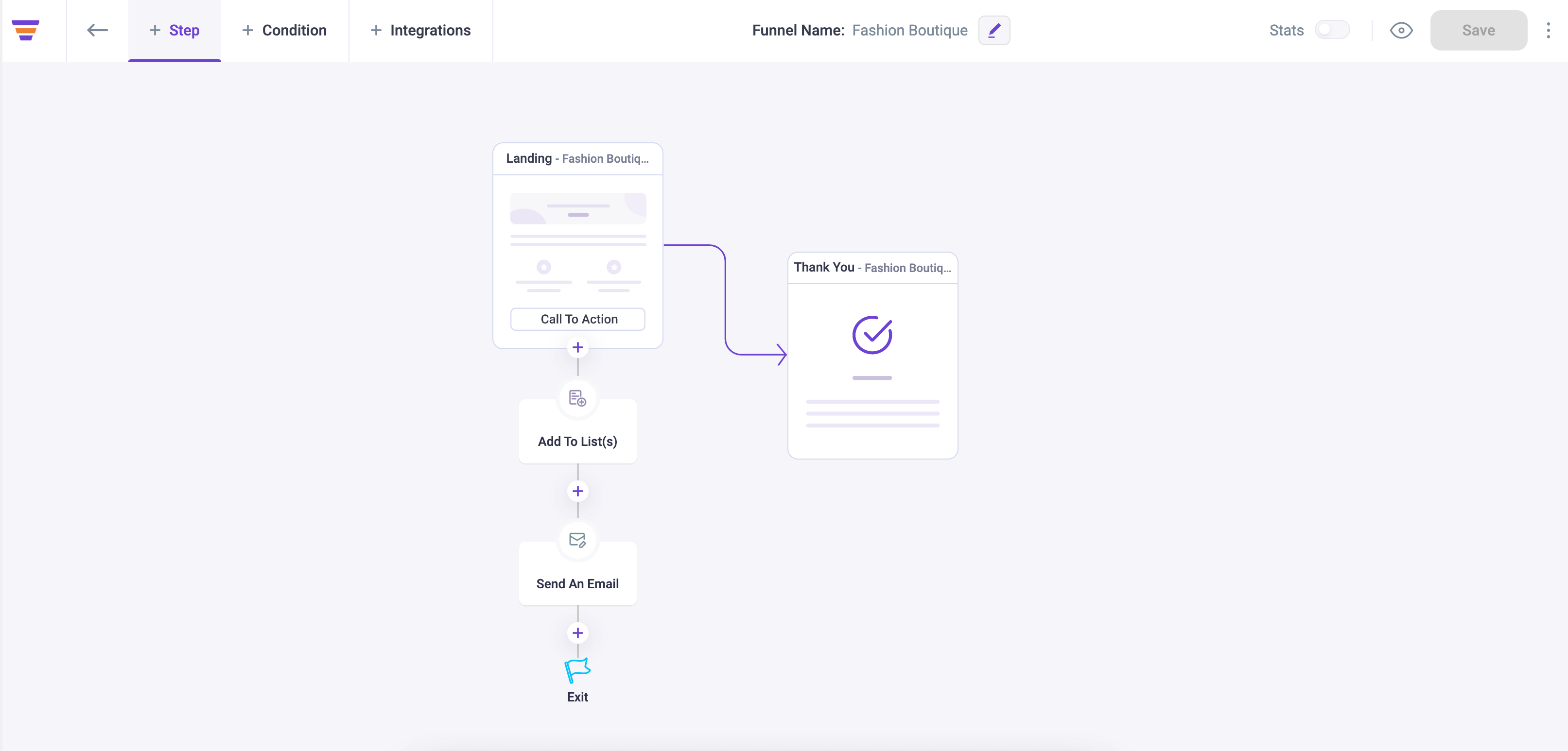
The exclusive integration means on the same visual canvas where you set up your squeeze funnel, you can then define the email automation flows based on user actions in the funnels and automatically add the leads to specific lists.
For example, once someone submits the opt-in form, you can trigger an email to send him the link to the free resource and then add the user to a specific list for whom you want to launch your next email campaign.
Mail Mint also allows you to create lead segments based on the data you have of your prospects (which could be their basic details or any custom details that you may have collected).
Once you have the leads collected, you can then run personalized email campaigns whenever you want.
3. Set Up Purchase-Based Automation Flows for WooCommerce Stores
Beyond lead collection, Mail Mint’s other specialty is automation built for WooCommerce purchase actions.
Targeted campaigns for e-commerce don’t always involve a sales funnel or lead collection at all, so you need a tool that triggers off a customer’s purchase actions directly.
This is where the signals from earlier in this guide stop being something you build by hand.
Mail Mint reads them straight from your WooCommerce order table and tags customers on three of them automatically: the product or category purchased, the number of orders placed, and the location on the order, the same purchase-action and demographic signals covered above, just applied the moment an order comes in instead of sorted manually afterward.
Say a customer buys an “Avengers” t-shirt. An automation emails them a discount coupon along with a suggestion for more superhero-themed t-shirts. Since you already know their interest, personalizing around it and showcasing similar designs, with the coupon as an extra push, converts far better than a generic follow-up would.
You can also run personalized sales funnels based on what a customer added to their cart, offering relevant order bumps and upsells built through WPFunnels’ Global Funnels feature.
Measuring Your Results
Once a campaign is live, watching the right numbers tells you whether the targeting actually worked, not just whether the email went out.
Track click-through rate and conversion rate for each segment separately, not blended across your whole list. A segment-specific view shows you which targeting decision is actually paying off.
Revenue per campaign matters more than raw clicks. A small segment with a high average order value can outperform a much bigger list running a weaker offer.
Watch your unsubscribe rate too. A rising unsubscribe rate on one specific segment usually means the targeting was right but the offer or frequency wasn’t.
Good to Know: Open rate still shows up in most dashboards, but treat it carefully. Apple’s Mail Privacy Protection auto-loads images for a large share of inboxes now, which inflates opens without reflecting real interest. Clicks and conversions tell you far more.
Once you know what’s working per segment, you can double down on it instead of guessing at your next campaign.
Conclusion
If you take one thing from this guide, take this: the email is never the problem. The list is.
You can rewrite a subject line ten times and it won’t fix what a wrong recipient list already broke. A first-time buyer, a loyal repeat customer, and someone who abandoned a cart last week are three different people having three different relationships with your store. Send them the same email and you’re not being efficient, you’re being invisible to at least two of them.
Start smaller than you think you need to. Pick one signal, product bought, order count, or location, and split your very next campaign around it. Don’t wait until you have five perfect segments mapped out. One real split beats a perfect plan that never ships.
Bottom Line: Match the campaign to the customer, not the customer to the campaign you already wrote.
Frequently Asked Questions
How Do You Write a Targeted Email?
Start with the segment, not the copy. Use whatever you know, demographic, purchase history, or quiz answers, to personalize the subject line, body, and call to action around what they’ve already told you.
Who Should You Target for Email Marketing?
Existing customers for upselling first, then prospects who’ve already shown interest through a purchase, a quiz answer, or an abandoned cart. A customer who’s already bought once is usually a stronger target than a cold newsletter subscriber.
What Is the Target Email Format?
A catchy subject line, a personalized greeting, content that speaks to the recipient’s specific needs, a clear call to action, and a friendly sign-off with contact details.
Do I Need a Separate Tool to Run Targeted Campaigns in WooCommerce?
Not a separate platform on top of what you’re running. A plugin like Mail Mint reads WooCommerce order data directly inside your existing WordPress install, so triggering a campaign off a purchase or category doesn’t need another integration.
How Can You Measure the Success of Targeted Email Campaigns?
Track click-through rate and conversion rate for each segment, alongside unsubscribe rate and overall engagement. Watch open rate too, but carefully, Apple’s Mail Privacy Protection now inflates opens without reflecting real interest.
What Are Common Mistakes in Targeted Email Marketing?
Sending generic content without segmenting properly, ignoring timing and mobile-friendliness, and personalizing the subject line while leaving the offer and campaign structure identical across every segment.