Running a WooCommerce store is often very expensive. From setting up your online store to running Ads and attracting buyers, most eCommerce stores spend between $20 to $45 per order as Customer Acquisition Cost (CAC).
So it’s crucial to increase the Average Order Value (AOV) for your WooCommerce store so that you can win back the amount you spent. And one of the best ways to do so is to use smart WooCommerce Order Bump offers at checkout.
According to WakeUpData, using relevant order bumps can boost your AOV by 10% – 30%!
In this article, you will get a complete guide on understanding and using WooCommerce order bumps in the right way and start making more money.
Whether you own a new online store or have been up and running for a while, you can benefit from this. By the end of this guide, you will learn:
- Exactly what is an order bump is and why it works.
- The right way to choose your order bump offers.
- How to set up order bumps for your WooCommerce store for free.
So let’s begin.
TL:DR – WooCommerce Order Bumps
- You can increase your AOV instantly with small add-ons at checkout, no extra traffic needed
- What works best:
- Keep it relevant to the product
- Make it low-cost
- Show a clear benefit
- Keep it one-click simple
- Best ideas you can use: discount, upgrade, bundle, related product
- How you set it up: add bump → write clear benefit → optional discount → add more
- Pro tip: keep the price under 20% of the main product
- Final verdict: Use order bump to get more revenue from the same traffic
What is an Order Bump?
An order bump is a special way of offering something extra to your buyers right on the checkout page.
When a buyer is ready to purchase a product and is on the checkout page, you can make a small offer right on that page, with another product that is relevant to the cart or attractive in some way. And the buyer can simply accept the offer and add it to the cart with just a single click.
This offer is called an order bump offer, and it helps to increase your AOV.
Let us look at an example:
Let’s say a buyer is about to purchase a Computer Keyboard from your online shop at $40.
He goes to the checkout page and is surprised by a great offer for a mouse at a 20% discount, let’s say $16 instead of $20.
This is a great offer, and if in his budget, he may accept the offer and include it in his order with just a click.
He can then proceed to pay.
And that’s it. You just made an extra $20 from a buyer without any extra acquisition cost.
If you can make the right offer, they will convert, and one of the secrets is to make relevant offers. We will look into it more later on in this article.
So keep reading.
Why Should You Use An Order Bump?
Till now, you can clearly see that order bumps are a great strategy to increase the order value. And this indeed is the best reason why you must include order bumps in your marketing strategy.
The concept here is that when a buyer is on the checkout page, he is ready to pay.
And if you can make a sensible offer that doesn’t require too much thinking, then in most cases, people will end up accepting the offer.
Now, this seems like a small increase in the amount you earn. But over time, more and more buyers will end up accepting your offer, thus saving you a great deal in acquisition costs and helping you to increase the revenue.
To the buyer, this is a small increase to the amount he is paying.
To you, this is a great strategy to increase your overall revenue and profit.
However, there is more to this. You can get several more advantages from using a WooCommerce order bump. Let us look at a few.
- Getting an order bump offer at checkout creates excitement in the buyers’ minds. They may return to your store again soon, hoping they get another offer.
- Most buyers have specific products they search for. But they may need more products that they are unaware you sell. If it’s a related product to the one they are willing to buy, then having this product as an order bump WooCommerce offer is a great way to attract them.
- A buyer may not have considered buying something extra with their original product. But you know they will need to buy another product, later on, to be able to use the main product.
You can offer that extra product as an order bump offer, and more often than not, people will choose to accept it.
- This can also act as a way to save the buyers’ time. The buyer may not want to go through browsing products again after spending enough time choosing the initial product.
So getting a desirable product as an order bump offer can be well-received.
Pro Tips On Making The Best Order Bump WooCommerce Offer For Your Store [Order Bump Examples]
There are a number of ways you can trigger more sales with order bumps at checkout. However, their use will really depend on what industry you are part of.
Let us look at various strategies you can follow to get the best results from your order bumps.
Here I will explain the strategies with some order bump examples and let you know which industry this strategy works best with.
i. Offer Discount On Increased Quantity
This order bump example is focused on offering discounts on an increased quantity of products.
Let’s say a buyer just added a t-shirt to the cart, worth $45. In this case, when he is about to checkout, you can offer an order bump offer so that if the buyer purchases 3 of those t-shirts, he will get a $15 discount.
This means the buyer will pay just $120 for the three t-shirts instead of $135.
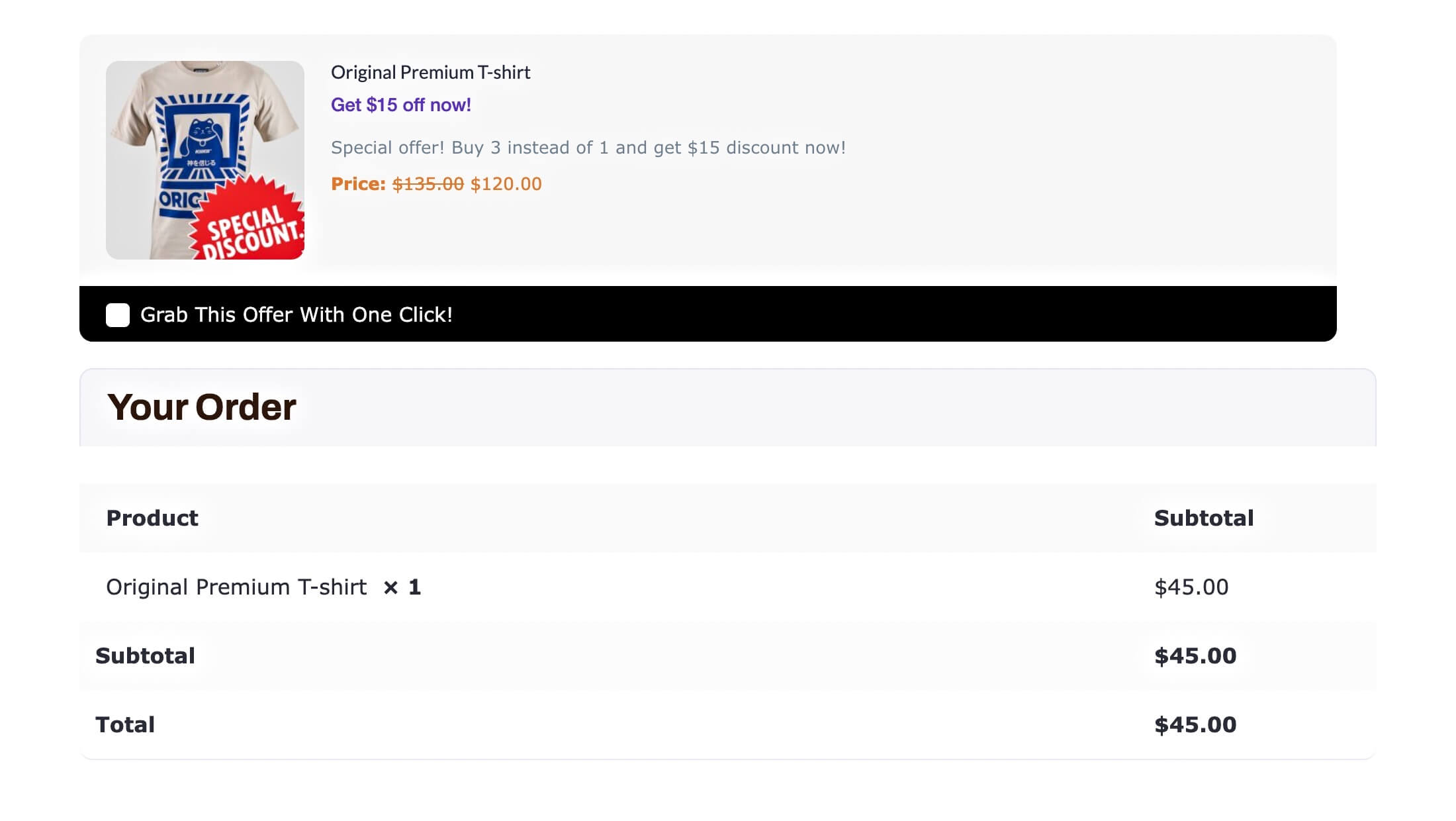
This is a great strategy to sell more quantities of a product and works really well for the following categories:
- Clothing & accessories – usually the low to medium cost products.
- Dairy, food & beverages – super effective to sell more chocolates and carbonated drinks.
- Cooking ingredients – cooking oil, spices, and salt are always in demand.
- Low-end electronics – this may include bulbs, multi-plugs, clippers, etc.
- Kitchen supplies – dishwasher, zipper bags, foil paper, etc, that need to be purchased frequently.
- Cleaning & bathing supplies – soap, detergent, toilet tissue, etc, can be commonly bought products.
- Baby supplies – people never compromise with products for babies.
- Event tickets – selling tickets for concerts or training classes.
and most other product categories where products are often bought in more quantities.
If you sell products in these industries then offering a discount on more quantities can be a great order bump offer.
ii. Offer An Attractive Upgrade As Order Bump
If you sell digital products or software, then one of the best strategies could be to offer your attractive packages as order bump upgrades during checkout.
For this order bump example, let’s say you have software with 3 plans:
- Plan 1 – $50 (Get’s 25% access)
- Plan 2 – $120 (Get’s 60% access)
- Plan 3 – $150 (Get’s 100% access)
If one of your buyers is at the checkout page with Plan 1, you can offer Plan 3 as the order bump offer. This could act as a last moment opportunity for your buyer to change his mind.
You can even add a small discount on the upgrade offer to make the choice more tempting.
This is a strategy that we used ourselves for some time and worked really well.
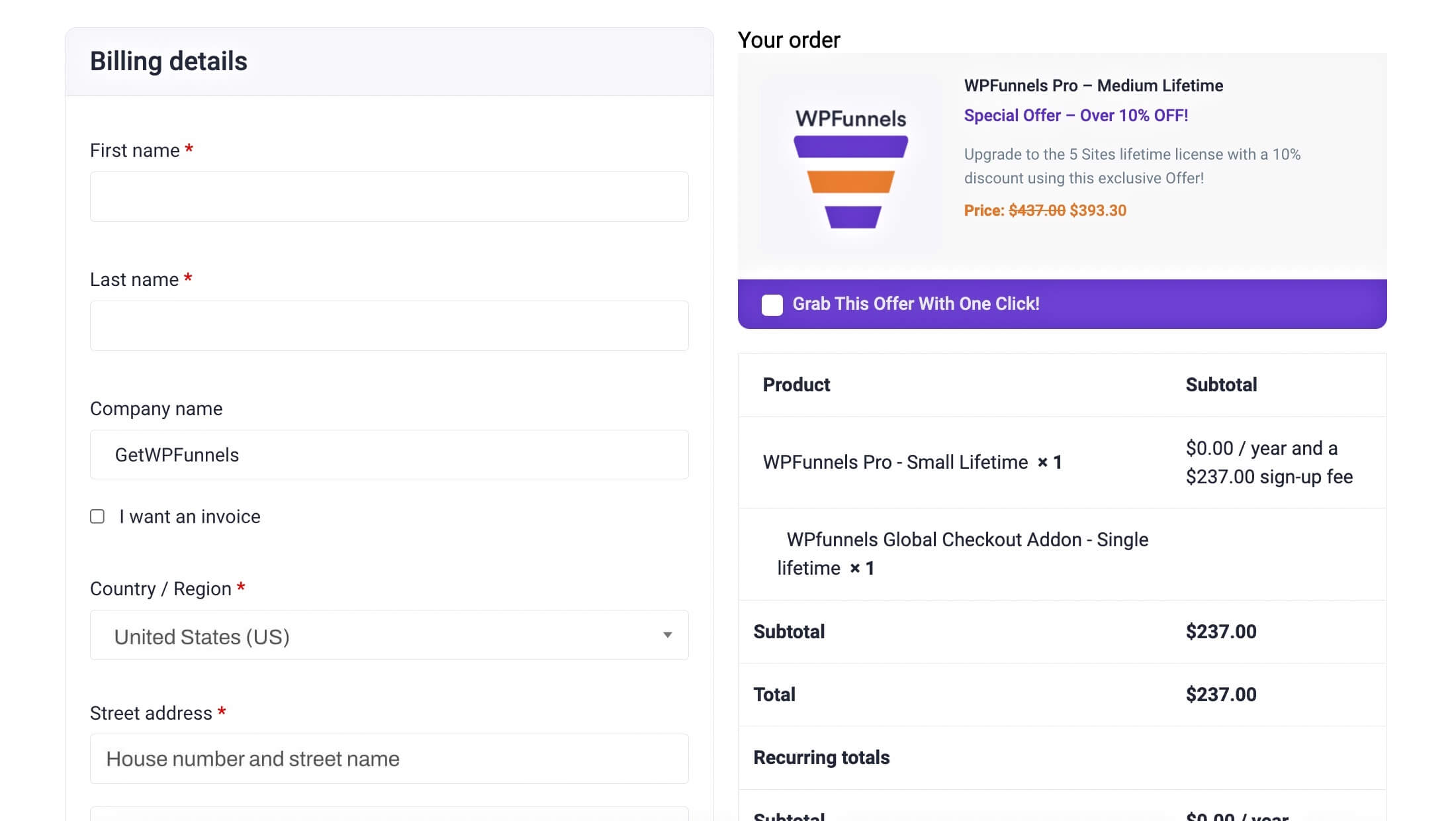
As mentioned earlier, this approach will be best for selling
- Software – offer a higher plan when a lower plan is being purchased.
- Virtual events – offer more members access.
- Even tickets – maybe for higher privilege tickets such as Silver to Gold tier.
iii. Make An Order Bump Offer For A Better Alternative
This can be confusing at times but in fact, is a great strategy that works.
Here’s the concept. Let’s say you sell Hair Dryers for women in your online shop.
A buyer decided to buy the Hair Dryer from Brand A, which costs $170. You can then offer a Better Hair Dryer from Brand B which costs $349, as the order bump offer.
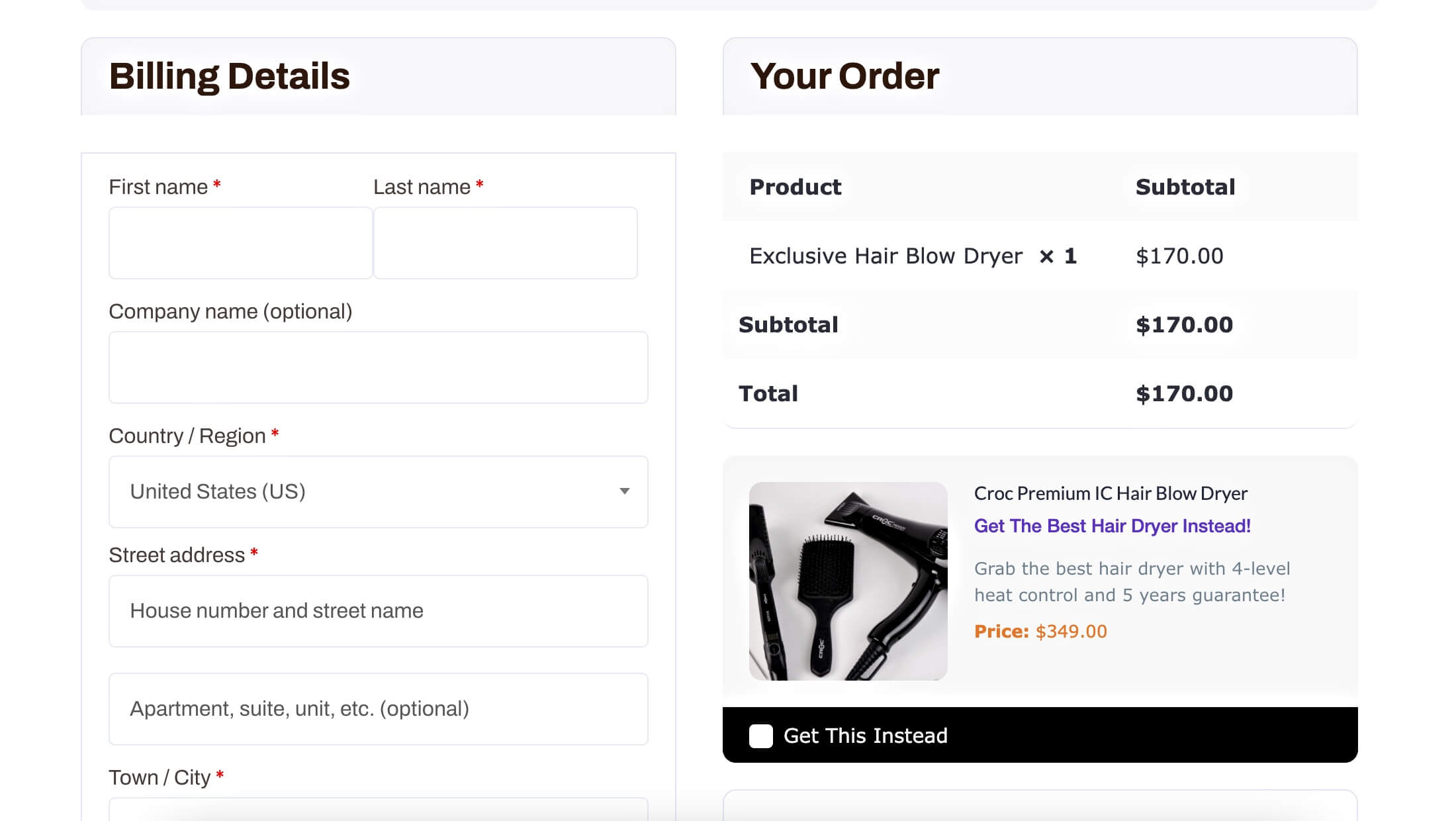
Now, here’s the tricky part. It’s obvious that a buyer will not switch to a higher-cost product without a valid reason. So you have to write a good copy as the offer description to grab the buyer’s attention.
In the case of hair dryers, women are most concerned about heat control and static electricity. So maybe a short copy stating that the offer product has easier control over heat and gives off no static electricity can help to convert. You have considered such an approach for your product.
And as always, an added discount is well appreciated by the buyers.
This strategy will be more effective if you can offer a product from a renounced brand. In that case, people may consider accepting the order bump offer just because it’s a better brand (as long as it is within their extensive budget).
The main idea of this strategy is people often prefer better quality or a reliable brand. So you can make more money just by targeting these preferences.
This strategy often works for products such as
- Laptops & Computers – for example, you can offer more RAM at a small discount.
- Laptop & computer accessories – people usually prefer purchasing mouse, keywords, and headphones from renounced brands.
- High-end electronics – hairdryers, washing machines, vacuum cleaners, etc, are some products this tactic works on.
- Cosmetics & Beauty Products – you can offer Huda lipsticks at a discount in place of a local lipstick brand.
iv. Make Order Bump Offers With Relevant or Related Products
This is the most commonly used approach most people follow.
Let’s say a person is about to buy a t-shirt. You can offer him a similar pair of joggers as the order bump. So, if the buyer had a slight need for this product, he will end up accepting it.
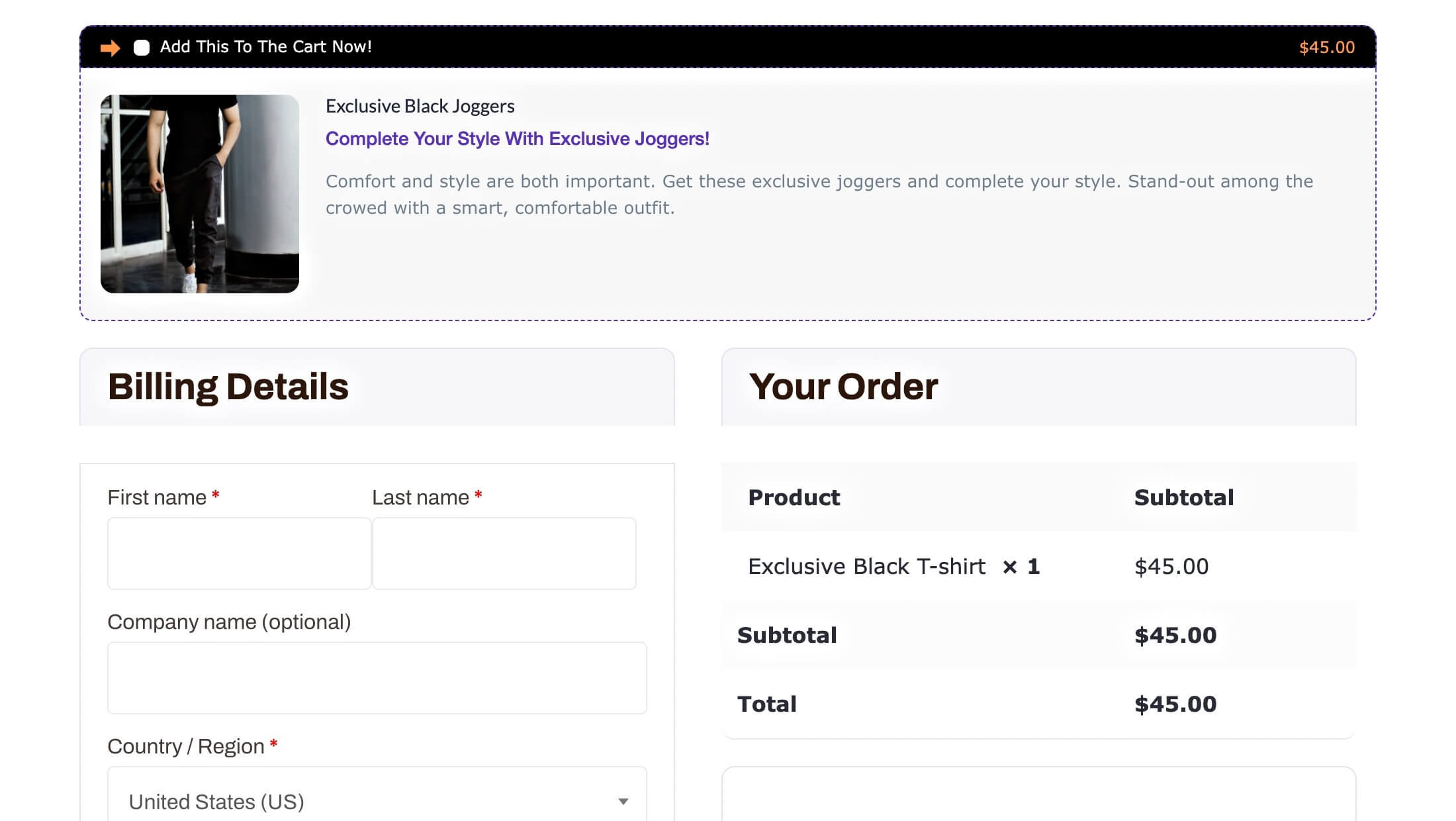
Relevant products convert more because the buyer clearly has a certain need in mind when making a purchase. As long as you can make attractive offers that somehow relates to their needs, it will increase the chances of conversion.
This approach can work with any type of product including courses, digital products, convenient products, physical products, or even high-end products such as cars.
v. Offer The Best Selling or The Most Popular Product At A Discount
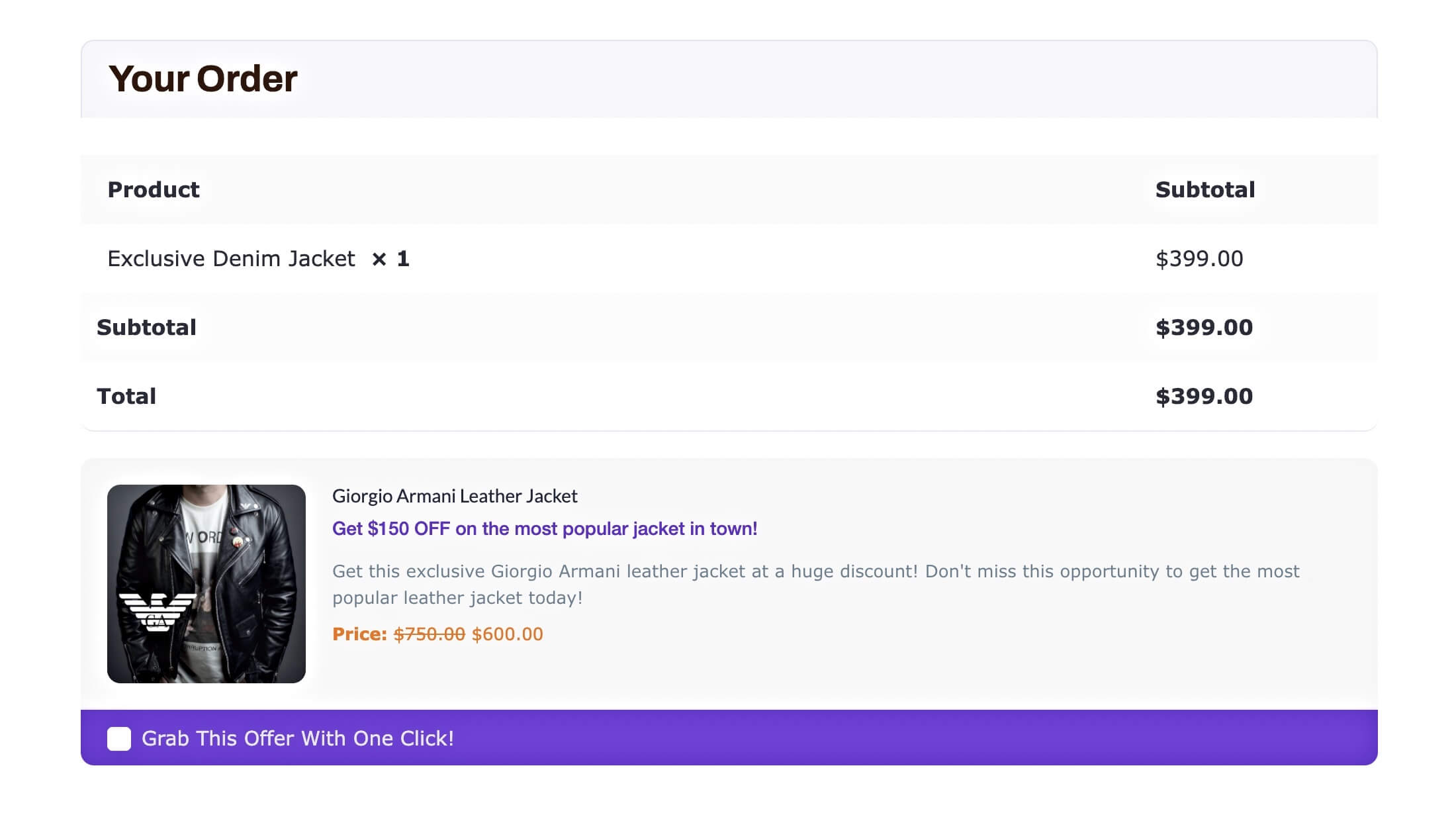
If you have a store that is set up around a particular niche, then offering the best-selling product or the most popular product at a discount can trigger more sales.
For example, if you mainly jackets and blazers, and if your most popular product is a certain leather jacket, then you can offer this with any product in the store. This will always be relevant no matter what product the buyer is here to purchase from your store.
vi. Make A Bundle Offer Right On The Checkout
Bundles have been a great way to attract buyers into buying more products at once. And this can be a great approach for your order bump as well.
For example, when a buyer is about to buy a Book written by William Shakespeare. You can then offer him a complete omnibus of William Shakespeare’s books as the order bump.
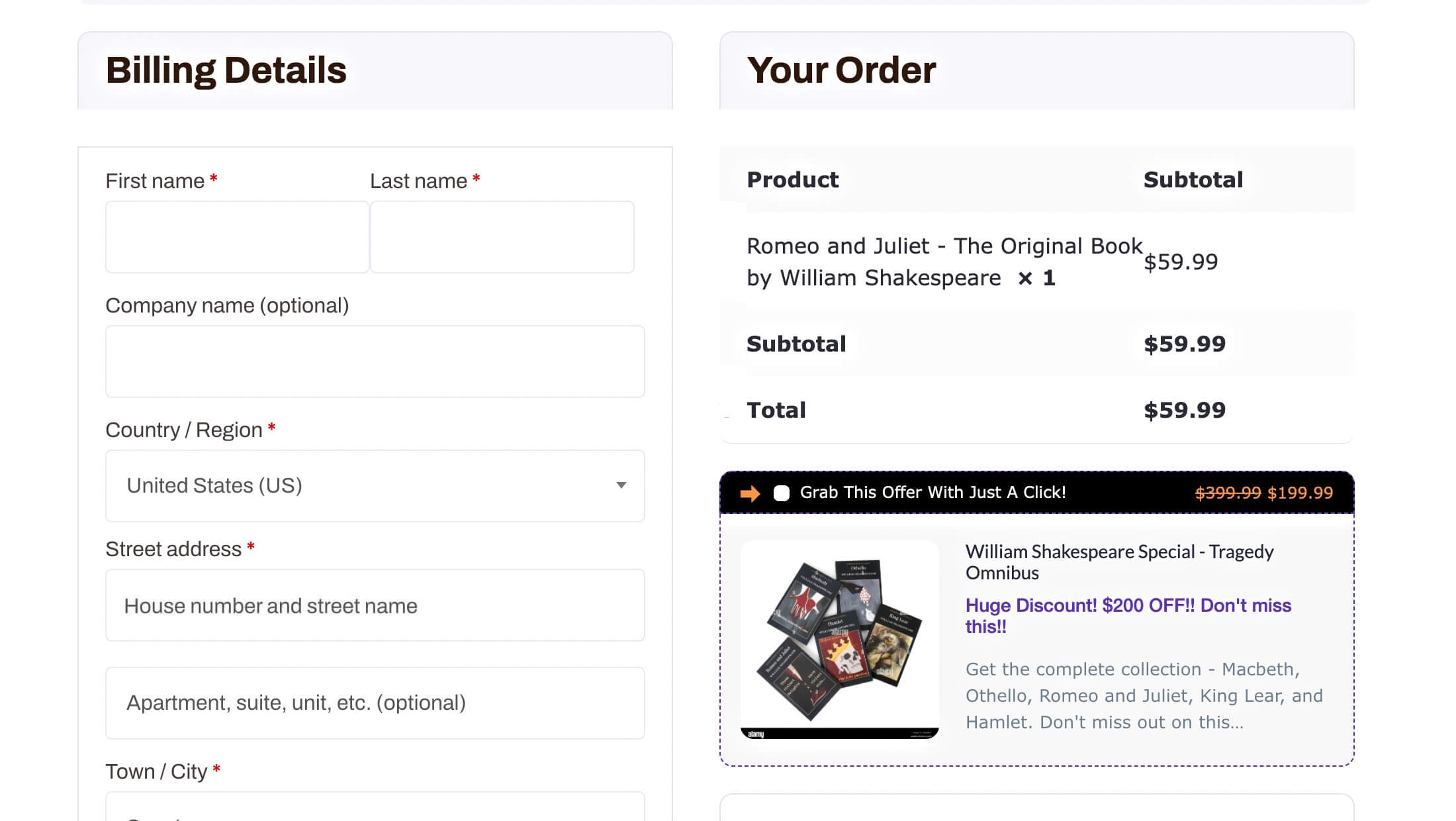
This approach works best with a Collection of Antic items, a Bundle of products related to hobbies, Collectible items, or even a bunch of related products bundled together such as a shampoo and a conditioner.
vii. Incorporate A Surprise Offer Of The Day Concept
This is a new strategy that has worked well for several small to medium online stores.
You can promote on the landing page that everyone will get a special offer during checkout, but don’t mention what it is. When the buyer gets to the checkout page, he will get a surprise discount offer on a product.
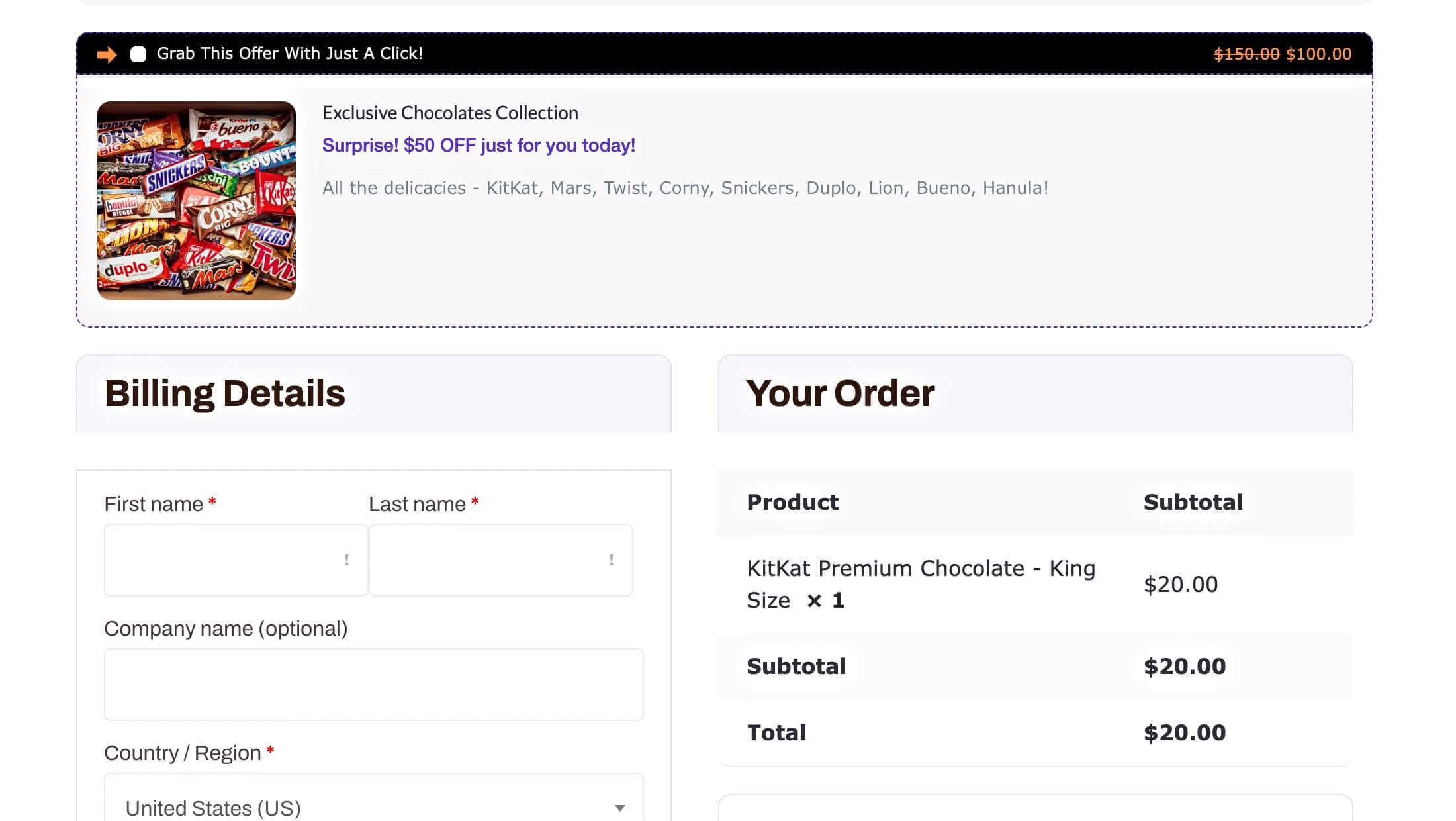
This, again, works really well if you have a store that is set up around a particular niche.
Now, yes, this does have a bit of manual work involved. You have to change the offer every day, but the result is amazing.
People coming to your store will always have excitement. They will visit your store over and over again just to get that surprise offer.
How to Create WooCommerce Order Bumps for Your Store
Well, so far, you learned all about what an order bump is and how it works. Plus, I gave you several real order bump examples and tips that you can implement immediately.
If you run a WooCommerce store and you have never tried using order bumps, then you are missing out on a massive opportunity to increase your revenue and profit margins.
The good news is that there are many tools that you can use to easily add WooCommerce order bumps to your store. Some popular tools include FunnelKit, Cartflows, and WPFunnels.
Among these, WPFunnels makes it easy for you to add a single order bump to your WooCommerce checkout page for FREE!
(With Pro, you can add multiple WooCommerce order bumps on your checkout page.)
It’s actually only a matter of a few clicks. The following are the steps to create an order for your WooCommerce store in just 5 minutes:
Step 1 – Install And Activate WPFunnels
You may search for “WPFunnels” on WordPress.org or search for it by going to “Add New Plugin” from your dashboard.
And then watch this video and follow the steps:
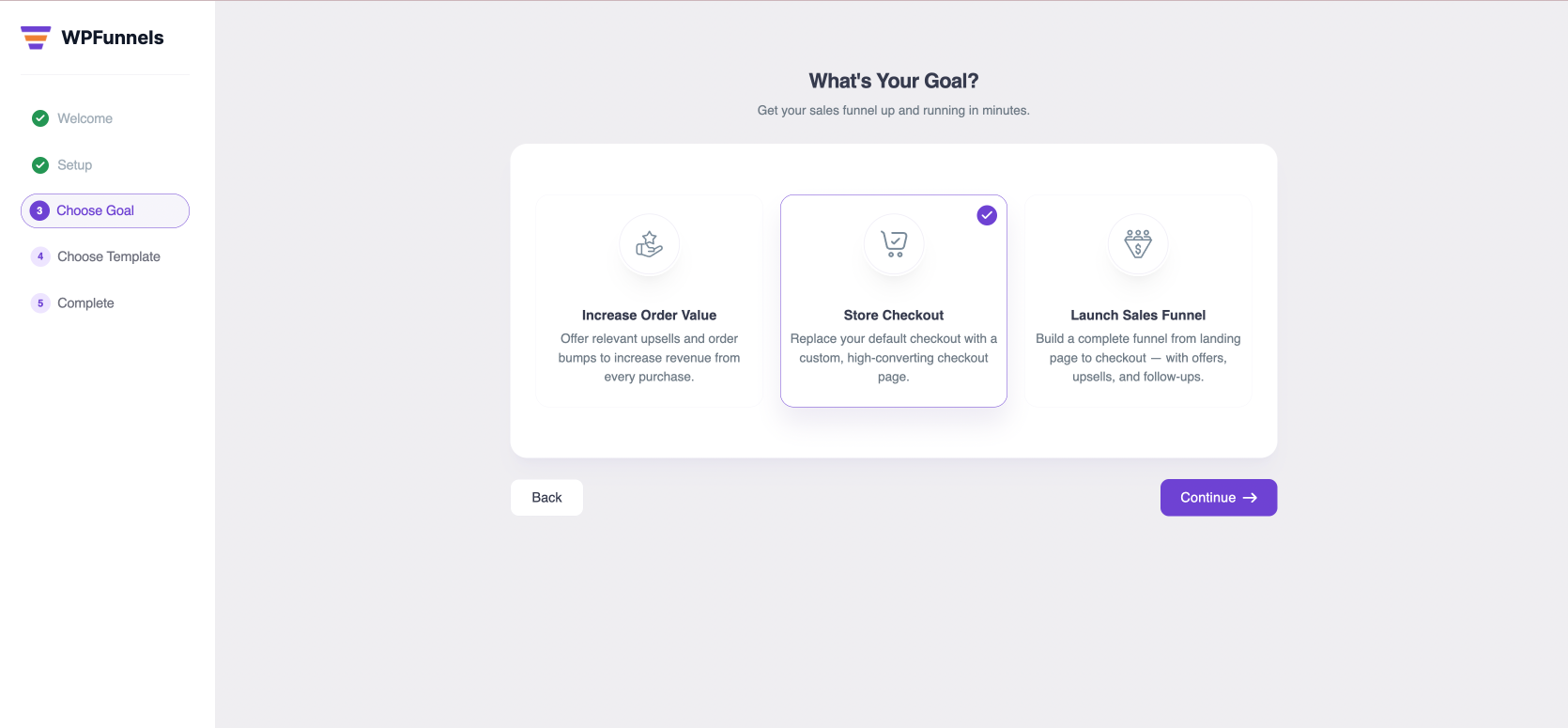
Step 2 – Choose Goal: Store Checkout
After installing, you will find the option to choose your goal. For WooCommerce, choose the goal “Store Checkout”.
Step 3 – Choose A Suitable Checkout Template
Here, you will get the option to choose from several checkout templates that are proven and more effective compared to your default WooCommerce checkout.
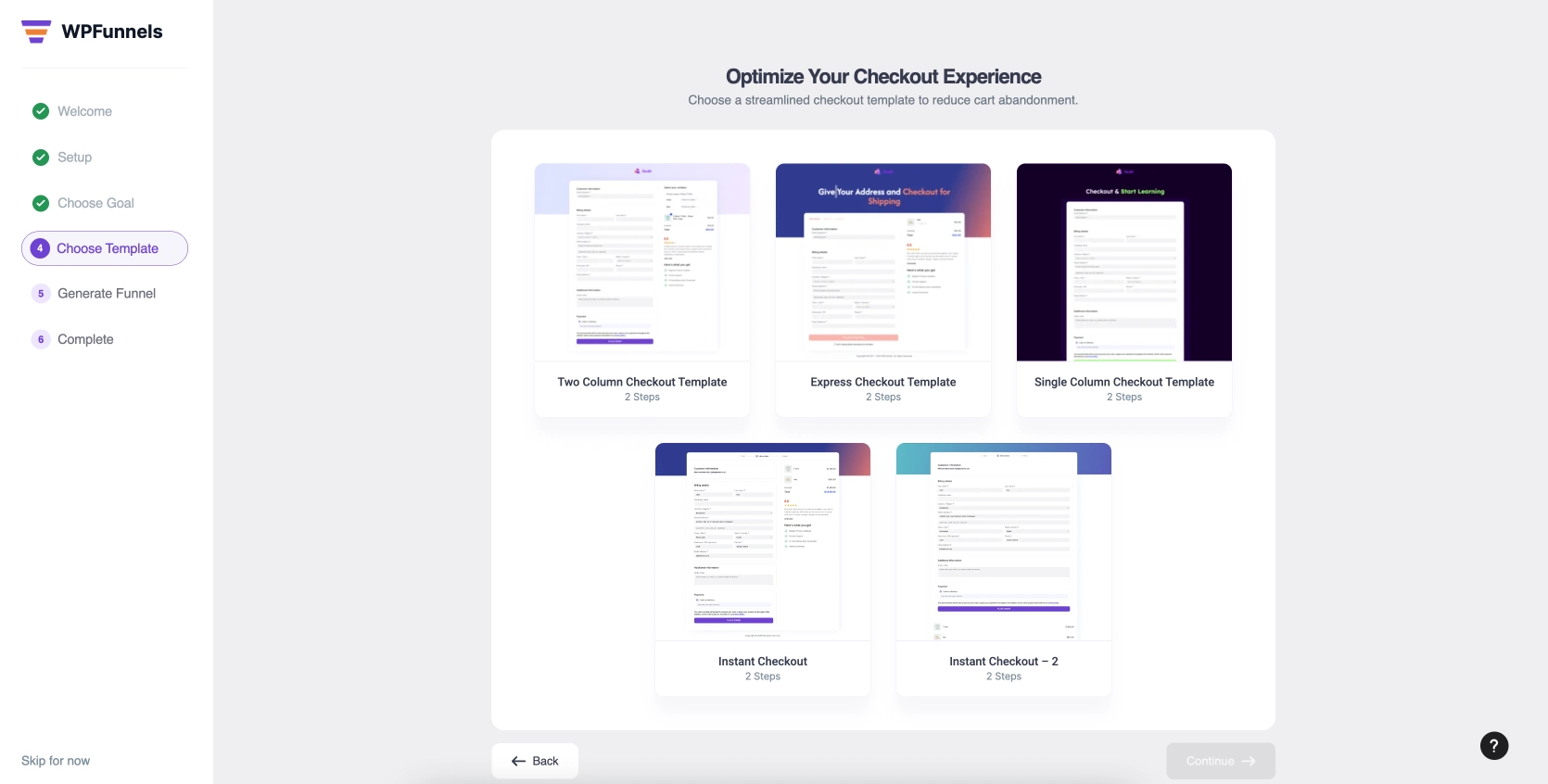
Once done, follow through with the setup wizard, and you will have a brand new WooCommerce checkout flow ready.
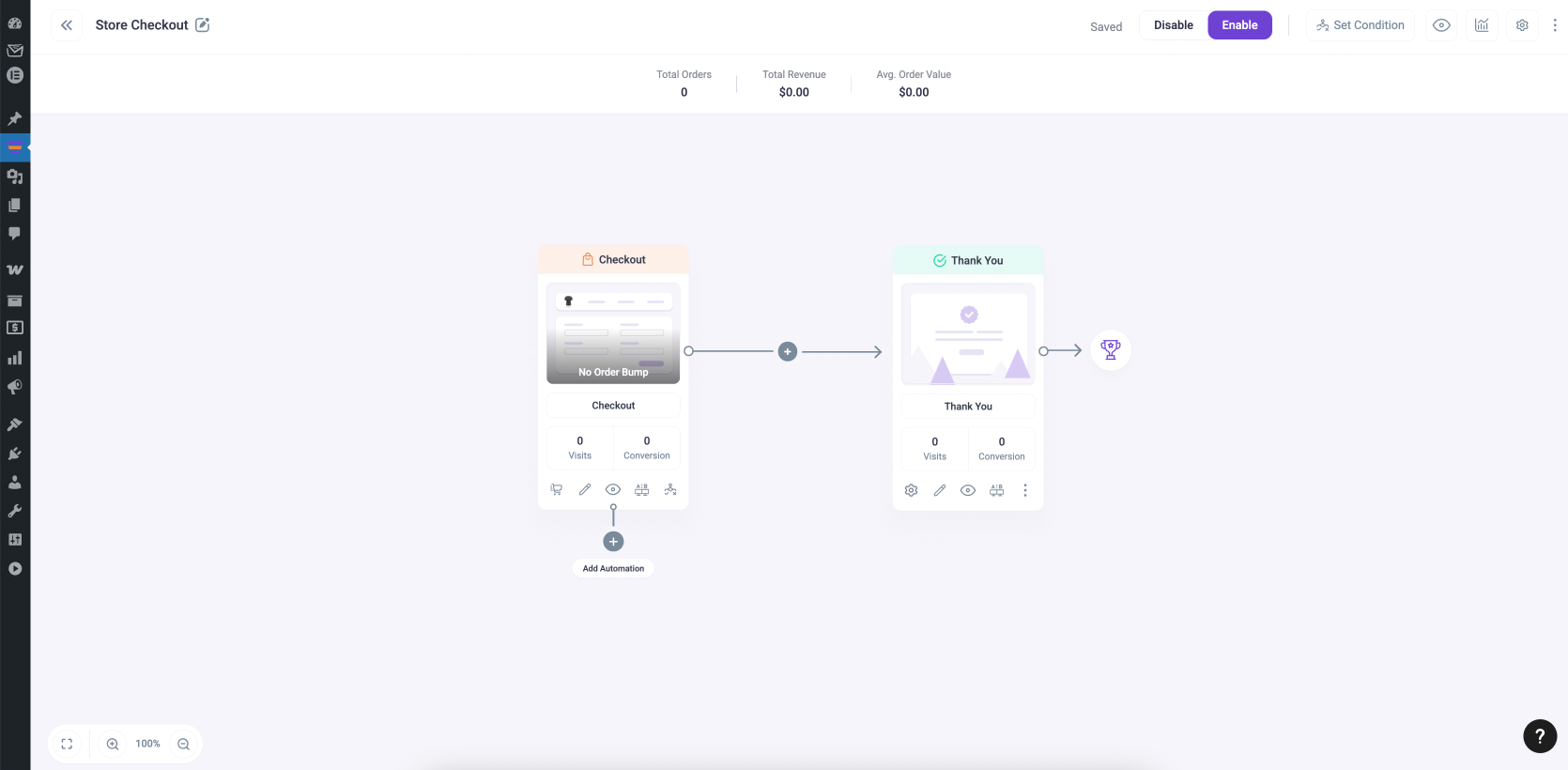
Step 4 – Go to Order Bump Tab At The Checkout Step
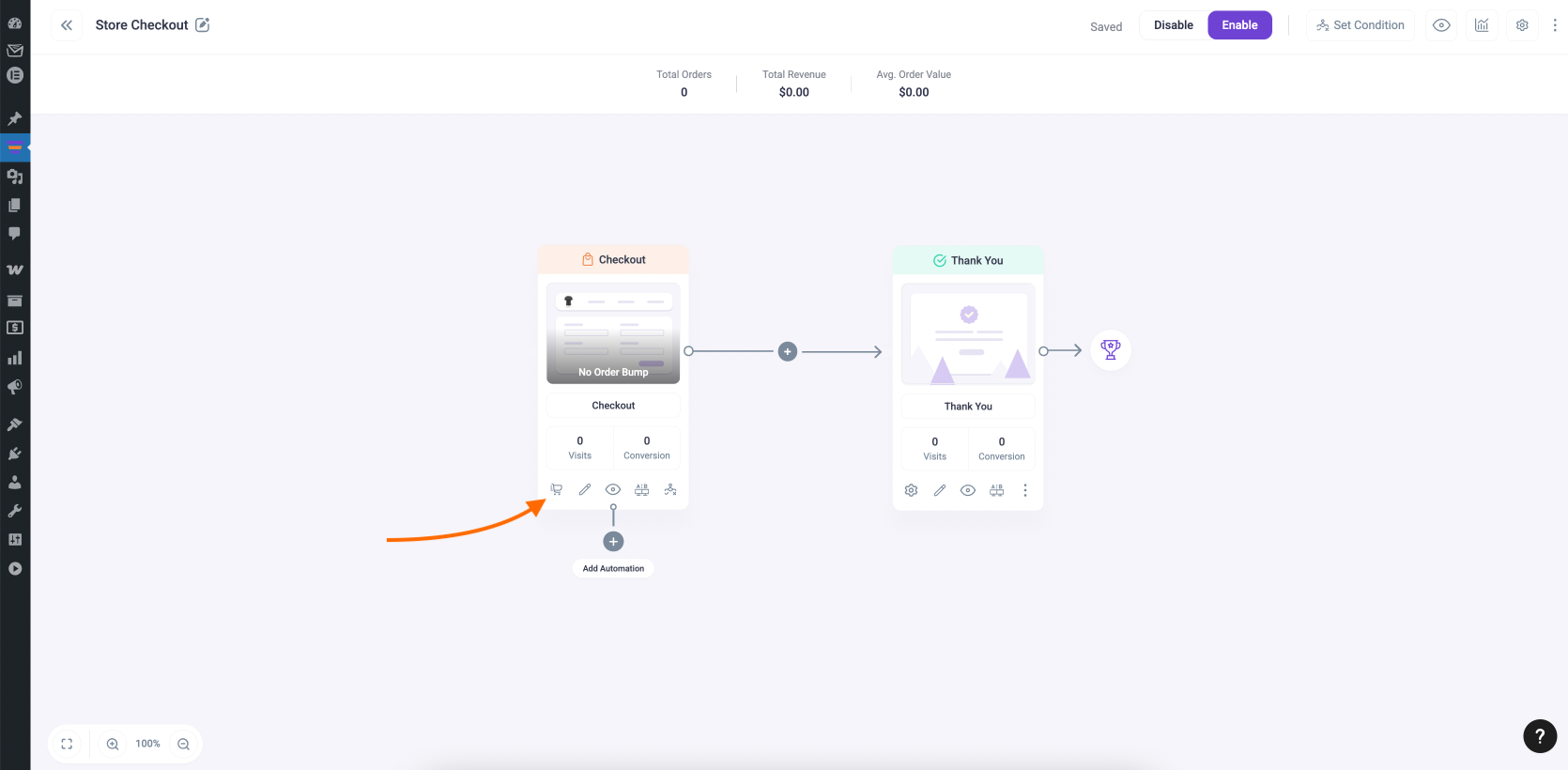
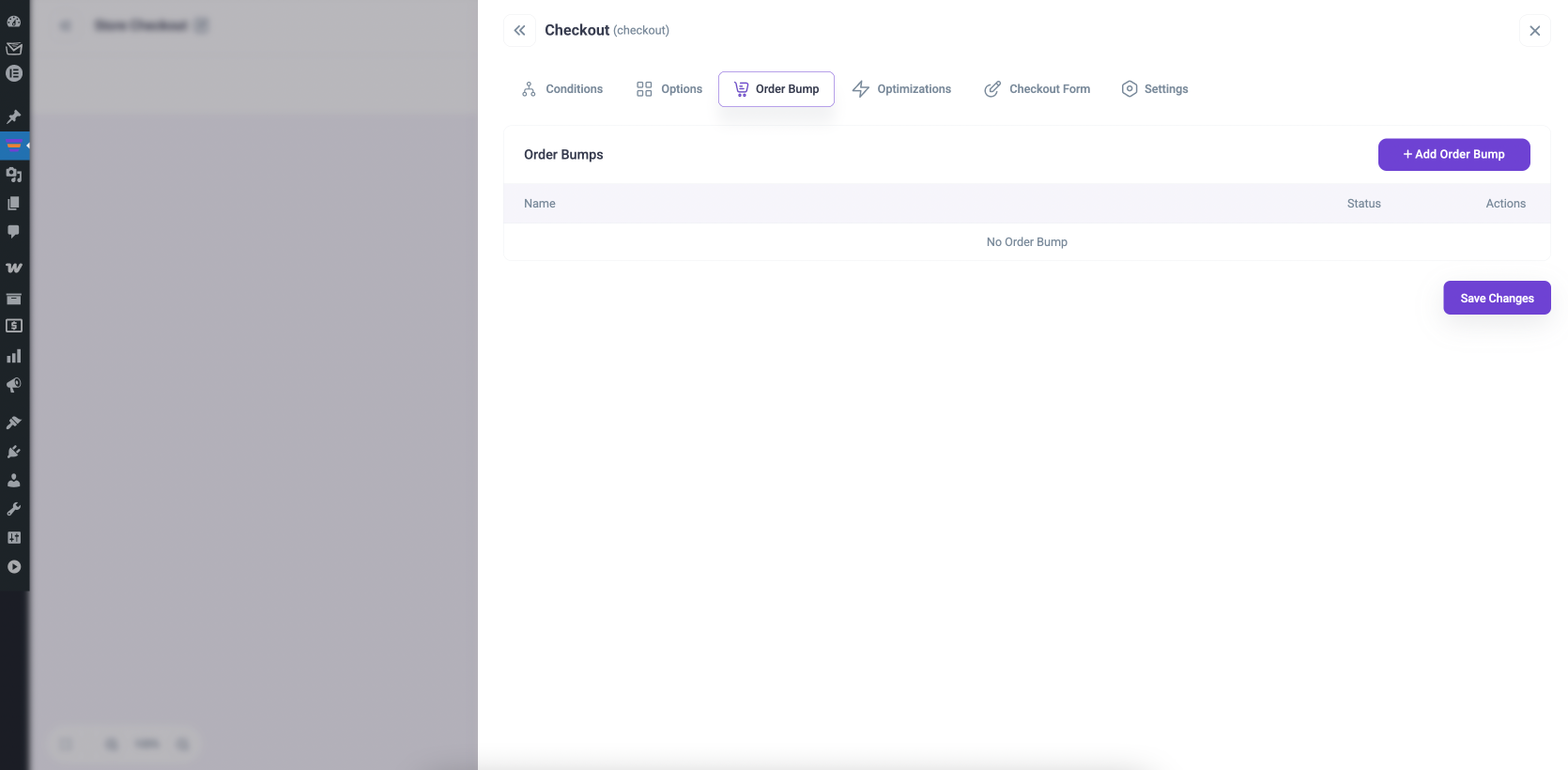
Hover your mouse on the checkout step and click on the cart icon. It will open the settings drawer. There, go to the order bump tab.
Then click on “Add order bump.”
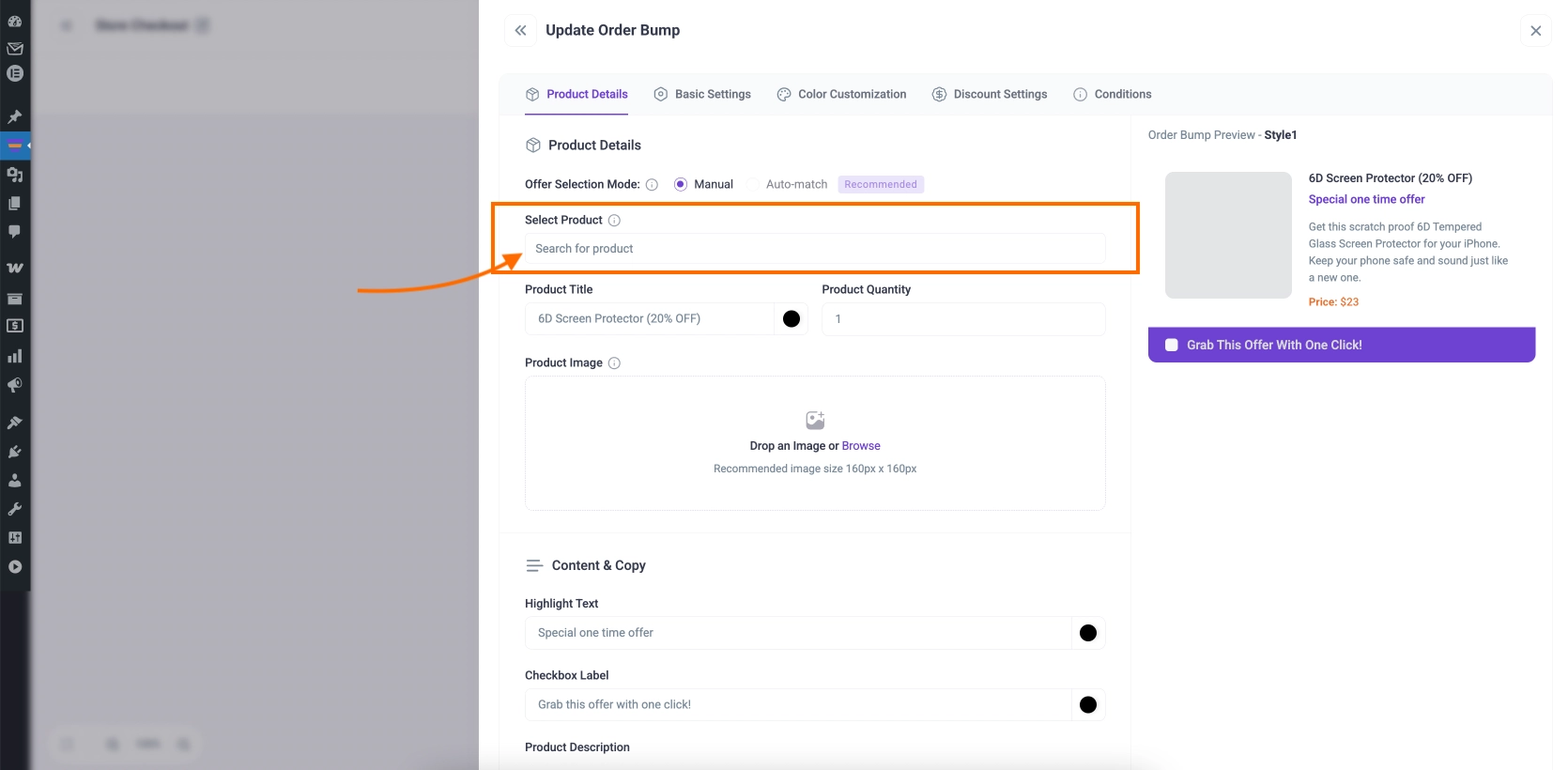
Step 5 – Assign The Product You Want To Offer
Here, you can search for the product and assign it.
Step 6 – Customize The Bump Offer
And then customize the content around them, such as the title or the description, to make the bump offer more attractive.
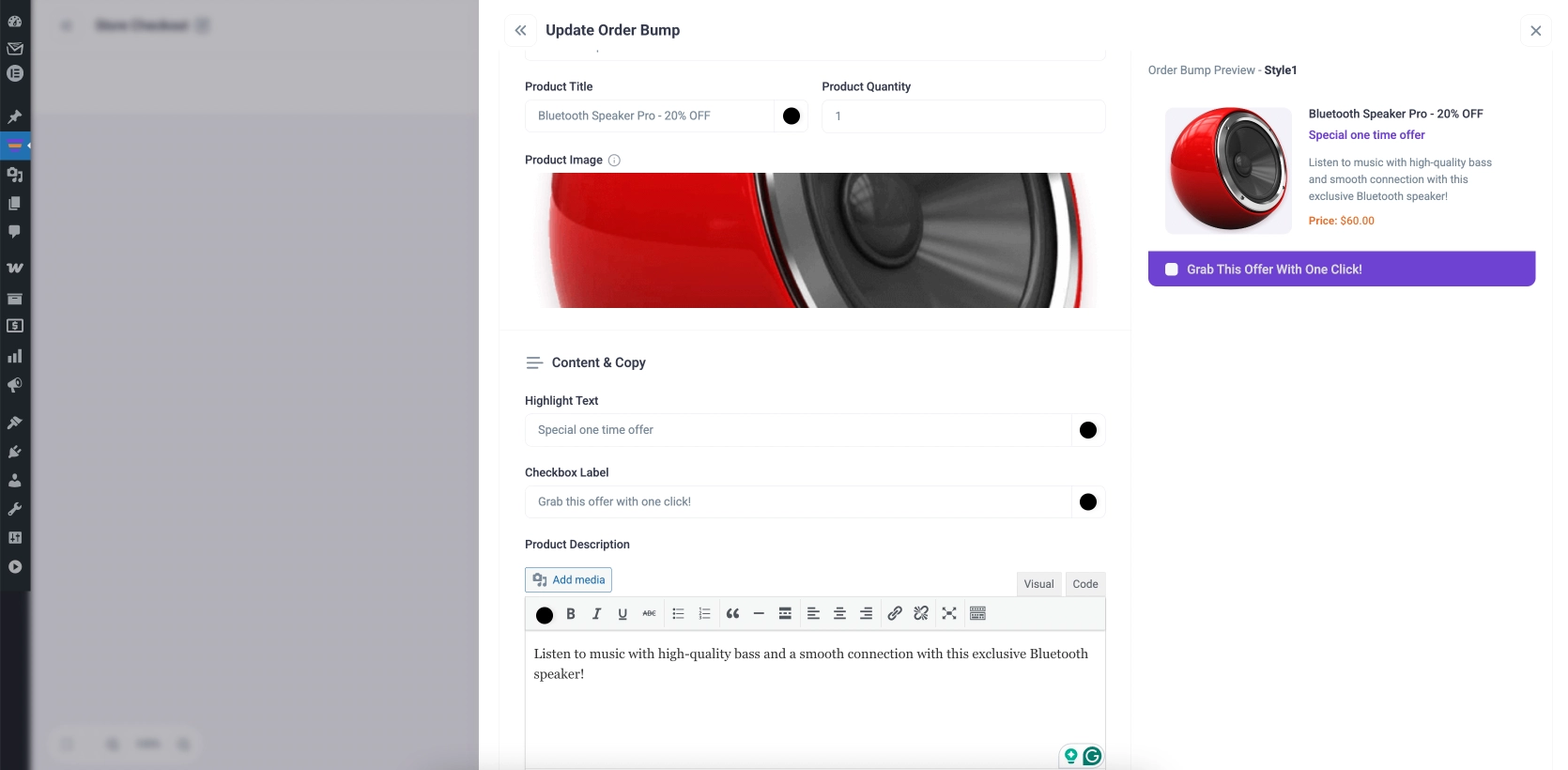
In the “Color Customization” tab, you can improve the visual look of the offer to make it stand out and less distracting.
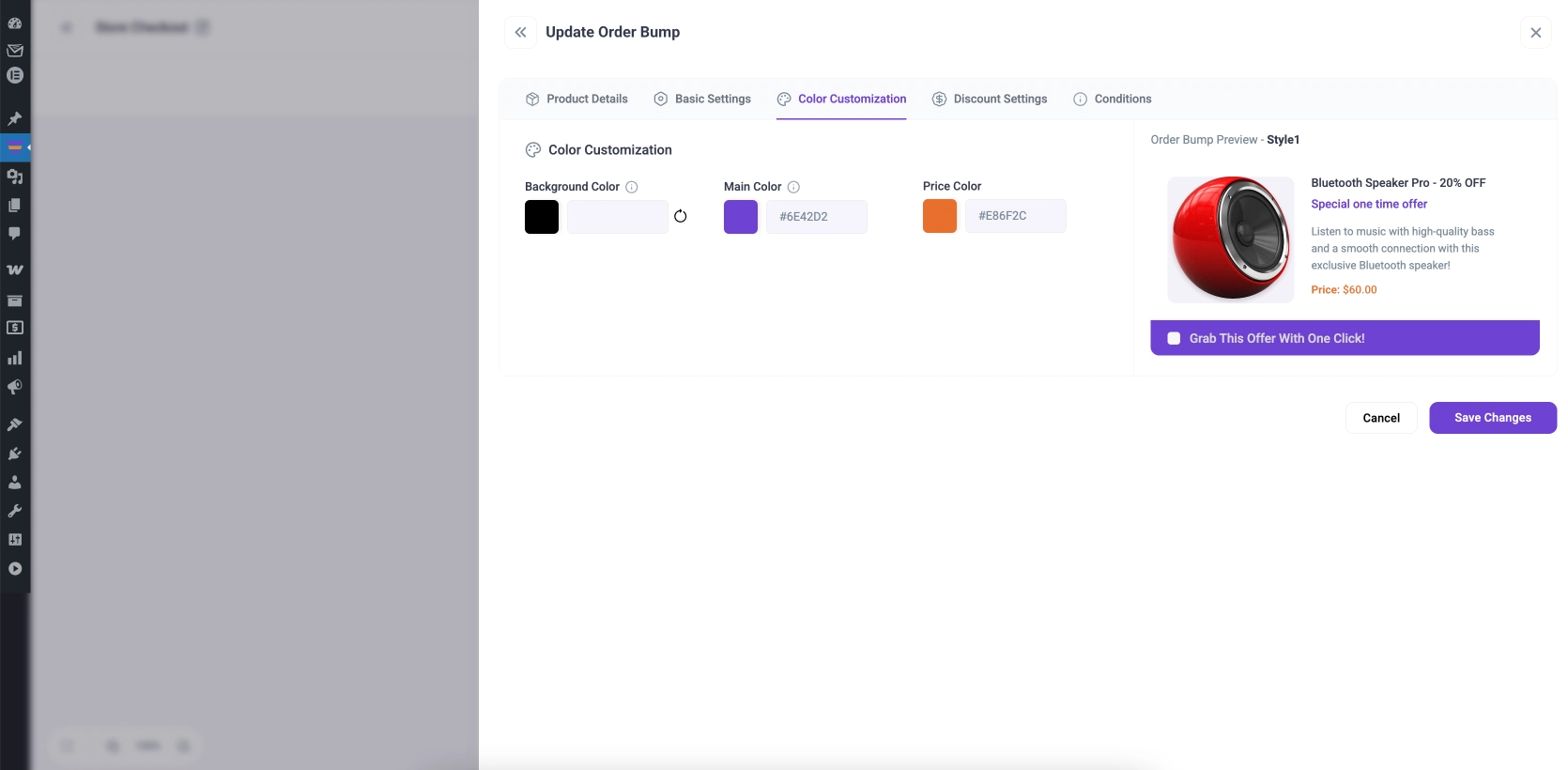
Step 7 – Offer A Discount If You Want
You can also go to the “Discount Settings” tab to offer an exclusive discount on the bump product that will not be available on the site.
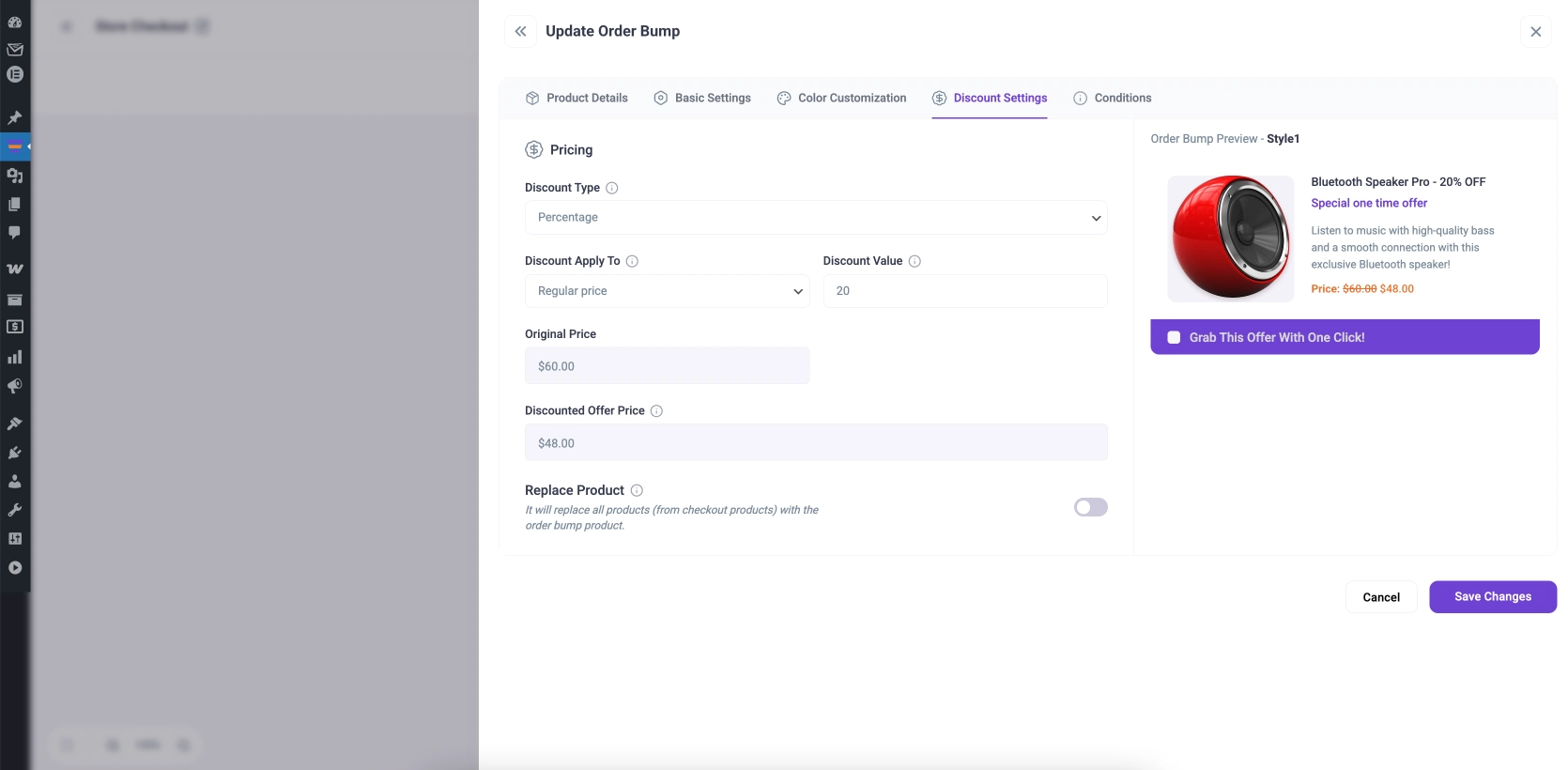
That’s it, this is how you can add single or multiple order bumps to your checkout page.
If you imported a template for the checkout page, then you can now simply preview the checkout page to see the WooCommerce order bump in action.
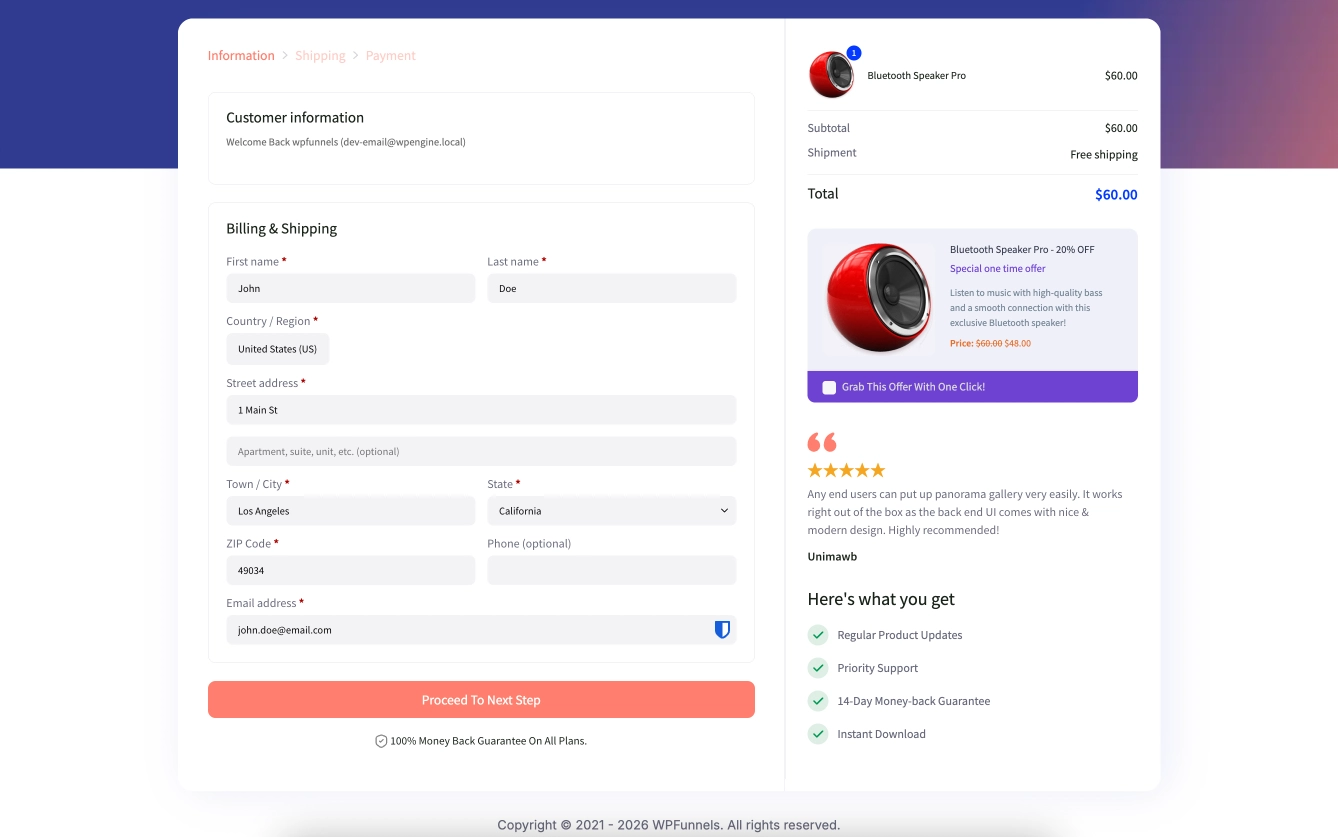
PRO TIP: We recommend you start testing with simple, low-cost, complementary items as Order Bumps to see the conversion rates.
Now it’s time to get started. Add order bumps to your WooCommerce checkout and increase your average order value.
** FAQs **
1. How can I increase my WooCommerce sales without spending more on ads?
You can add order bumps at checkout to increase your average order value instantly. These offers target buyers who are already ready to purchase, so conversion is easier. This way, you earn more from the same traffic without increasing ad spend.
2. Why are my customers not adding order bump offers?
Your offer may not be relevant or attractive enough to your main product. If the price is too high or the benefit is unclear, customers will skip it. Focus on low-cost, highly relevant items with clear value.
3. How do I choose the right product for an order bump?
Pick products that naturally complement what the customer is already buying. It should feel like a helpful addition, not a random offer. For example, accessories, upgrades, or bundles work best.
4. How many order bumps should I use on my checkout page?
You can start with one strong offer and then test adding more. Too many options can overwhelm customers and reduce conversions. The goal is to keep it simple while maximizing value.
5. How can I make my order bump convert better?
Use clear, benefit-driven copy that explains why the offer matters. Add urgency or a small discount to make it more appealing. Keeping it one-click and easy to accept will improve conversions significantly.
Conclusion
If you’re looking for a way to increase your sales, WooCommerce order bumps are a great option.
By offering additional products or services at checkout, you can encourage customers to spend more money with your business.
While there are many different ways to set up WooCommerce order bumps, we hope this guide has given you a good overview of how they work and how to get started.
If you have any questions, feel free to leave a comment below, and we’ll do our best to answer them. Thanks for reading.