
Quick Answer: A one-page funnel removes the separate landing page entirely and builds the pitch, proof, and offer directly into your checkout step. For a WooCommerce store, that means the buyer goes straight from an ad or product link to a checkout page that already carries the headline, reviews, and guarantee a landing page used to hold. An order bump on that same page does the revenue work a whole extra page used to do.
Every time we look at how WooCommerce checkouts actually perform, the same pattern shows up. Stores don’t lose orders because they’re missing a page.
They lose orders because there’s one too many pages between “interested” and “paid.”
A one-page funnel isn’t a design trend. It’s a fix for that specific leak.
Most explanations of this topic assume you’re selling a $2,000 coaching program. They tell you to build a video sales letter, a wall of testimonials, and a countdown timer to close the deal.
That’s a different business model with a different sales cycle.
If you’re running a WooCommerce store selling a $20 to $150 product, the version of a one-page funnel that actually works looks nothing like that.
It looks like your product page and your checkout page have merged into one, with the friction stripped out.
TL;DR – One Page Funnel
- A one-page funnel drops the separate landing page and builds the pitch, proof, and offer directly into your checkout step.
- The problem it solves is checkout friction, not a lack of persuasive copy. Cart abandonment sits around 70% industry-wide, and most of it comes from unnecessary steps and fields.
- The revenue mechanism a normal landing page skips entirely is the order bump, built right into the checkout step in WPFunnels. A one-click upsell can be layered on afterward.
- It fits single-SKU products in the $20–$150 range, where the buying decision is quick. It’s a weaker fit for anything that needs real comparison between options.
- You can build the whole thing in WordPress with WPFunnels in under 15 minutes, without touching code.
Before you start building, it’s worth spending 30 seconds confirming this is actually the right move for the product you have in mind.
Not every product benefits from losing its landing page, and it’s a lot faster to check that now than to find out after you’ve built it.
Is a One-Page Funnel the Right Fit for Your Store?
A one-page funnel works best when you’re selling one clear product. The price point should be one where the buying decision doesn’t need a lot of research.
A review or two and a straightforward guarantee should be enough proof.
Run your product through this quick check. If you tick 4 or more, the build below is exactly what you need:
- It’s a single product or a simple bundle, not a line with several meaningfully different options
- It’s priced roughly $20 to $150
- You already have real reviews or a star rating to show
- A buyer could reasonably decide in under 2 minutes
- You have, or can quickly add, one relevant order bump product
- The product doesn’t need a feature comparison or tier explanation to make sense
For example: Products that clear this bar easily include a $42 physical product with a simple story (a conditioner bar, where reviews and a photo do most of the convincing), a $79 single-tier digital course with one clear outcome, and a $95 subscription starter box where the first order is the whole decision.
If you checked 2 or fewer, hold off.
That usually means your product genuinely needs a feature table, a tier explanation, or a use-case walkthrough, the kind of context only a real landing page can carry.
Collapsing that into a single checkout page won’t remove friction. It’ll just send buyers to checkout without the information they need to say yes.
Key Takeaway: 4 or more checks, build the one-page version below. 2 or fewer, keep your landing page and put your energy into optimizing that instead.
This deserves its own guide, and we’ve written one: Simplify One Page Checkout to Reduce Abandoned Carts covers a closely related tactic, building a single-view checkout page, with more detail on when it’s especially worth it for higher-priced products.
If your product clears the checklist, here’s exactly how to put it together in WordPress.
How to Build a One-Page Funnel in WordPress with WPFunnels
If your product clears the checklist, it’s time to build the funnel.
You only need WooCommerce and WPFunnels to follow along.
WPFunnels lets you create checkout-focused sales funnels visually inside WordPress, so you can remove the extra landing page, add order bumps, and track how the funnel performs without writing code.
For this walkthrough, we’ll assume you’ve already created your WooCommerce product and want to turn it into a simple Checkout → Thank You funnel.
Before you begin, make sure:
- WPFunnels (and WPFunnels Pro, if you’re using premium features) is installed and activated.
- WooCommerce is installed, and your product is already created.
- You’re ready to build a two-step funnel around that product.
With everything in place, let’s build your one-page funnel step by step.
Step 1. Create a New Funnel
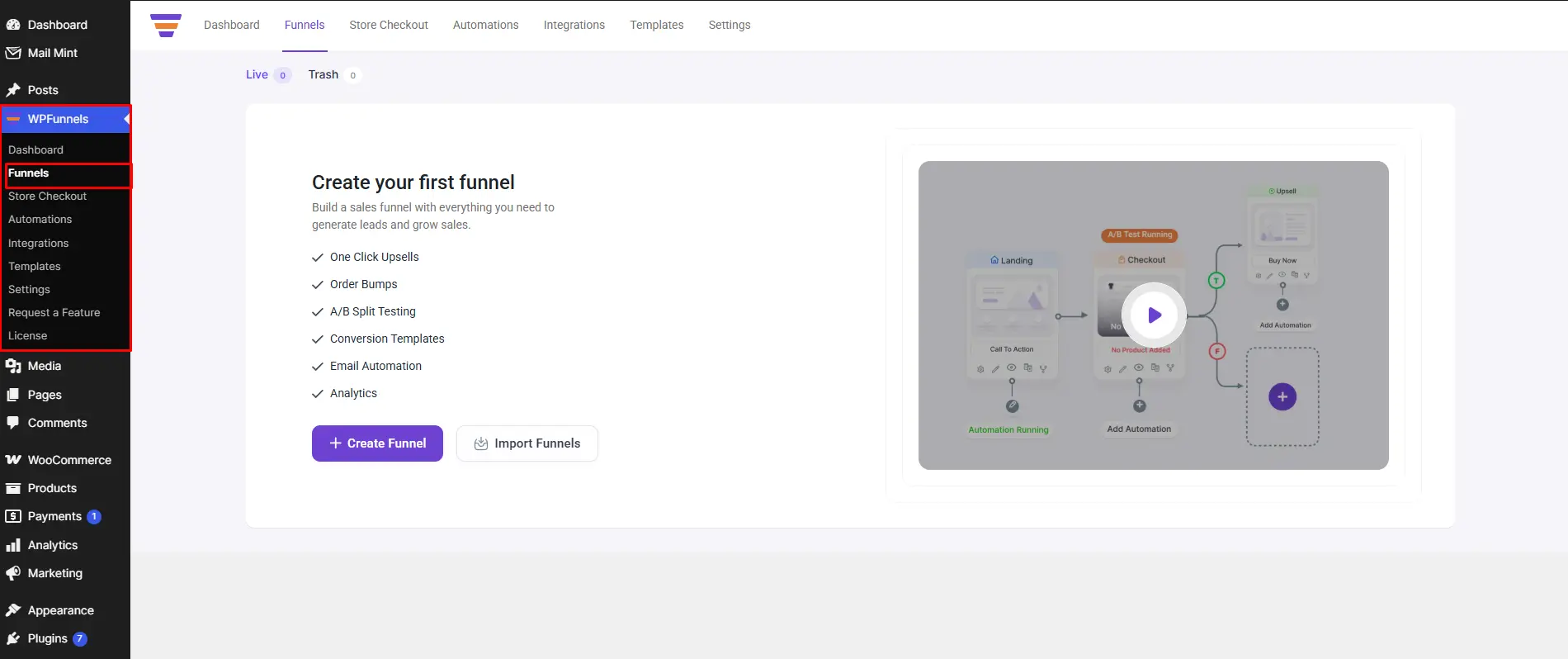
Go to WordPress Admin → WPFunnels → Funnels (the menu sits between Posts and Media in the sidebar).
- If this is your first funnel, you’ll see a “+ Create Your First Funnel” button in the center of the screen, along with another button called Import Funnels.
- If you already have funnels, look for “+ Add New Funnel” in the top-right corner instead.
Click on the “+ Create Your First Funnel” or “+ Add New Funnel” whichever stage you are, and it will take you to the next stages, which is “Choose a Funnel Template”
Step 2. Import a Funnel Template
On the Templates page, use the “Sales Templates” dropdown at the top, and pick All, Free, or Freemium.
- Scroll until you find the Weight Loss – Pro Gutenberg template.
- Hover over it, and two buttons appear: Preview and Import.
- Click Import.
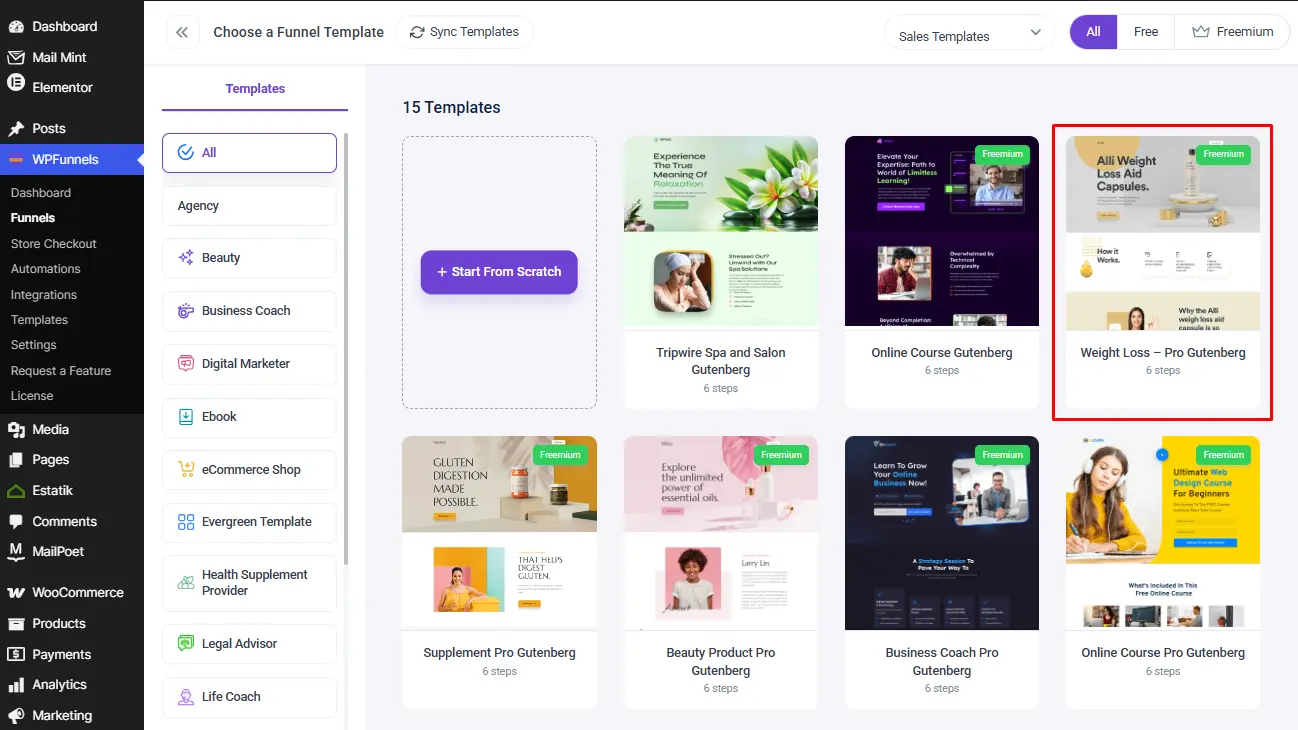
This template comes with 6 pages already linked together: a Landing page, a Checkout page, an Upsell page, a Downsell page, and two Thank You pages.
You don’t need to worry about what Upsell and Downsell mean right now. The next two steps delete most of these pages, so only two are left in the end.
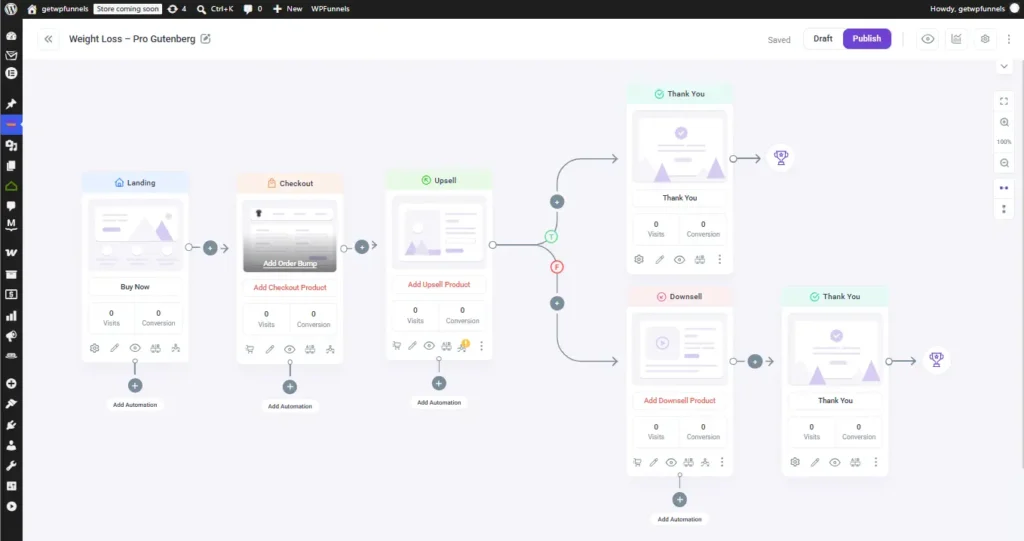
Step 3. Remove the Landing Page
On the canvas, move your mouse over the Landing page card. A small ❌ appears in its top-right corner.
- Click it, and a small box pops up asking “Are you sure to delete this step?” with two buttons: Yes and Cancel.
- Click Yes.
The Landing page disappears, and Checkout becomes the very first page in your funnel.
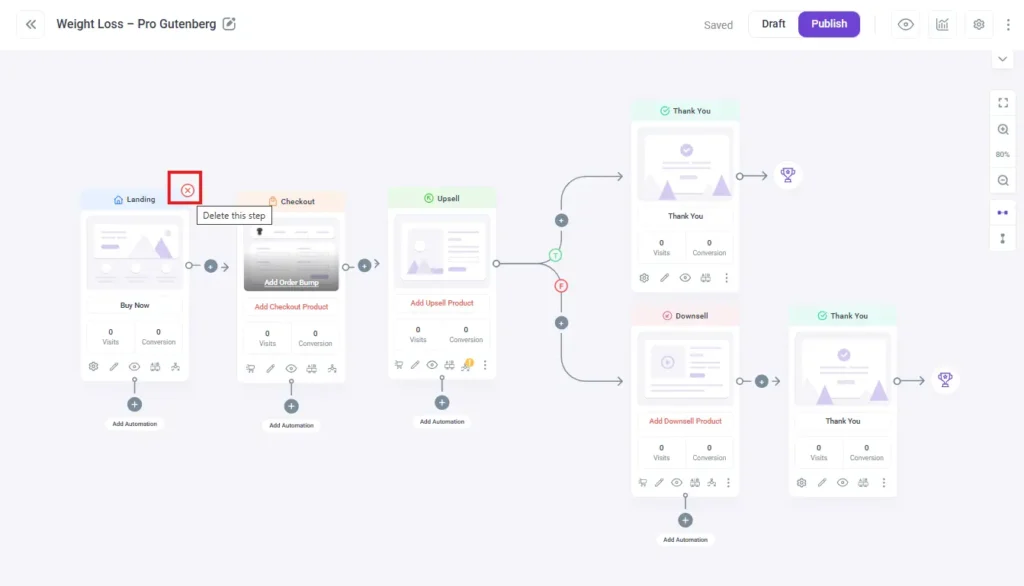
Step 4. Remove the Upsell and Downsell Pages
A one-page funnel only needs two pages: Checkout and Thank You. So the Upsell and Downsell pages need to go too, the exact same way you removed Landing.
- Hover the Upsell card, click its ❌, then click Yes.
- Hover the Downsell card, click its ❌, then click Yes.
These two pages each had their own Thank You page attached, so you might now see two Thank You pages left on the canvas.
If you do, delete the extra one the same way, until only one Thank You page remains.
Once you’re done, your canvas should show exactly two pages: Checkout → Thank You.
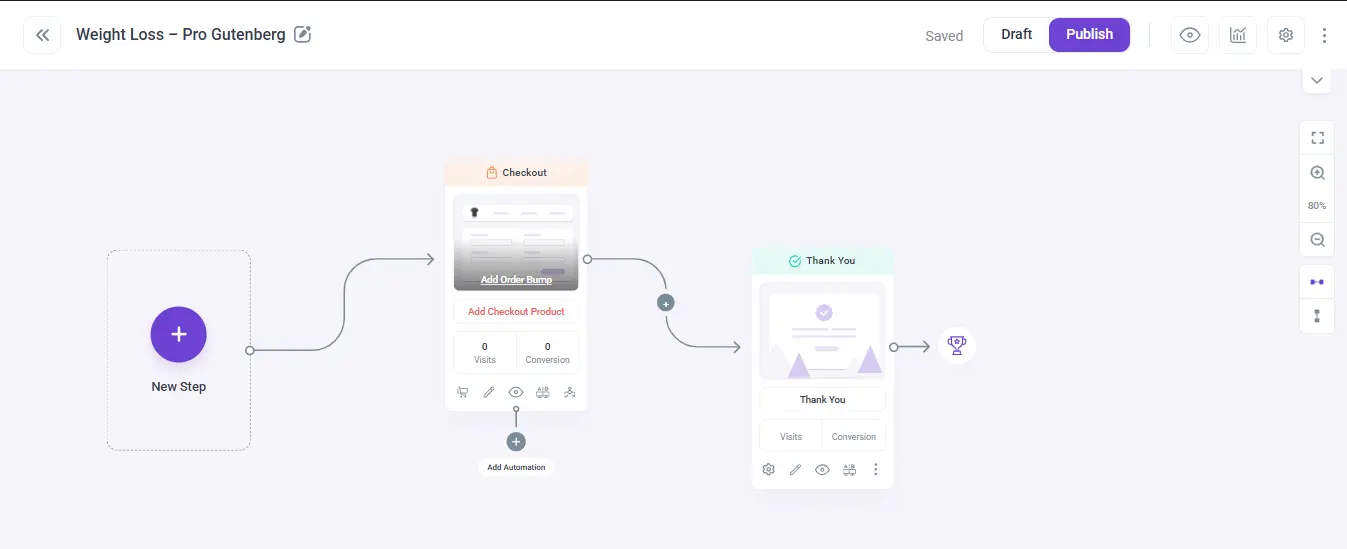
Step 5. Add Your Product to the Checkout Page
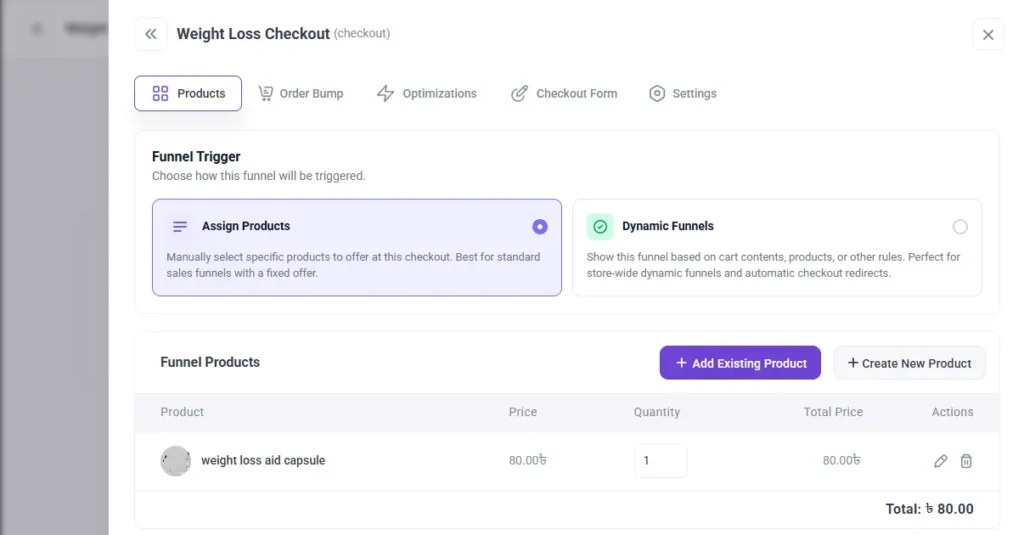
On the Checkout card, click the red “Add Checkout Product” link, or the cart icon in the row of icons at the bottom. Both open the same settings box, landing on the Products tab.
- This opens on the Products tab.
- Search for your product by name, select it, and click + Add Product.
- Click Save Changes.
Your product is now the thing people will actually buy on this page.
If you’re selling a digital product, remove unnecessary fields like the shipping address.
You can do this with WPFunnels’ built-in checkout field editor, or use Checkoutify if you want more control over the layout.
Step 6. Design the Checkout Page
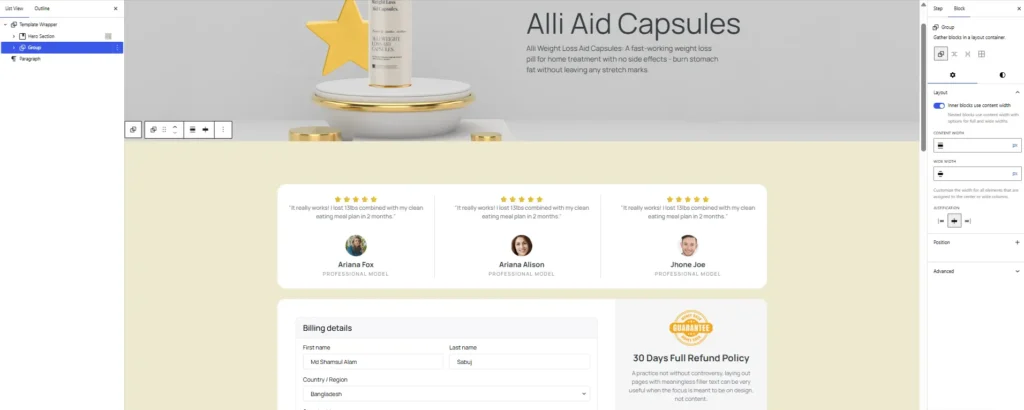
Click the pencil icon on the Checkout card. This opens the page in Gutenberg, where you can build it like a normal page.
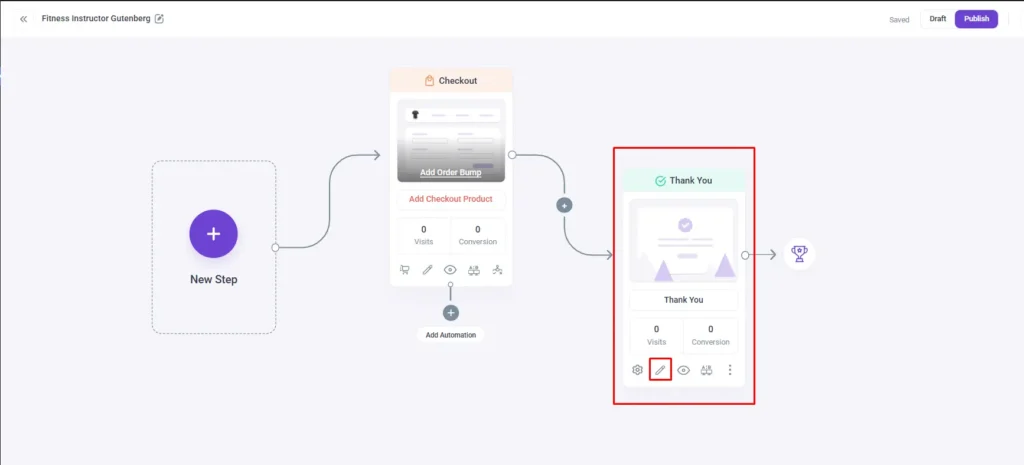
- Add a headline at the top that explains what the buyer gets.
- Add proof underneath: a review, a star rating, or a photo of the product.
- Keep the checkout form as the WPFunnels checkout block. Don’t replace it with a random form.
- Add one short line near the buy button promising a guarantee, like “30-day money-back guarantee.”
Headline formulas to test:
- “[Outcome] Without [Common Pain Point],” for example “Softer skin without the greasy residue”
- “The [Adjective] Way to [Desired Outcome],” for example “The 30-second way to a cleaner kitchen”
- “Join [Number]+ [People] Who Already [Result],” for example “Join 4,000+ people who already switched”
Save or update the page once you’re happy with how it looks.
Step 7. Remove Fields You Don’t Need
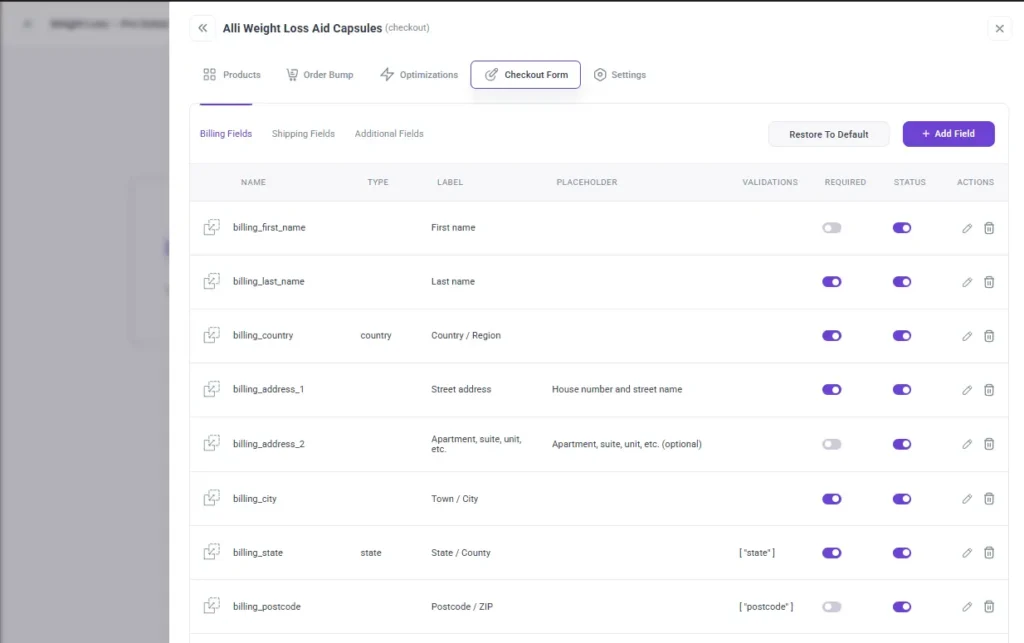
Open the same settings box from Step 5, and click the Checkout Form tab. You’ll see three sections: Billing Fields, Shipping Fields, and Additional Fields.
- For any field you don’t need (like a shipping address for a digital product), either switch its Status toggle off or click the trash icon next to it to remove it completely.
- If you make a mistake, click Restore to Default to bring everything back.
Once your form only asks for what you actually need, you’re ready for the next step.
Step 8. Add Your Order Bump
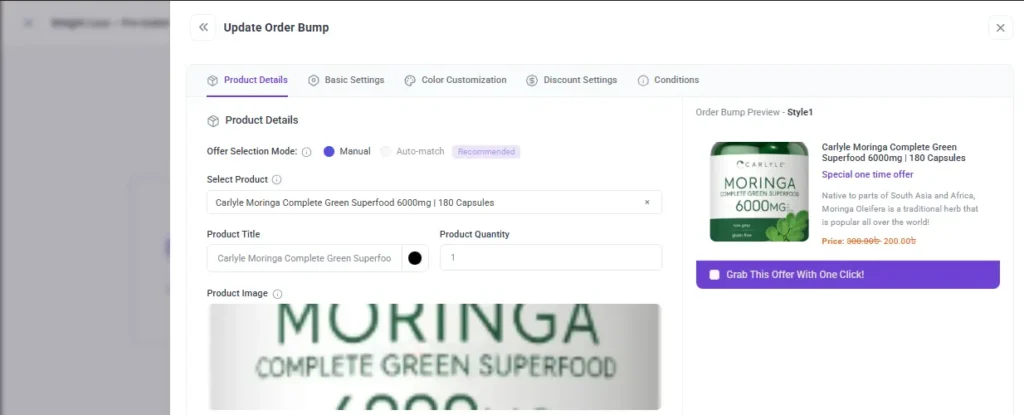
On the Checkout card, click “Add Order Bump. This opens the same settings box on the Order Bump tab.
- Pick a smaller, related product, set its price or discount, and choose how it looks on the page.
Order bump copy formulas to test:
- “Yes, add [Product] to my order for just $[X],” written in the buyer’s own voice
- “Complete your [main product] with [bump product], save $[X] today”
- “[X]% of buyers add this too,” only if you have a real acceptance-rate number to back it up
Save your changes. Now, right at checkout, buyers will see a small checkbox offering this extra item.
Step 9. Design the Thank You Page
Click the pencil icon on the Thank You card to open it in Gutenberg. Keep it short: just confirm the order went through.
- Add one line telling them what will happen next (like “Your order will ship in 2–3 days” or “Check your email for the download link”).
- Save or update the page once it’s ready.
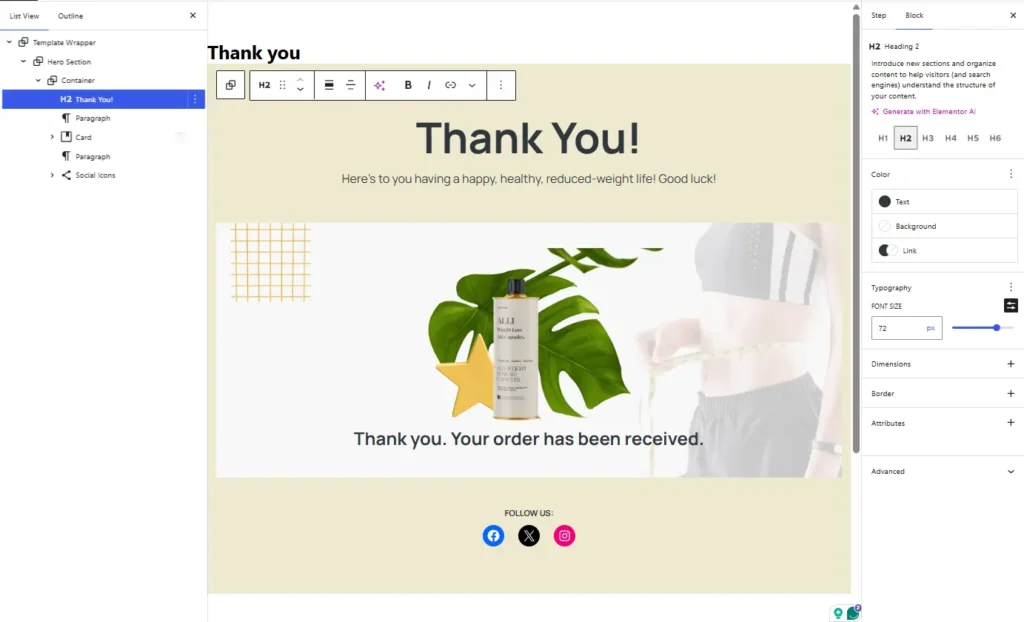
Step 10. Check the Whole Funnel
Click the eye icon on the Checkout page, or publish the funnel and open the live link.
- Walk through it like a real buyer would: read the headline, see the proof, check out, see the order bump, land on the Thank You page.
- Make sure there’s nothing extra in between. No landing page, no upsell, no downsell. Just checkout, then thank you.
That’s it. Your one-page funnel is done: two pages, Checkout and Thank You, doing all the work that three or four separate pages used to do.
Now, before sending traffic to your funnel, create another version of your checkout page and run an A/B test to compare headlines, layouts, or offers.
Once your funnel is live, connect Mail Mint to automatically recover abandoned carts and send post-purchase email sequences.
Pro Tip: Launch the basic Checkout → Thank You funnel first. Once it’s converting consistently, test headlines, order bumps, and email automation one improvement at a time.
Why Cutting a Step Beats Adding a Page
The core difference between a one-page funnel and the traditional version comes down to where the pitch lives and what happens after checkout:
| Traditional Multi-Step Funnel | One Page Funnel | |
|---|---|---|
| Structure | Landing Page → Checkout → Thank You | Checkout → Thank You |
| Where the pitch lives | A dedicated landing page | Built directly into the checkout step |
| Best for | Multiple SKUs, tiered pricing, or purchases that need comparison | A single clear product with a fast buying decision |
| Revenue mechanism | Usually, just the initial sale | Order bump built in at checkout |
| Setup effort | More pages and copy to write and maintain | Fewer pages, faster to launch and test |
| Main risk | An extra step gives buyers a reason to leave before paying | Not enough proof on the page if the product genuinely needs more explanation |
Here’s what that difference is worth in real numbers, and it holds at more than one price point.
Take a $50 physical product first. Your old 3-step funnel converted at 3% on paid traffic. Out of 1,000 visitors, that’s 30 orders.
- Old funnel (Landing → Checkout → Thank You): 1,000 visitors × 3% = 30 orders = $1,500
- New funnel (Checkout → Thank You): 1,000 visitors × 4% = 40 orders = $2,000
Now run the same math on a $79 digital course, a different product type entirely, at the same conversion lift:
- Old funnel: 1,000 visitors × 3% = 30 orders = $2,370
- New funnel: 1,000 visitors × 4% = 40 orders = $3,160
The lift holds regardless of what you’re selling, because it’s not coming from a better pitch. It’s coming from one fewer page-load between interest and payment.
You haven’t changed the offer or the price in either case. You’ve just removed one click.
Then there’s the order bump you added in Step 8. That’s revenue a landing page never touched at all, stacked on top of the step-removal gain above.
Good to Know: A one-click upsell can add even more on top of this once your base funnel is proven, since it earns money from buyers who already said yes once, with no new visitors or ad spend needed. That’s the “add-on later” move covered in the Pro Tip above, not part of the core build.
Cart abandonment sits at just over 70% industry-wide, according to Baymard Institute’s meta-analysis of independent checkout studies. Unexpected costs and a complicated checkout are consistently named as the top reasons.
Every extra page, field, or click between “add to cart” and “order confirmed” gives a buyer one more chance to close the tab.
Bottom Line: The revenue gain isn’t coming from better persuasion. It’s coming from removing a step, then adding an order bump on top of that. Both effects compound instead of competing, and they hold up across different products and price points.
Understanding why this works is one thing. Most of that value still gets lost in the same handful of ways every time someone builds one of these, which is exactly where to look next.
The One Page Funnel Mistakes That Quietly Kill Your Conversion Rate
Building the coaching-funnel version instead of the WooCommerce version is the most common one. Adding a video sales letter and a countdown-timer discount to a $35 product that never needed persuasion just adds a step it didn’t need.
Cutting checkout fields that WooCommerce actually needs is the second. Digital products don’t need a shipping address, but physical products absolutely do.
Cutting that field doesn’t reduce friction. It breaks fulfillment.
Skipping the order bump entirely is the third, and it’s the one with the clearest revenue math behind it. A one-click upsell is different. That’s a deliberate next step once the base funnel is converting, not something you’re missing at launch.
Never checking mobile rounds out the list. A large share of WooCommerce checkout traffic arrives on a phone, and a checkout that looks clean on a monitor can be unusable on a small screen.
Related to that, treating the thank-you page as done the moment it says “thank you” wastes real estate you already have a buyer’s attention on. Use it for delivery instructions or a repeat-purchase nudge.
Remember: Before you launch, walk through your own funnel on a phone, as a buyer, from ad click to thank-you page. Most of these five mistakes show up the moment you do that once, honestly.
Once your build is clear of these, the only way to know for certain whether it’s actually earning its keep is to watch the right numbers, not your overall store sales.
How to Know If Your One Page Funnel Is Actually Converting
Don’t judge a one-page funnel by general site traffic or overall sales for the month. That mixes in every other channel and product you have.
Track it at the funnel level instead.
Start with your checkout completion rate, the percentage of people who reach the checkout step and actually finish the order. Pair it with your order bump acceptance rate.
If that’s low, the bump product isn’t relevant enough to what’s already in the cart.
For this base build, the average order value is mainly a function of your order bump’s acceptance rate. Compare it before and after the funnel goes live.
If you later add a one-click upsell, track its acceptance rate separately, since it’s a different moment in the buying decision.
WPFunnels’ built-in funnel analytics track all of this per funnel, so you’re comparing the one-page version against your old multi-step funnel directly.
Bottom Line: If checkout completion rate improved but average order value didn’t move, the fix is the offer, not the page, so adjust your bump before touching the checkout design again. If both improved, the funnel is doing its job.
If AOV is a metric you want to understand properly, not just track, “What Is AOV And Why It’s Crucial for WooCommerce Revenue Growth” covers how to calculate it correctly in WooCommerce and what actually moves it.
Final Thoughts
A one-page funnel isn’t a persuasion trick borrowed from high-ticket coaching offers. For a WooCommerce store, it’s what’s left after you strip out every step that isn’t earning its place between “interested” and “paid.”
You’ve now got the full path: confirm the fit, build it around the product you’re already selling, understand why it works, avoid the handful of ways it usually goes wrong, and measure it at the funnel level instead of guessing.
Ready to try it?
Install WPFunnels free, pick your best-selling product, and build the two-step version (Checkout → Thank You) before you touch anything else. It’s the fastest way to see whether this is worth doing for your store.
Frequently Asked Questions
Does a one page funnel need a video sales letter?
No. A VSL is built for high-ticket, high-consideration offers where a buyer needs to be walked through a decision. For most WooCommerce products, a clear product photo, an honest review, and a straightforward guarantee do the same job.
How is a one page funnel different from a normal WooCommerce checkout?
The default WooCommerce checkout is just a payment form. A one-page funnel builds the pitch, proof, and offer into that same page, and adds an order bump at the point of payment. A one-click upsell can be layered on afterward, but it isn’t required to make the funnel work.
What kinds of WooCommerce products work best for this?
Single-SKU physical products and single-tier digital products in a price range where buyers can decide quickly. A review or two and a plain guarantee are usually enough proof. Products that require real comparison between options are a weaker fit.
Do I have to remove the landing page completely, or can I keep a shortened version?
You can do either. Some stores remove it entirely and route straight to checkout. Others keep a short scroll above the checkout form with a couple of proof points. What makes it a one-page funnel is that there’s no separate page between the offer and checkout.
How do I know if my one page funnel is actually working?
Compare checkout completion rate and order bump acceptance rate before and after switching from a multi-step funnel, using funnel-level analytics rather than general site traffic numbers.
Can I combine a one-page funnel with abandoned cart recovery?
Yes, and it’s worth doing. A one-page funnel reduces how often people abandon it in the first place, but it won’t get you to zero. Connecting Mail Mint lets you follow up automatically with anyone who still doesn’t finish.