In 2026, you already know that e-Commerce is super saturated. Buyers have countless options, and you have to work extra hard to stay relevant among the competition.
But that’s not the main challenge. What most online stores are struggling with today is staying profitable or at least staying break-even.
You can see large brands like Amazon or eBay showing off their billion-dollar success. How often do you hear local e-commerce brands making the headlines?
Here’s the illusion: You will always see stats showing that the industry grew by trillions every year, but they don’t tell you that over 90% e-commerce startups shut down within the first 120 days. And about 50% of the rest die out in the next 5 years.
Why? The main reason is that they have poor cash flow management and a lack of profit growth tactics.
They mostly focus on getting the number of sales or getting exposure through discounts, paid ads, press releases, SEO, etc.
But that’s the wrong approach. A store should first make sure it is optimized for more revenue at less cost.
And the first step to do that is to focus on increasing Average Order Value (AOV).
TL;DR – Using Upsell Funnel For WooCommerce
Upsell funnels guide buyers to purchase more or upgrade instead of ending at one product
They work by showing relevant offers at the moment of highest buying intent
The goal is simple: increase average order value (AOV) without needing more traffic
Common funnel steps include checkout → upsell → downsell → thank you page
One-click upsells remove friction and boost conversions significantly
You can add offers at multiple stages: before, during, and after checkout
Typical upsell types: product upgrades, bundles, add-ons, or discounts
A well-optimized funnel can increase revenue by 10–30% per order
The key to success is relevance, timing, and a smooth buying experience
Amazon’s Success Is Not Exposure Or Reach… It’s AOV Growth
While local e-commerce stores struggle, Amazon is making billions every year. But you can’t credit it all to its renowned status. Amazon has actually done something smart that has led it to become the giant they are today.
Ever heard of their famous “Recommendation Engine”? That is the masterpiece Jeff Bezos used to make over 200billion extra in revenue every year. Back in 2013, this engine contributed to 35% of their total revenue.
So what did they do?
Well, they realized that it is possible to maximize profits by focusing on the average order value.
So instead of working on getting more prospects, they put extra effort into making every buyer add more products to their order. So if someone came to spend on a $50 product, Amazon used smart recommendations to tempt the buyer to spend $15-20 more. Meaning, they would make an extra 35% revenue from the same buyer without any extra acquisition cost!
So you could imagine, this extra earnings, minus the product cost, is 100% profit. No acquisition costs. No labor costs. No extra Ads Spend.
That’s exactly what you should focus on doing.
But it’s not 2013. So the same recommendation engine won’t be as effective. However, the concept of focusing on increasing AOV is still your best bet in getting more profits.
Instead, now, you should use a sales funnel tactic for e-commerce, which we like to call “upsell funnel”.
This is a special funnel that takes buyers into a custom checkout journey where you make relevant offers as upsells either during checkout or after checkout.
(This is an upselling strategy, but you can always combine it with a cross-sell tactic where you offer a complimentary product as order bumps on the checkout page, and an upgrade or bundle as a post-purchase upsell offer.)
No, I’m not talking about single funnels for each product. I am talking about dynamic sales funnels for your entire WooCommerce store.
And moving forward, you will learn exactly how you can implement this in your own WooCommerce store.
Upsell Funnels For WooCommerce
Normally, when you think of upsell, you think it’s either suggestions around the store or emails with an option to upgrade a subscription plan. While those are true, for eCommerce, upsell truly means any offer that can increase the current spending amount with a better alternative.
For example, if someone is buying a t-shirt, you could offer a bundle of 3 t-shirts at a discount to upsell the user into getting the more expensive package.
It sounds so simple. But the real challenge is knowing when to make upsell offers and how to make them desirable.
For example, the guy who was buying a t-shirt, if you were to offer him a pair of shoes instead just because it costs more, that wouldn’t make sense, right? I mean, he is here to buy a t-shirt, not shoes. It doesn’t match his buying intent or purpose.
Also, let’s say the guy is browsing a watch, and on the sidebar, you suggest to him the bundle of t-shirts. The buyer would, most likely, ignore it because he is there to buy the watch. (Some buyers will check out the bundle if the discount is great. But then you would fall into the same “low profit margin” trap.)
So, you have to decide when it is the most profitable moment to offer an upsell. And after digging through this topic for the last couple of years, I have come to this conclusion:
There are only 4 ways to offer an upsell without losing profits:
On the checkout page This is right when the buyer has shown his/her intent and is ready to spend money. The product could be a better alternative or a bundle.
Right after purchase, but before confirmation By now, the payment is done, and you’ve already made some money. Plus, the buyer is in decision mode. Again, the product could be a better alternative or a bundle.
Via follow-up email after purchase. This won’t be a literal upsell. But you can offer to take the bundle minus the product he already bought, with a compact discount on the total.
Via retargeting ads into a landing page Similar to the follow-up email, you could make this only for buyers of certain products to get a bundle minus what they already bought, at a significant discount.
And the products you offer at the moment are also crucial, as I explained in the example above.
So, you need to decide what product to offer as an upsell and when to offer it for the funnel to work.
How To Implement Upsell Funnels In WooCommerce Without Technical Overwhelm?
Here comes another challenge. Your WooCommerce setup doesn’t, by default, allow your to set up order bumps or post-purchase upsells.
So, when we think about funnels for WooCommerce, what comes to mind are plugins that let you manually add offers for every product, or create custom sales funnels for single products, and so on. (And you will find plenty of plugins that lets you do this.)
But that is quite time-consuming, and frankly, inefficient.
For how many hours do you think you can invest in setting up offers for every product? That’s a huge hassle, given that you could be importing new products every now and then, and products could go out of stock, and so on.
But here’s where WPFunnels will come to play.
What if you could set up conditions for a certain group of products, like a specific category, and make relevant offers?
For example, if you are selling books, then, for an action genre, you could craft a single bundle. And then set that as the upsell offer for all books that people buy in the action category.
You could also think of creating personalized sales funnel offers based on quantity, amount spent, etc.
These would make the offers more acceptable and meaningful for buyers, right?
With WPFunnels, you can set up such conditional WooCommerce funnels for your WooCommerce store and control everything from a single visualized dashboard.
You won’t have to sit hours defining product-to-product offers, and you won’t need to worry about any complex setup. Simply define conditions and let the plugin handle the rest.
You will get to set up conditions such as product category, cart total, quantity, shipping country, price range, and many more, based on which, a buyer will enter the funnel and get custom offers.
For example, if you use the condition “Enter Funnel If Product Category is Clothing”, then any buyer who has a product in the cart from the category ‘Clothing’ will enter a sales funnel with a custom checkout page where you can make conditional dynamic offers as order bumps and post-purchase upsells.
Likewise, you can use all other conditions to make meaningful sales funnels that will apply to your whole WooCommerce store.
You won’t have to manually create funnels for every product (although you can do that if you want to) or manually assign upsell and downsell products by editing each product. Everything can be done from a single funnel canvas.
In the next section, we will look at a few proven tactics to grow sales for eCommerce stores. And most of them can be easily applied in WooCommerce using WPFunnels.
Proven Upsell Funnel Tactics For Your WooCommerce Store
Before you learn how you can set up proper ecommerce sales funnels in your WooCommerce store, let us look at some upsell funnel tactics that are proven to work for any eCommerce business.
These are tactics that will help you attract buyers to spend more, and later in this article, you will see how easy it is to set them up in WordPress.
Tactic#1 – Relevant Offers Based On Category (Combination of cross-sell and upsell)
Since we are talking about dynamic sales funnels for the whole store, one of the best approaches would be to make offers based on the product category.
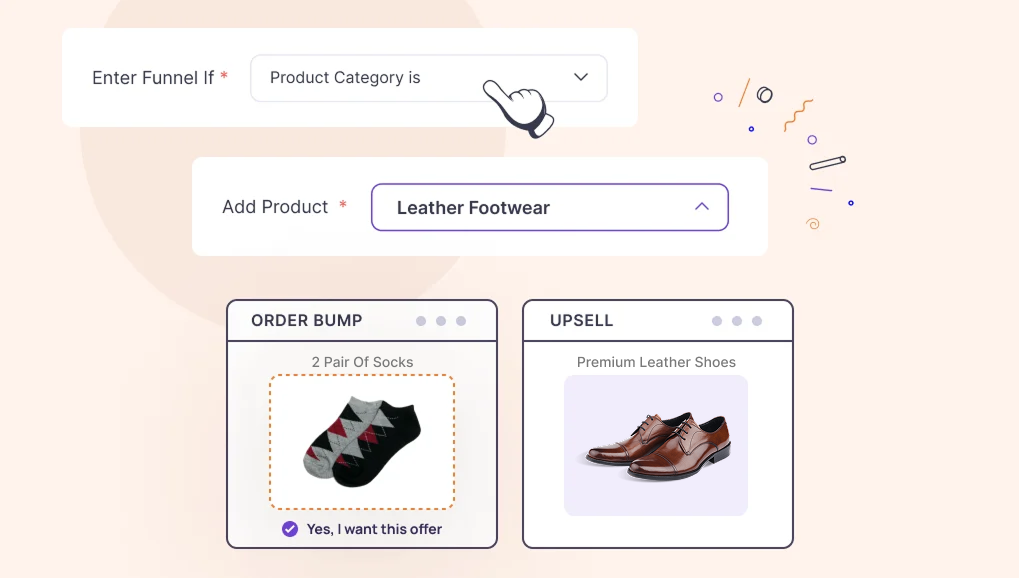
Let’s say you have a product category “Leather Footwear” where you sell shoes, sandals, and other accessories for them.
So you can create a conditional funnel so that if someone has a product in the cart that falls under the category, “Leather Footwear,” he/she will enter the funnel.
Here, set up an order bump offer for a related product, for example, 2 pairs of socks, at a 10% discount (cross-selling). So if someone has a Leather shoe in the cart, they can get 3 pairs of socks by accepting an order bump offer at checkout.
Then set up a dynamic upsell offer after checkout, with the condition “Best-selling product in the same category.” This will offer the buyer to buy the top-selling leather shoe in your store, besides what he has already purchased.
So, once someone has gone through checkout, you have already made some money. Immediately, he will get an upsell offer for a product that is selling well in the same category. And if the buyer chooses to take the offer, you make more money from the same buyer.
Here, the challenge is to set up your store with proper categorization. If you have relevant products added in the right category, your funnel will always be meaningful and, in most cases, trigger more sales from the same buyer.
Tactic#2 – Set Up A Purchase Target To Get Discount Offers (Spending bump and post-purchase upsell)
This is a tactic that has been working for years in large online shops.
The idea is that you can mention to your buyers that they will get special discounts and offers if they purchase products worth a certain amount.
Based on that, when the target is achieved, the buyer will enter a custom funnel checkout that will include the discount. (You could even offer a coupon, free shipping, or a small gift.)
And then on the same flow, after the payment is made, you can set an upsell offer with the condition “More quantity of the same product,” and maybe offer a small discount to get 3 of them instead. (This will be applied to the first product the buyer has in the cart.)
For example, let’s say you set a spending threshold of $100 to get 10% off on the total.
So the buyer comes to checkout with $100 worth of product and gets to checkout with $90 (10% off).
Immediately after, he is taken to the upsell page. (Let’s say one of the products in his cart was a box of chocolates.)
Now, in the upsell offer, the buyer will see an offer on 3 chocolate boxes at 15% off.
This way, not only will the buyer spend more on their initial purchase to get the reward, but you also have a chance to make them spend even more with a meaningful post-purchase upsell.
This funnel works really well because people love discounts. And setting up a purchase target motivates buyers to spend more than what they’ve initially intended.
This approach will also give you the opportunity to use banners on the Home page to promote this offer so that more and more buyers try to hit the cart-total target and get a discount. They will save some money, while you will generate more revenue from every buyer.
Tactic#3 – Make Quantity-Based Offers to Sell More (Quick upsell strategy)
Much like the cart total target, a quantity target is also very effective, especially for daily needs and food products.
This funnel will motivate buyers to add more quantities to the cart so that they can enjoy the special discount.
Let’s say you own an online chocolate shop. You may announce to your buyers that if a person buys 5 or more of any product, he/she will get a 5% discount on the whole cart.
In this case, create a funnel with the condition “Enter funnel if product quantity is greater than 4”. Then assign a special 5% discount to the cart.
So, let’s say a buyer added 5 Kitkats to the cart worth $2 each, and 2 Twix bars at $1.8 each, his cart total will be $13.6, but as he will enter your funnel, he will get a 5% discount to pay $12.92.
Once the buyer goes through checkout, you can then set up a dynamic offer of “Random product in the same category.” You can offer this at a 5% discount.
So after checkout, your buyer will be offered another chocolate at a 5% discount.
If you choose to go with this approach, then you need to make sure you have products in your shop that will be affordable for your target niche, even when buying higher quantities.
‘Targets’ to get discounts and special offers are always exciting and always seem to work well.
Tactic#4 – Special Funnel For The Best-Selling Product (Multiply with what’s already selling)
One smart approach that worked for many is to set up a sales funnel specifically for your best-selling product.
Let’s say you sell t-shirts and the ‘Iron Man T-shirt’ is the highest-selling product in your store.
You can then set up a sales funnel for that t-shirt and offer other Avengers t-shirts on the go.
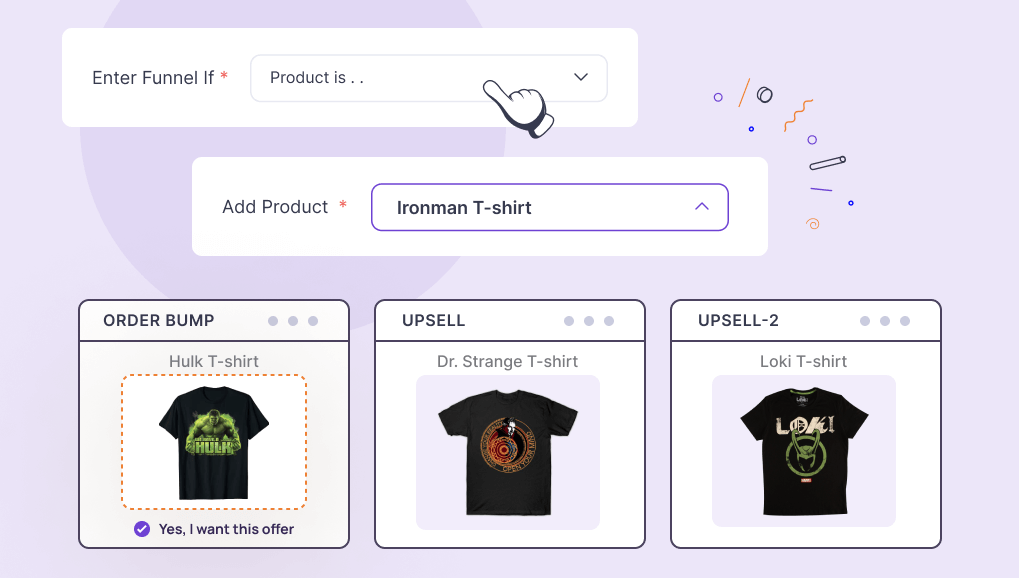
Here, create a funnel with the condition “Enter funnel if Specific Product is Iron Man t-shirt”.
Then set up an order bump offer with the product “Hulk t-shirt”.
Next, create an upsell offer after checkout with 5 Avengers’ t-shirts (maybe “Spiderman t-shirt”, “Dr. Strange t-shirt, “Captain America t-shirt”, “Thor t-shirt”, and “Black Panther t-shirt”, all bundled into a single package) with a 10% discount.
If they reject it, set up a downsell offer with the “Dr. Strange t-shirt” only at 5% off.
And end with a final downsell offer on a “Loki T-shirt”, giving a 5% off.
Since people are already buying your “Iron Man T-shirt”, you do not need to go for any extra discount on it. But you will be able to use it to sell bundles or other products and make the buyer spend more on the go. At the same time, discounts on upsells and downsells will make those offers more attractive and easier for you to convert.
You can create similar funnels for any niche you sell in. This works all the time.
Tactic#5 – Make Combo Offers With Relevant Products (Bundling as upsell)
This is exactly what it sounds like. A person buys a product, and you make a combo offer with other products that go with the same.
For example, create a funnel for the product “Gaming Headset”. Then set up an Upsell offer with a combo of the same headset, a gaming mouse, and a Gaming keyboard, at $30 off.
This means that whenever a person tries to purchase a Gaming Headset, he/she will be offered to purchase 3 Gaming products at once with a $30 discount.
Combo offers are the best way to sell more in restaurants or shops that sell electronic accessories.
When making dynamic offers based on category or quantity, combo offers may not get highlighted often. But you do realize that combo offers are still a good trend. The combo offer strategy is often used in cross-selling, and it can be your upsell as well.
So, for the products that you think can be sold more as combos, you can choose to make sales funnels for specific products with combo offers as post-purchase upsells.
There are more ways you can trigger sales, such as using buy 1 get 1 free, limited-time offers, reward-based discounts based on customer order history, and many more.
It’s totally up to you to decide on creative ways to attract buyers and convince them to spend more through your upsell funnel tactics.
In the next section, you will get a guide to see how you can create a dynamic sales funnel or upsell funnels for your WooCommerce store using one of the tactics above.
How To Create Dynamic Upsell Funnels For WooCommerce Using WPFunnels
Now, let’s jump into the execution part. I’ll show you how you can create a dynamic WooCommerce funnel for your shop, leveraging the special conditional offer features by WPFunnels.
For that, I’ll create an example funnel using a mix of Tactic#4 and Tactic#5 – a special upsell funnel for the best-selling product with a bundle as upsell.
To build this funnel in WPFunnels, you can use the storewide checkout option. Or you can plan to create a separate funnel, including a landing page, that you may want to run promotions around (not available in your store).
Here, I’ll demonstrate using the Storewide checkout feature combined with a conditional upsell funnel journey.
Step 1: Create A Checkout Flow In WPFunnels’ Storewide Checkout Dashboard
Then, during the setup wizard, create a Storewide checkout. (If you are an old user but have the latest update, simply go to the “Storewide checkout” menu on the left and create a checkout flow with one of the custom checkout layouts.)
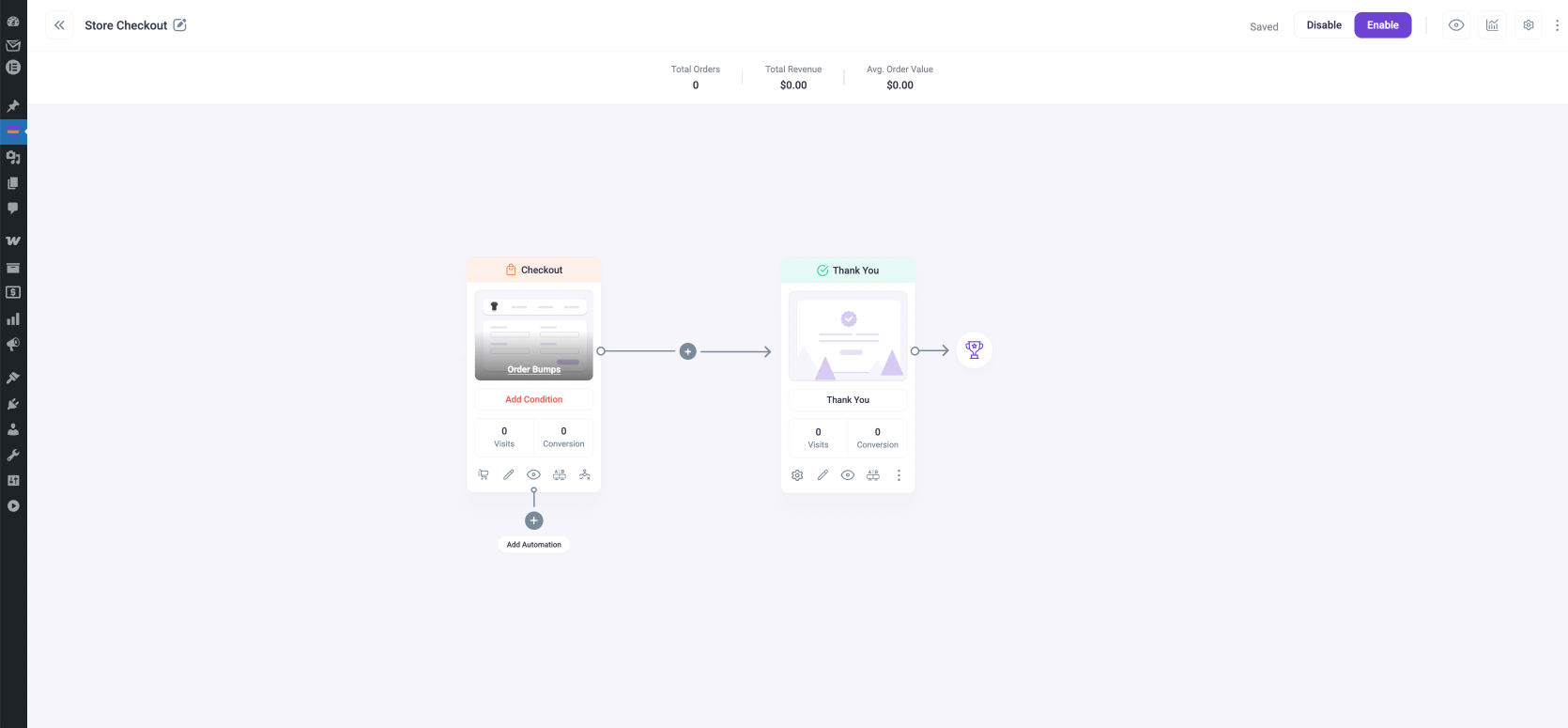
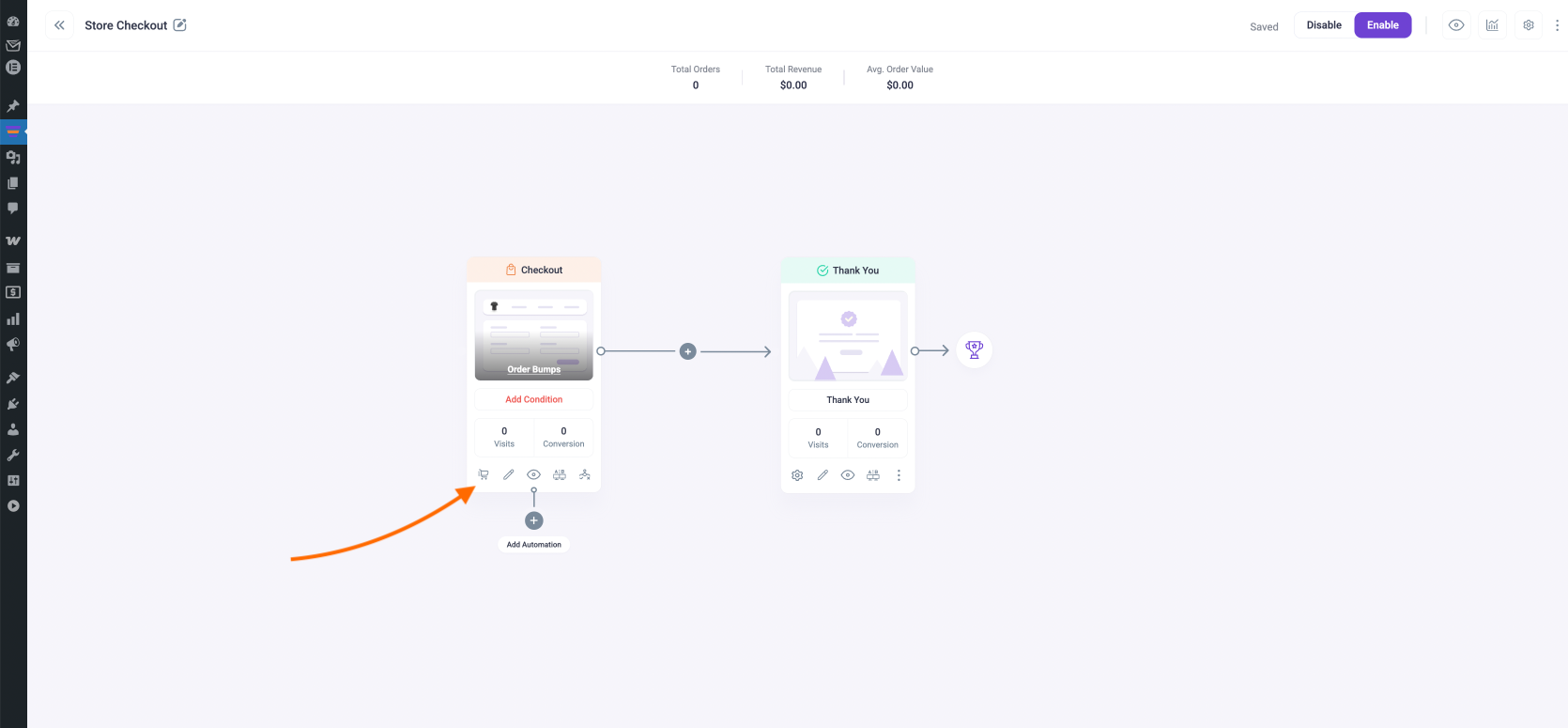
It will give you a visualized checkout flow.
Step 2: Configure The Conditions To Enter The Checkout Flow
You now have a custom checkout page with a much cleaner checkout form than the default WooCommerce checkout.
Now, you need to set the condition to bring in people for the right products.
As per the example in Tactic#4, you are to create this funnel for the best-selling product in the store. And in my store, let’s say that’s a t-shirt.
Click on the Checkout Settings icon on the Checkout Step.
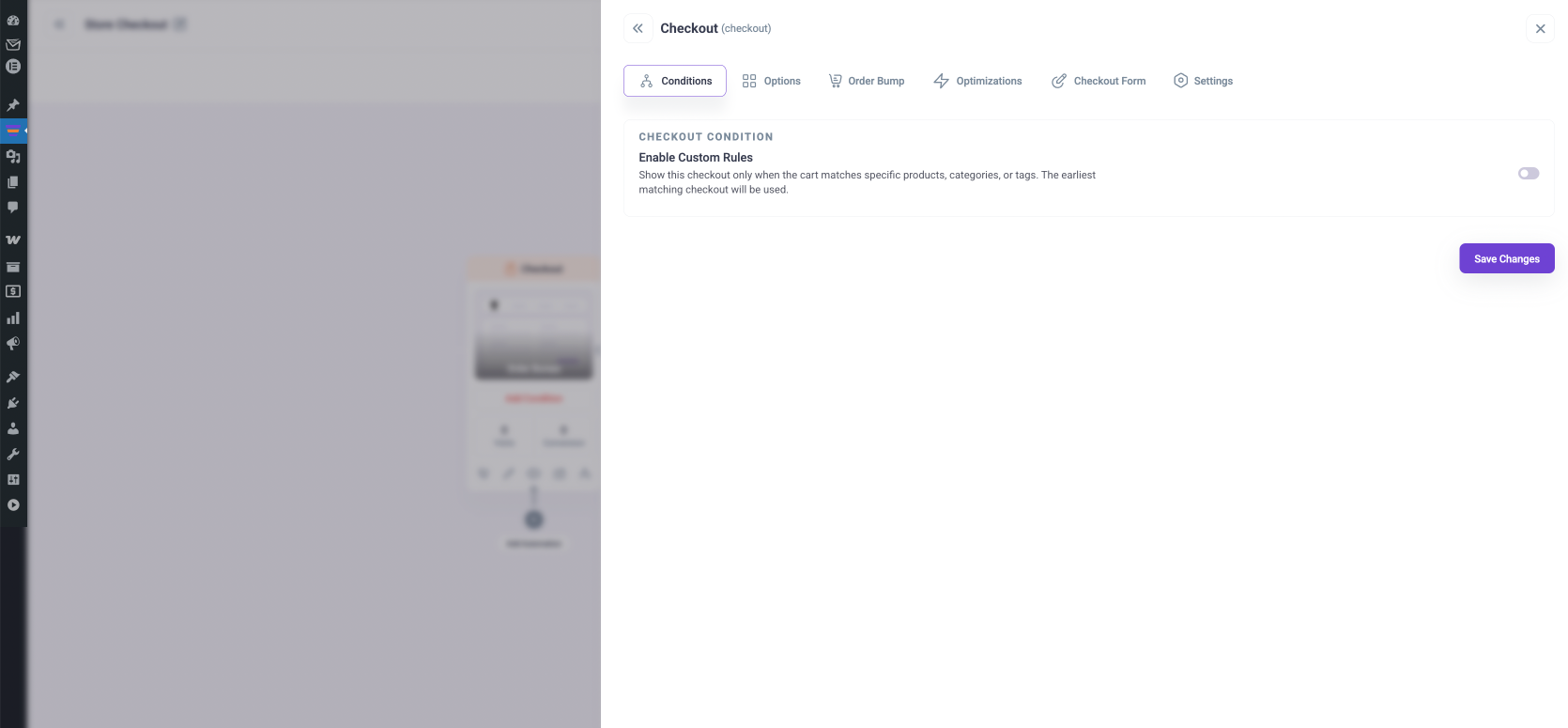
On the Checkout step settings drawer, you will be on the Conditions tab.
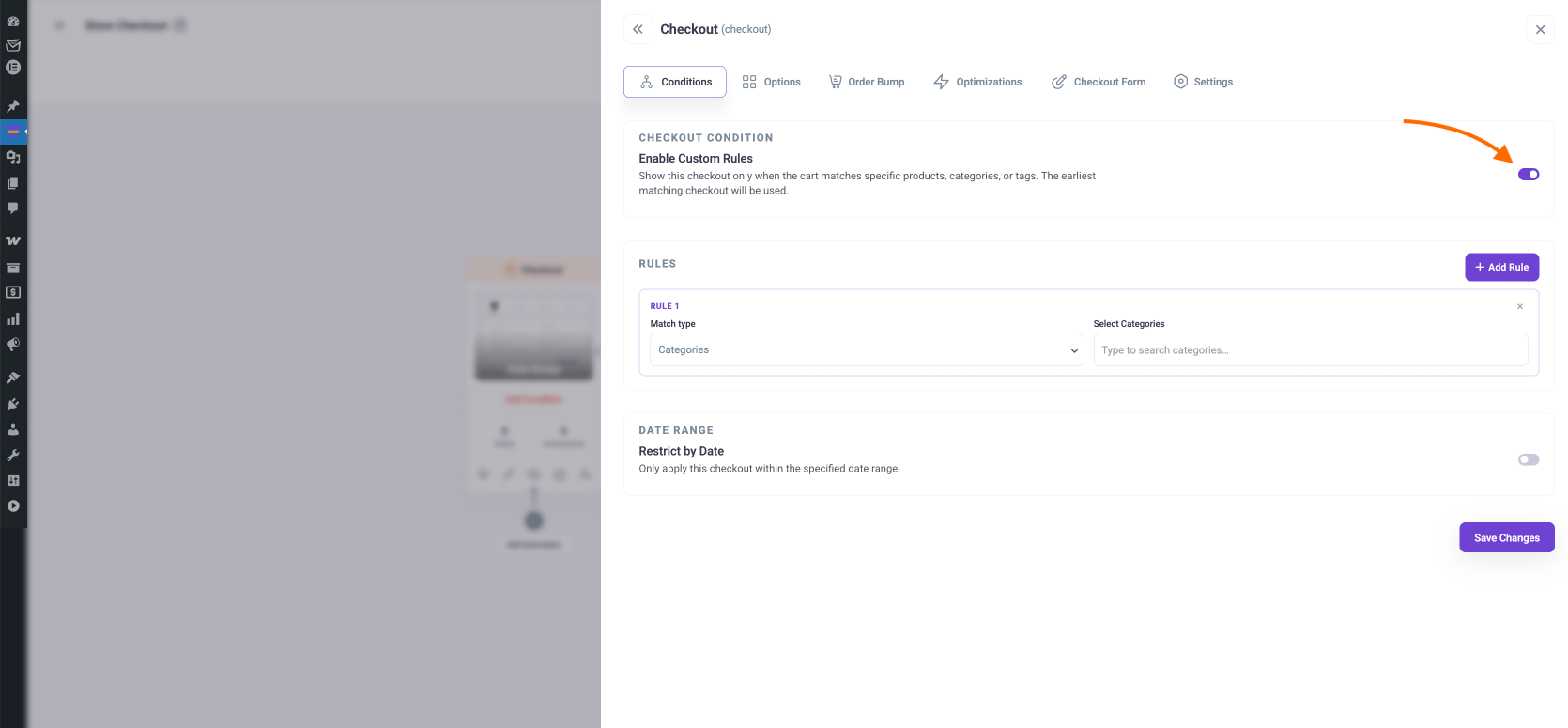
Here, click on the toggle on the right side to Enable Custom Rules
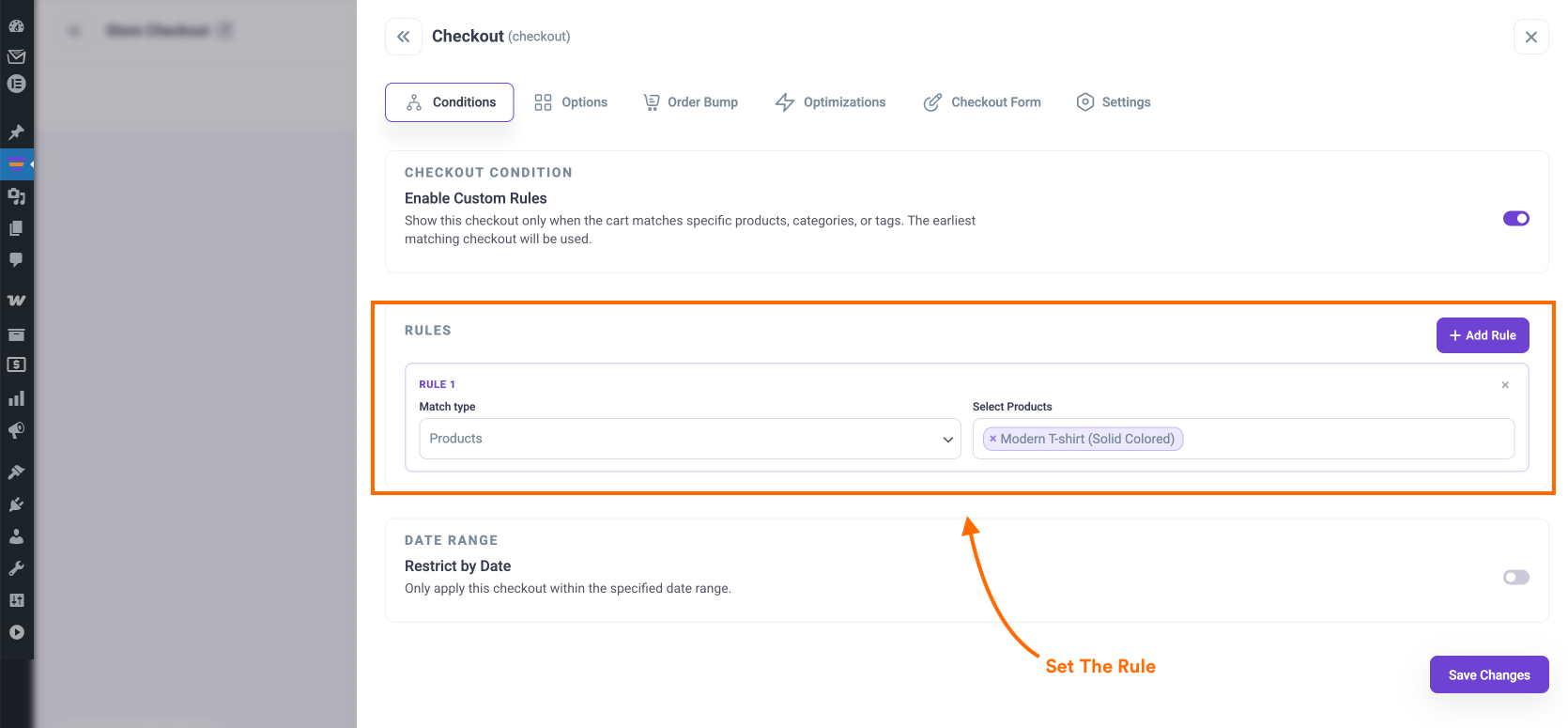
Here, under Rule 1, set the Match Type as “Products” and then under Select Products, search for the product that you know is the best-selling product.
In my case, it’s the Modern T-shirt.
Then click on “Save Changes.” Now, this will act as the default checkout flow for anyone who wants to proceed to checkout for the product you assigned in the Rule.
Step 3: Add An Upsell Offer After Checkout Step
Assigning the upsell is actually quite easy.
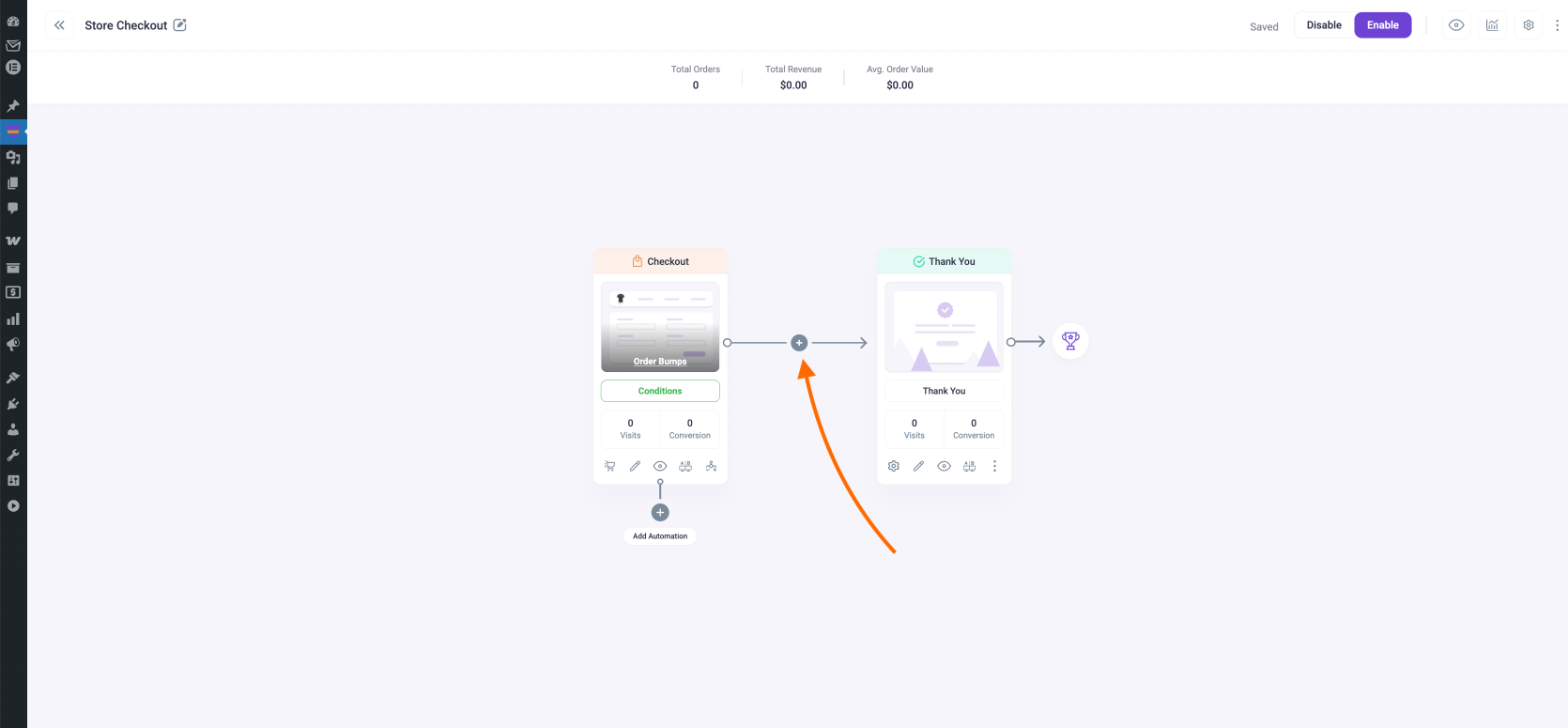
Click on the “+” icon between the checkout step and the thank you page.
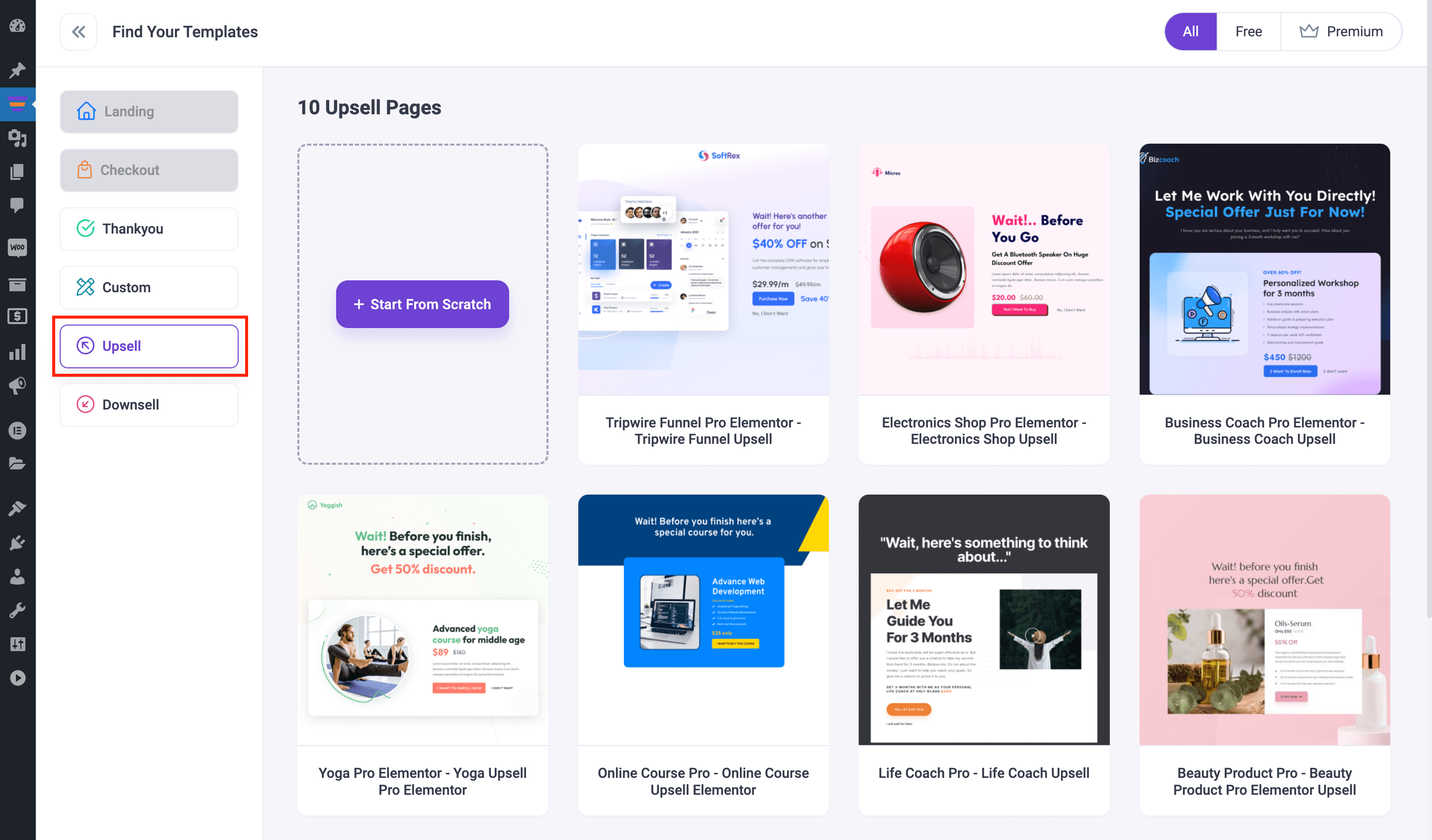
It will take you to the place where you can choose templates.
Here, choose one that you think can be modified easily for your product.
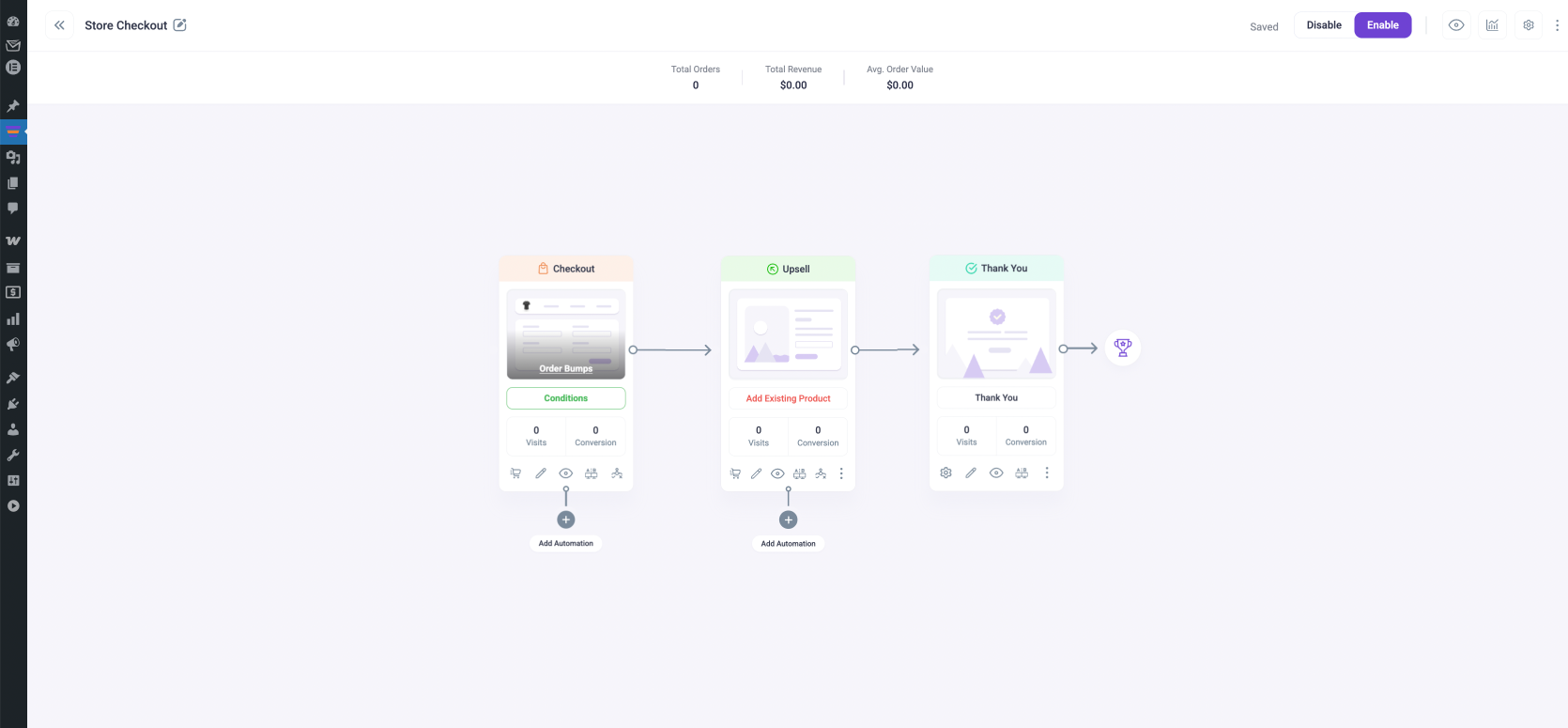
Once you do, the step will be added to the checkout flow.
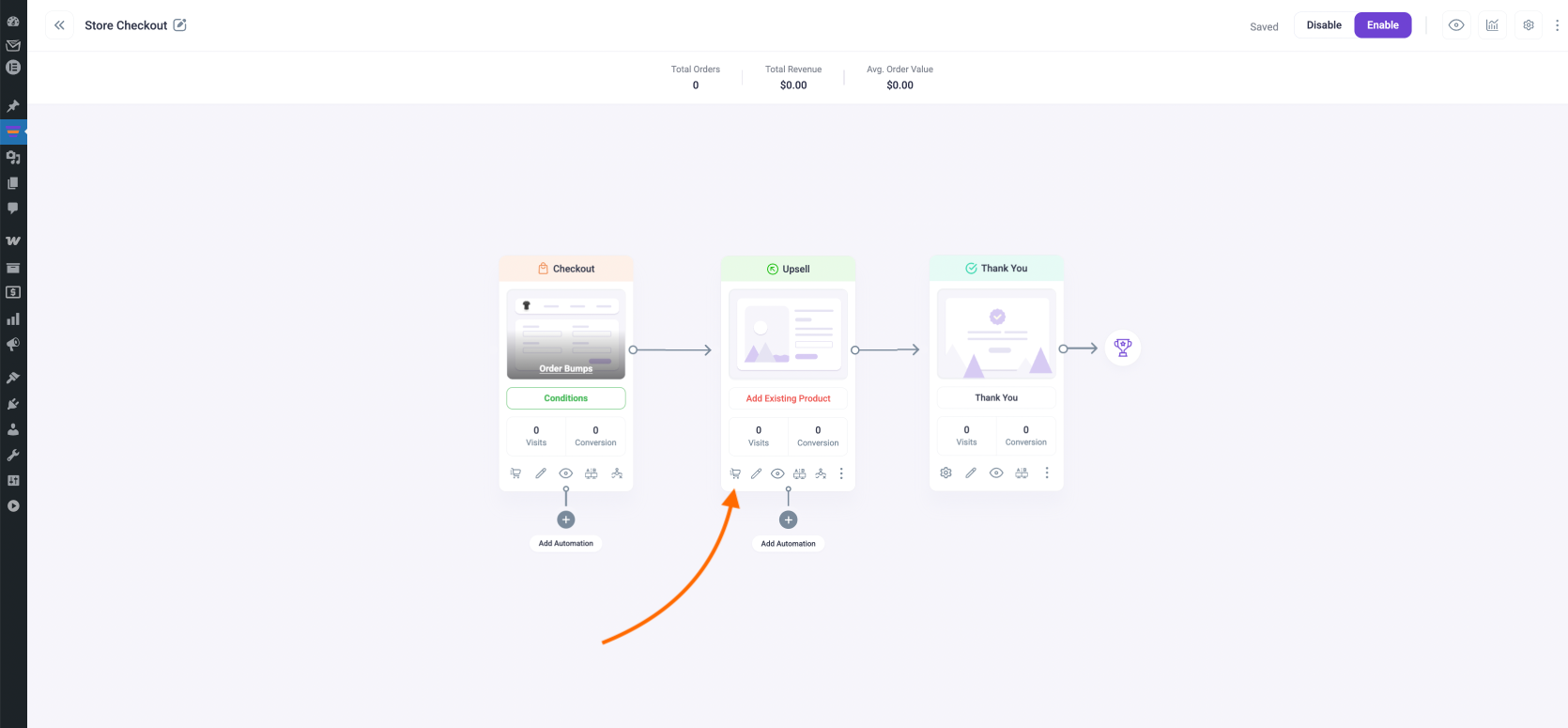
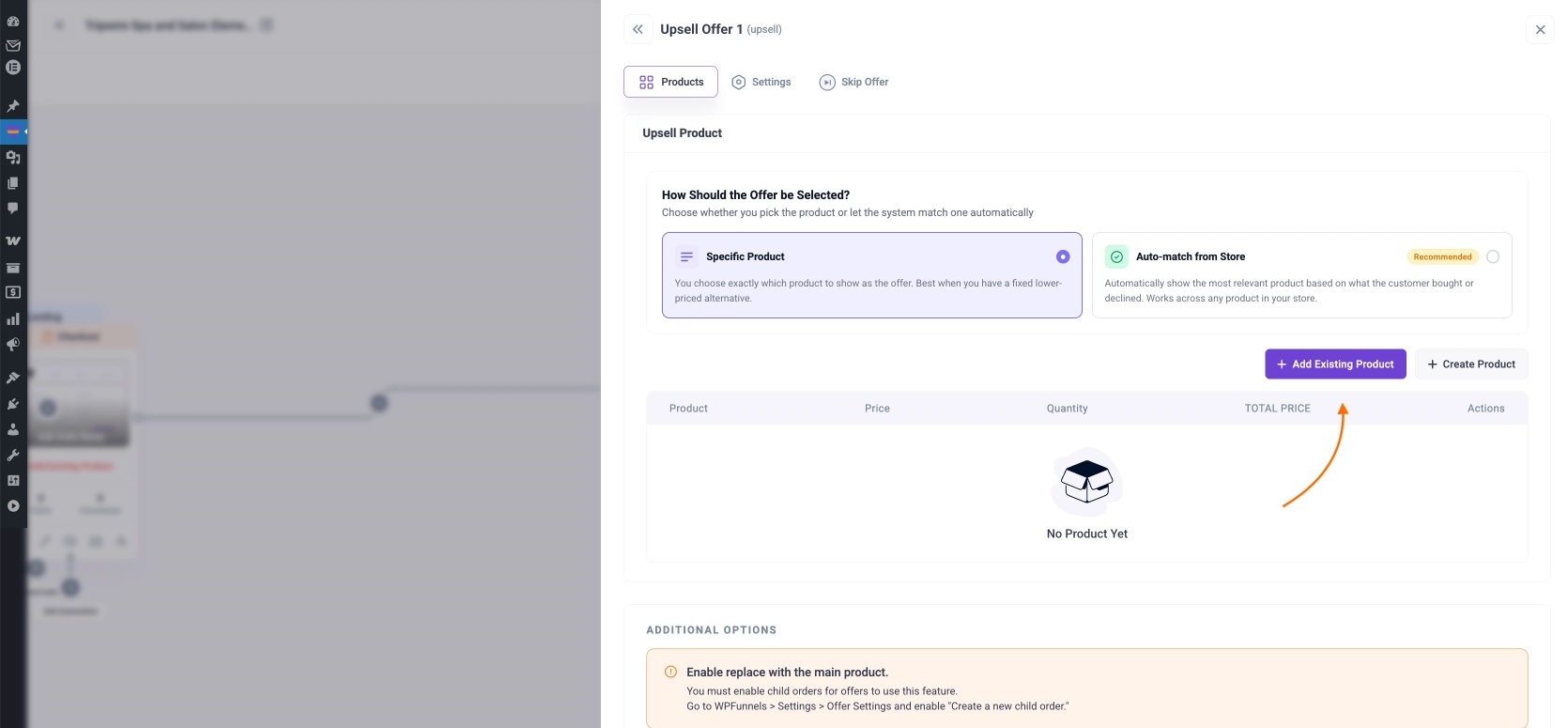
Now, similar to the Checkout step, click on the settings icon of the Upsell step to open its configuration window.
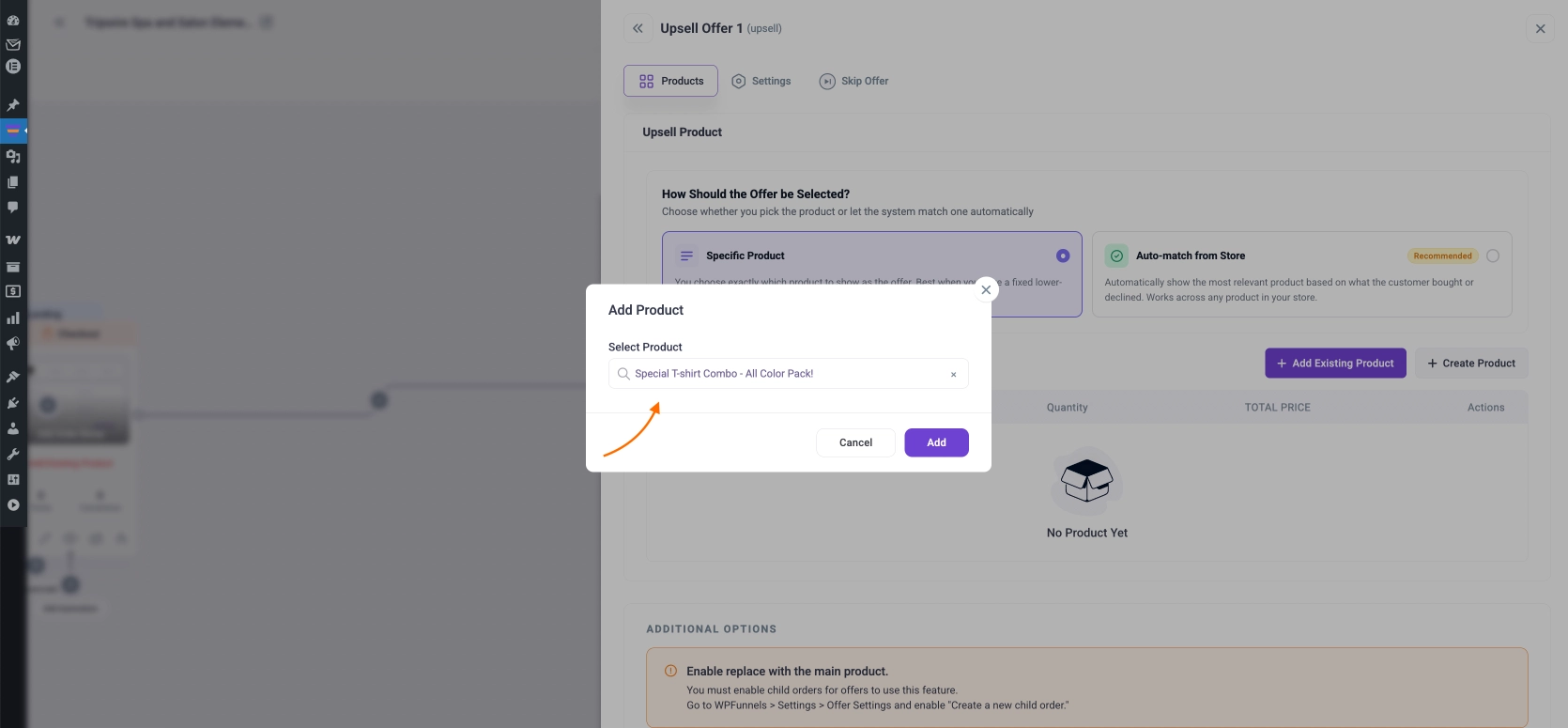
Here, click on Add Existing Product and search for the bundle you want to offer.
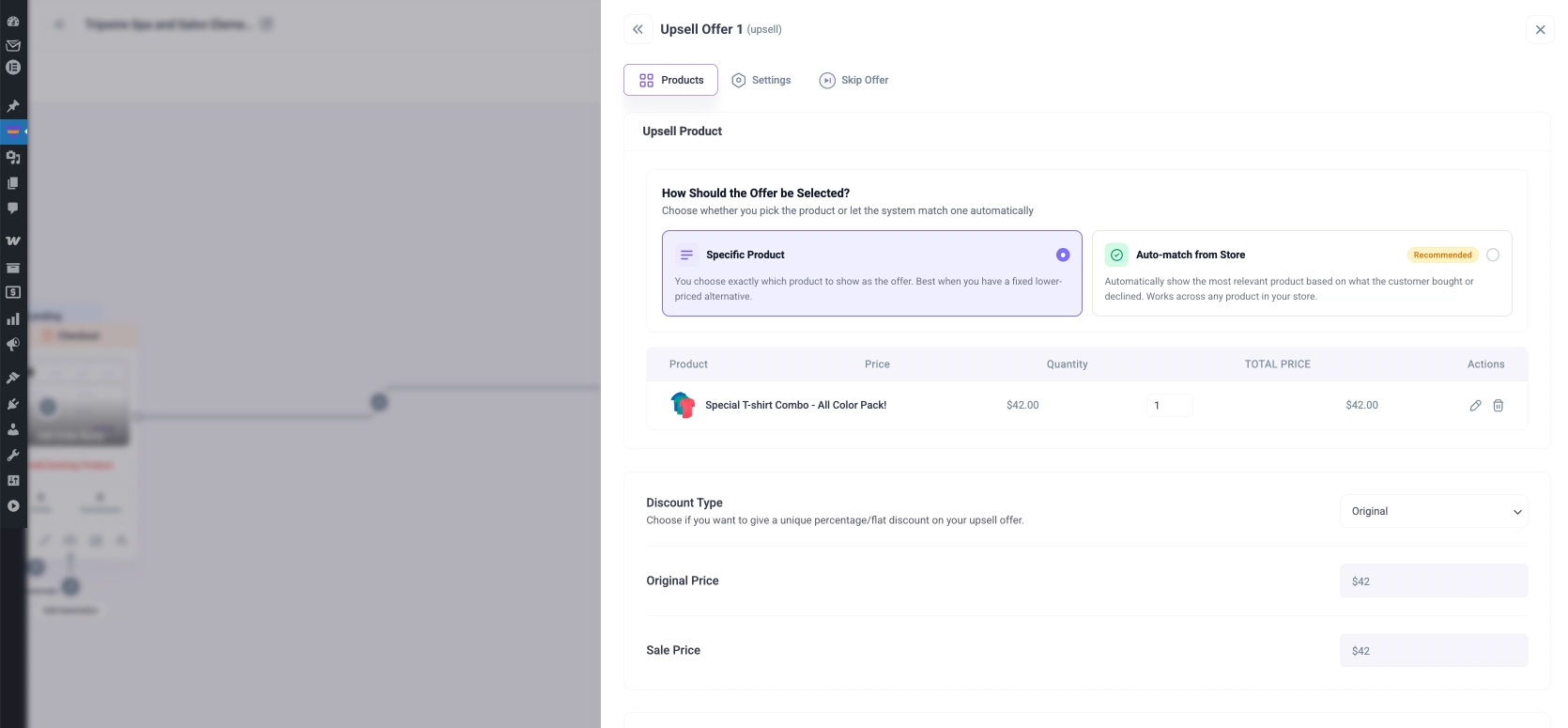
And you will notice the product will be added.
Configure other options as you wish and then hit the Save Changes button.
Step 4 – Design The Upsell Page
The final step to make it functional is to design the upsell page. Simply go to the checkout flow and click on the edit icon.
It will open the page in the edit mode of your preferred page builder. And that’s it.
Your funnel is ready. Your buyers will now get this bundle offered as a one-click upsell after checkout, when purchasing the t-shirt.
[Optional] Step 5 – Add Order Bump Offer And Discounts If Needed
If you want, you can also add an order bump to this upsell funnel to add some extra revenue to the journey.
Plus, you can assign exclusive discounts to the upsell and order bump offers that are not available in your store.
Watch this video to understand how the storewide checkout feature normally works, even without a condition.
Output Of This Funnel?
A buyer will add the Modern T-shirt to the cart.
He will view the cart and click on “Proceed to checkout.”
He will enter this custom checkout flow and view the custom checkout.
Once he goes through payment, immediately, he will see the custom upsell offer on the T-shirt bundle.
After accepting, the flow will end with confirmation.
The customer will get 3 t-shirts at 30% discount, and you will earn over 2 times more in revenue from the same buyer without any acquisition costs.
Conclusion
As you saw, it’s really easy to create an upsell funnel for Woocommerce stores using WPFunnels. You, too, should start planning effective sales funnels so that you can earn more revenue from every buyer.
Start using WPFunnels to take advantage of well-planned upsell offers to increase sales in your WooCommerce store.
1. How can I apply one funnel to all my WooCommerce products without creating multiple funnels?
With WPFunnels’ storewide checkout, you don’t have to build separate funnels for each product. It lets you apply one checkout, upsell, and order bump flow across your entire store automatically. This saves you time and keeps your funnel strategy consistent without extra work.
2. Why are my upsells not showing after checkout, even though I set them up?
This usually happens when your funnel conditions are not set correctly. You need to define Rules for entering based on products, categories, or cart conditions so buyers actually enter the funnel. Once you fix that, you will start seeing your upsell offers appear properly.
3. How do I show different offers based on what customers buy?
You can set Rules to control when specific offers appear. For example, you can show different upsells based on product type, cart value, or quantity. This helps you present more relevant offers so you can increase conversions easily.
4. Can I increase my average order value without giving heavy discounts?
Yes, you can use order bumps and one-click upsells instead of discounts. These offers encourage your customers to add more items during or after checkout. This way, you grow your revenue without hurting your profit margins.
5. Why does my funnel not start from a landing page like traditional funnels?
The storewide checkout flows work directly from your product or checkout page. So your customers automatically enter the funnel when they try to buy. This makes the process smoother and reduces friction in your checkout experience.
With years of hands-on experience, C S Sultan helps businesses grow through growth marketing, eCommerce strategy, product management, sales funnels, email marketing, customer success, and conversion optimization.
He has led the launch and growth of multiple successful WordPress plugins, WooCommerce solutions, and a Virtual Reality software, while also helping many online businesses improve their average order value (AOV) and conversion rates.
His insights are backed by real-world execution, a proven track record, and measurable business results.
(Get connected on LinkedIn)
Creating courses in WordPress is now easier than ever with so many amazing LMS plugins out there. However, the true challenge is selling the courses....
The travel and tourism industry is growing fast, and so is the competition. With so many options available, getting your travel packages in front of...
Most new store owners focus only on getting more traffic without finding more opportunities to. But after working with online brands for a few years,...