Email marketing remains one of the most reliable ways to grow your online business.
But here’s a reality check: 36% of marketing emails get caught in spam filters, according to recent studies.
That means a big chunk of your carefully crafted messages never reach your audience.
And no, it’s not just about writing better subject lines or deliverability issues.
If you want to stay out of spam filters, you need to know what’s actually triggering them. That means getting your sender reputation right, cleaning your list, understanding authentication protocols, and avoiding subtle content mistakes that flag your emails.
Over the past few years, I’ve been doing email marketing, and from my experience, I’ve compiled 10 actionable ways that’ll help you send bulk emails without spamming.
So, let’s get started.
Quick answer: To send bulk emails without tripping spam filters, use a verified domain with SPF, DKIM, and DMARC, build your list with double opt-in, maintain list hygiene by removing inactive contacts, and send consistently rather than sporadically. For WordPress users, Mail Mint handles all of this natively.
TL: DR – Send Bulk Emails without Spamming
Use a few proven tactics that can help you avoid losing marketing opportunities to getting marked as spam or being blocked by filters.
- Why your emails actually land in spam, and why it’s rarely about the words in your subject line.
- 10 concrete fixes, from double opt-in to authentication to sending cadence.
- A quick technical checklist you can run through before every send.
- A full walkthrough of doing this in Mail Mint, so you’re not stitching together five different tools.
Why Do Your Bulk Emails Keep Landing in Spam?
Bulk emails are what you send when you need to reach a lot of people at once, like when you’re running a promo, launching a new product, or sending updates to your entire list. It’s fast, it’s scalable, and it should work well.
But here’s the problem: even legit bulk emails can land in spam if you’re not careful.
Before I share the ways to fix it, let’s look at what’s actually causing it.
1. People don’t recognize who you are
You might’ve collected their email fairly, but if they don’t remember you or why they subscribed, your message feels intrusive. And when that happens, they either ignore it or mark it as spam.
2. Your content raises red flags
Spam filters scan your emails for specific patterns: aggressive language, too many links, all-caps subject lines, or image-heavy layouts. Even a few small missteps can trigger those filters.
3. Your sender reputation isn’t strong
If your domain or IP has a history of high bounce rates, spam complaints, or low engagement, email platforms start treating your messages as unreliable, which is why a proper email warmup is essential before launching any new campaign. Sometimes, even with a proper warm-up, your email domain or IP’s previous reputation can still affect deliverability. Use an email blacklist checker to identify blacklist listings and determine whether you need to take manual action before starting the warm-up process.
4. You skipped basic email authentication
Without SPF, DKIM, and DMARC in place, inbox providers can’t verify that you’re a legitimate sender. That uncertainty alone is enough to get filtered.
You can quickly verify your current status and identify configuration gaps by using the DMARC lookup tool.
Good to Know: Your marketing emails and your order confirmations run through the same sending domain. If your domain isn’t authenticated, WordPress is likely still sending mail through PHP’s default
mail()function, which has no real authentication behind it, and that can affect your receipts and password resets too, not just your promotions.
5. You’re inconsistent with your sending
Sending too often overwhelms your list. Not sending enough makes your emails feel out of place when they do show up. Both lead to lower engagement, which signals trouble for spam filters.
6. Your list isn’t clean
If your email list includes outdated contacts or inactive users, it hurts your engagement rates. Using a bulk email validation tool helps you clean your list and improve deliverability.
And poor engagement tells inbox providers your emails don’t matter, so they stop delivering them.
Now that you know what’s working against you, let’s break down what you can do to fix it, step by step.
Bulk Emails Don’t Go to Spam. Untrusted Senders Do.
Now, looking at the reasons above, you might be thinking, “So does sending bulk emails automatically send them to spam?”
Not really.
The number of emails you send isn’t what determines whether they land in the inbox or the spam folder. What really matters is whether email providers trust you as a sender.
Think about it. If sending thousands of emails automatically meant spam, every large brand’s marketing emails would end up there, too.
But they don’t.
When Gmail or Outlook receives your campaign, it isn’t counting how many emails you’re sending. Instead, it’s looking at signals like:
- Have you authenticated your domain with SPF, DKIM, and DMARC?
- Do people actually open and engage with your emails?
- Is your email list made up of real subscribers?
- Do recipients report your emails as spam?
- Have you built a good sending reputation over time?
If those signals look good, sending bulk emails isn’t the problem.
In other words, your goal isn’t to send fewer emails. It’s to become a sender that mailbox providers trust.
Once you understand that, the 10 practices below make a lot more sense because every one of them helps build and protect that trust.
Before we move on, let’s clear up a few common misconceptions.
Common Myths About Sending Bulk Emails
❌ Myth: Sending 10,000 emails automatically sends them to spam.
✅ Reality: Sending 10,000 emails to people who never asked for them—or to an unverified list—is what causes problems.
❌ Myth: Gmail blocks bulk email.
✅ Reality: Gmail rewards trustworthy senders and filters out low-quality ones, regardless of how many emails they send.
❌ Myth: Avoiding words like “Free” is the secret to good deliverability.
✅ Reality: Your sender reputation has a much bigger impact. Spam-trigger words matter, but they won’t ruin a campaign if you’ve already built trust.
10 Actionable Ways to Send Bulk Emails without Spamming
Let us look into each of these tactics in more detail.
1. Use Double Opt-in Confirmation
Double opt-in is a great way to ensure your subscribers are real people who truly want your emails. It helps weed out fake or mistyped email addresses that can hurt your deliverability and skew your stats.
Sometimes people sign up on impulse or accidentally type their email address wrong. This leaves you with incorrect contacts and lowers the effectiveness of your campaigns.
With double opt-in, you can confirm each signup and build a proper, engaged email list. It ensures your subscribers genuinely want to hear from you, making your emails more impactful.

2. Generate Targeted Leads
Generating targeted leads is all about reaching people who are genuinely interested in what you offer. Instead of casting a wide net, you can focus on attracting individuals who are more likely to become loyal customers.
You can do this by using strategies like market research, demographic analysis, and personalized marketing.
For example, capturing leads through your website and ads targeting your ideal audience helps you build a high-quality list that’s more likely to engage with your emails.
Avoid buying random email lists, as they can lead to spam complaints and hurt your sender’s reputation.
Focus on nurturing relationships with those who have already shown interest in your products or services.
Here are some easy ways you can generate targeted leads:
- Content marketing and SEO with targeted keywords
- Social media advertising and engagement
- Webinars, workshops, and educational events on topics your audience cares about
- Networking and participating in industry events
- Offering lead magnets that resonate with your audience
- Paid search advertising (PPC)
- Partnering with influencers
- Running surveys with qualifying questions
Pro Tip – put AI to work on this: Paste your product or audience details into Claude or ChatGPT with a prompt like: “I sell [your product/service] to [your target audience]. Suggest 5 targeted lead-generation angles I could test, and one qualifying question for each to make sure I’m attracting the right people.” Use the output as a starting shortlist, not a final plan.
3. Clean Your Email List Regularly
To improve your email marketing and avoid spam filters, it’s crucial to routinely clean your list.
Removing inactive subscribers, fake emails, and invalid addresses helps you reach the right audience and boosts your deliverability.
When you send emails to people who aren’t engaging or have incorrect email addresses, it can hurt your sender’s reputation.
Getting rid of these contacts will ensure your bulk email marketing efforts are focused on those who want to hear from you. Investing in an email validation or list-cleaning tool can make this process easier.
So, take a little time to clean your list and ensure your emails get to the right people. This will help you send bulk emails more effectively and avoid unnecessary roadblocks.
4. Avoid Spammy Words in Subject Lines
It’s important to show clear language that might trigger spam filters or appear deceptive, overly promotional, or misleading.
Words like “free,” “guarantee,” “urgent,” excessive punctuation (!!!), or phrases promising unrealistic benefits can raise red flags for spam filters, potentially causing emails to be diverted to the recipients’ spam or junk folders.

At the same time, do not use fake subject lines just to get more email opens and then give a different message in the email copy.
This is a serious trust killer, and people who will open with high expectations will be disappointed. Thus, many people will unsubscribe or mark your email as spam due to misleading subject lines.
Read this blog to learn about some of the best email subject lines.
5. Include Unsubscribe Link
You must make it easy for people to unsubscribe when they aren’t pleased. Letting subscribers leave when they choose is a simple yet crucial principle.
The fact is, if a person is not interested in your brand or what you offer anymore, pretty soon, they will either become inactive towards your emails or mark your emails as spam.
You will be wasting your resources on such customers.
Rather, include an easy “unsubscribe” link in your emails to let them stop receiving your emails. (The best place to put the unsubscribe link is at the footer section.)
By respecting their choice to opt-out, you not only maintain a positive brand reputation but also cultivate goodwill. At the same time, you maintain a quality lead list.
6. Avoid Using Too Many Images
While images can spice up your email design, using too many large images can send emails to spam.
Images significantly increase the size of emails both in server resources and length, which is a red flag for spam filters.
At the same time, some email clients have images automatically disabled from loading unless prompted by the user.
This means the email will look blank in most areas and disoriented in terms of format at first glance.
People who are unsure how to enable images will find this very dissatisfying, causing them to mark the email as spam.
To avoid such issues, stick to 2-3 relevant high-quality images and compress their file size.
Structure your email in such a way that even if the images are hidden, it doesn’t make the email unreadable. And definitely, do not use an image-only email.
7. Ensure Proper Email Authentication & IP Reputation
As per the new Google and Yahoo email requirements to avoid spam in bulk email campaigns, ensure you are using an email marketing tool that is optimized with SPF, DKIM, and DMARC authentication.
This will signal to email clients that you are a legitimate sender.
At the same time, ensure you have a dedicated IP address with a good reputation to avoid getting flagged. An IP reputation check can help you identify potential reputation issues before they affect your email campaigns. Consult with your SMTP provider to find out your sender’s reputation so that you do not face such issues.
Here’s a breakdown of key authentication methods
- SPF (Sender Policy Framework): Defines the authorized IP addresses allowed to send emails from your domain.
- DKIM (Domain Keys Identified Mail): Verifies the authenticity of your emails, ensuring the recipient’s server can confirm the email genuinely originates from your domain.
- DMARC (Domain-based Message Authentication, Reporting, and Conformance): A comprehensive authentication method designed to protect your email from spam and phishing attempts.
Even if you’re sending emails directly from your domain without a tool, it’s important to set up the right DNS records. Use an online DNS record checker to ensure SPF, DKIM, and DMARC are correctly added as TXT records in your domain settings.
8. Use Email Testing Platforms
Use specialized email testing tools or platforms to assess and optimize email campaigns before sending them to a broader audience.
These platforms will help you evaluate various aspects of your emails, such as layout, design, content, subject lines, and even technical elements like SPF/DKIM authentication or HTML formatting.
You will be able to identify potential issues, preview how emails will appear across different devices and email clients, and ensure compatibility with spam filters.
There are several types of email testing tools to help you out with various optimizations.
9. Do not include suspicious links or attachments
Avoid placing links that lead to unfamiliar or suspicious domains, especially those commonly associated with phishing, malware, trojan viruses, or deceptive practices.
Similarly, attachments that are not explicitly expected by the recipient or are from unknown sources can raise suspicions and trigger spam filters.
Including such elements in emails can lead to them being flagged as spam or malicious by the bulk email service providers’ filters or security protocols.
The best way to handle this is to only include valid links that you are sure are trustworthy. Attachments are no longer common in bulk email marketing… rather, upload your resources in a safe environment and provide a link in the email for the recipient to access it.
Using a link checker can also help ensure every URL you share is safe and functional.
10. Avoid Sending the Same Email Frequently
Sending the same email repeatedly in bulk campaigns can trigger spam filters, making your messages more likely to be flagged as spam.
If email clients detect identical content being sent over and over, it’s a clear sign that you’re spamming recipients, which could annoy them and reduce your chances of engagement.
Instead, think about using a drip campaign or a series of varied emails. Personalizing content, such as including customer-specific details, can also help keep your emails fresh and engaging.
This way, your bulk email content won’t be identical and your SMTP reputation will stay strong. The goal is always to deliver value and avoid overwhelming your audience.
Quick Checklist: The Technical Basics Before You Hit Send
- SPF, DKIM, and DMARC set up on your sending domain
- SMTP provider connected (not your default web host or PHP’s
mail()function) - Double opt-in enabled on every signup form
- List hygiene: inactive and invalid contacts removed regularly
- Unsubscribe link visible and working in every email
- Consistent sending schedule, not sporadic bursts
If you can check off all six, you’ve covered the technical foundation this entire article is about.
How to Send Bulk Emails Without Spamming Using Mail Mint
By now, you already know what helps emails reach the inbox. The next question is: how do you actually put all of this into practice?
If you’re running a WordPress or WooCommerce store, Mail Mint lets you handle everything from one place without jumping between different tools.
Here’s a simple workflow you can follow.
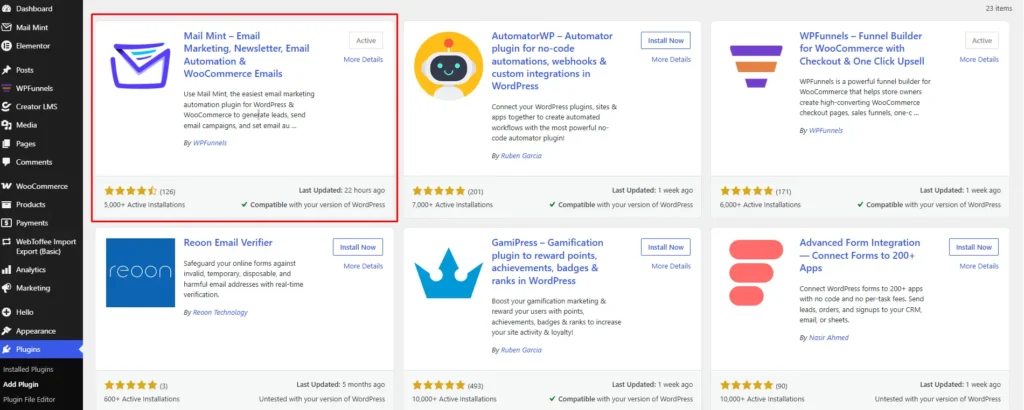
Step 1: Install and Configure Mail Mint
Install and activate Mail Mint on your WordPress website, then complete the initial setup. Once it’s connected to your WooCommerce store, you’ll be ready to create campaigns using your customer and order data.
Step 2: Connect Your SMTP Provider
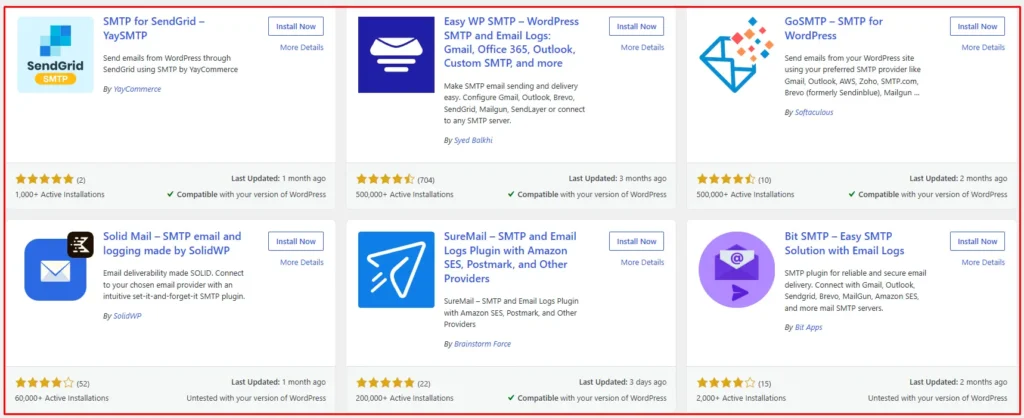
Before sending any campaign, connect a trusted SMTP provider like Amazon SES, Postmark, SendGrid, or your preferred SMTP service. This helps build a reliable sending reputation instead of relying on your web hosting server.
Step 3: Authenticate Your Domain
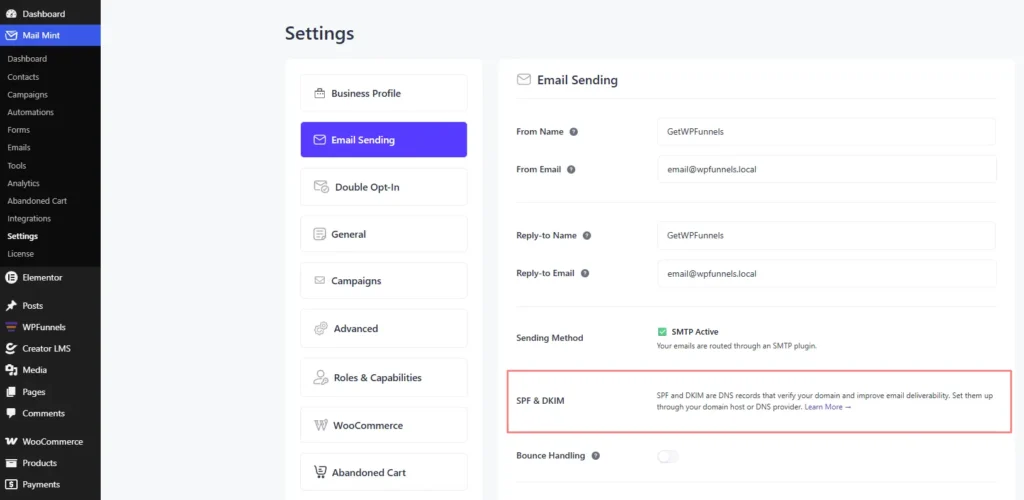
Set up SPF, DKIM, and DMARC using the DNS records provided by your SMTP service. This tells mailbox providers that your emails are legitimate and deserve to reach the inbox.
Step 4: Turn On Double Opt-in
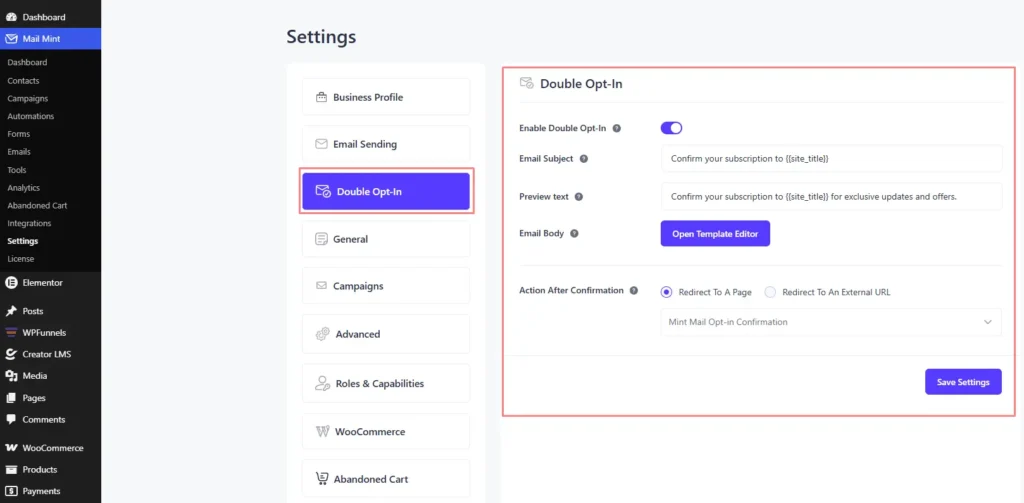
Next, enable double opt-in for your forms. This keeps fake email addresses and accidental signups out of your list before they can hurt your deliverability.
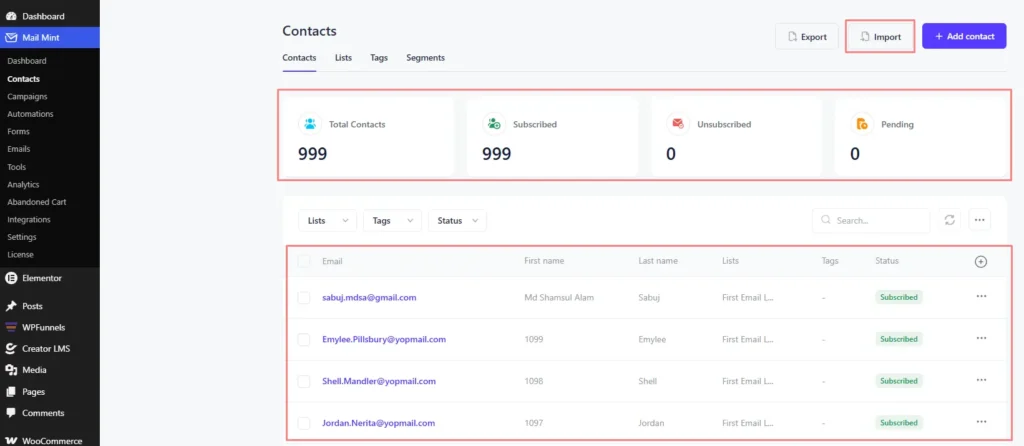
Step 5: Import a Clean Email List
If you’re moving contacts from another platform, make sure the list contains only verified subscribers. Importing inactive or purchased lists can damage your sender reputation from the very beginning.
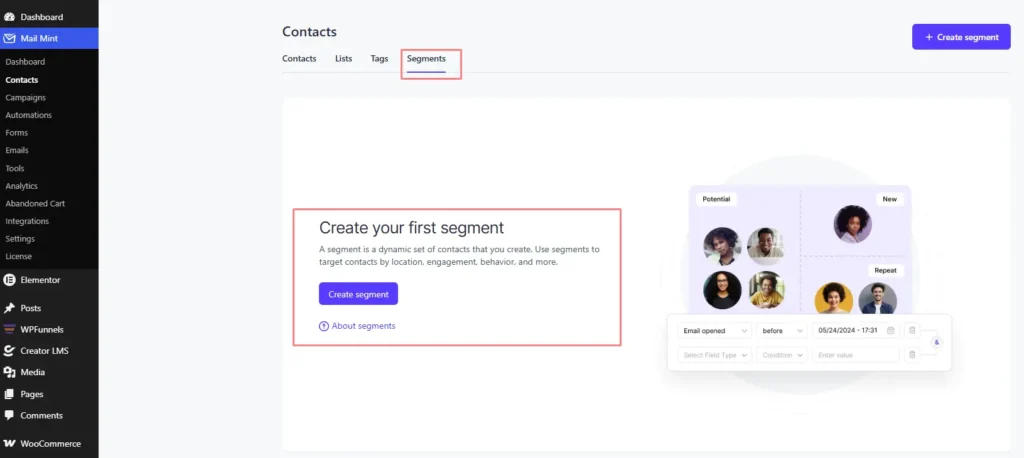
Step 6: Segment Your Audience
Instead of sending the same email to everyone, create segments based on purchase history, customer activity, interests, or engagement. The more relevant your emails are, the better they’ll perform.
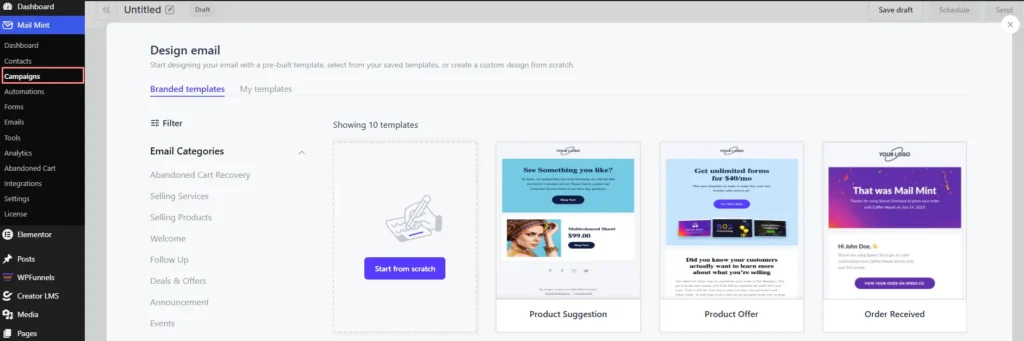
Step 7: Create and Personalize Your Campaign
Build your email using Mail Mint’s drag-and-drop builder and personalize it with merge tags such as the subscriber’s name or purchase history. You can also use the built-in AI assistant to speed up writing subject lines and email copy.
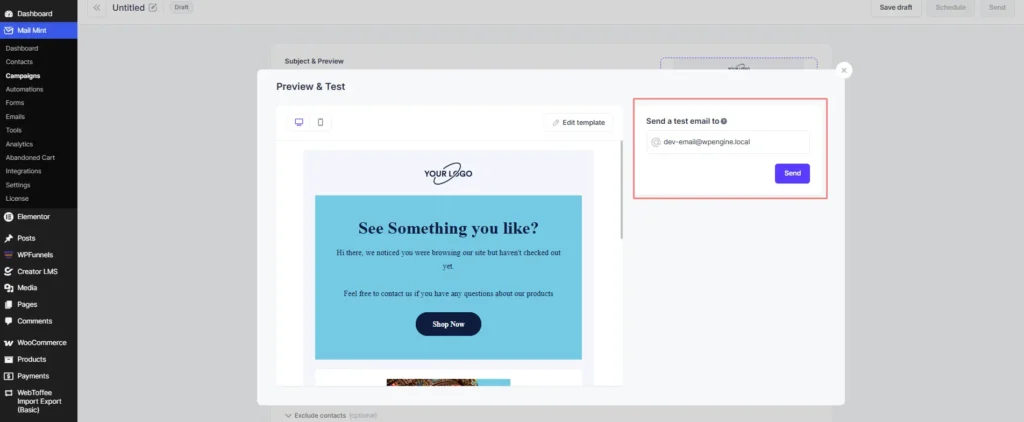
Step 8: Test Before Sending
Always send a few test emails first. Check how they look in Gmail, Outlook, and on mobile devices, and make sure every link works as expected.
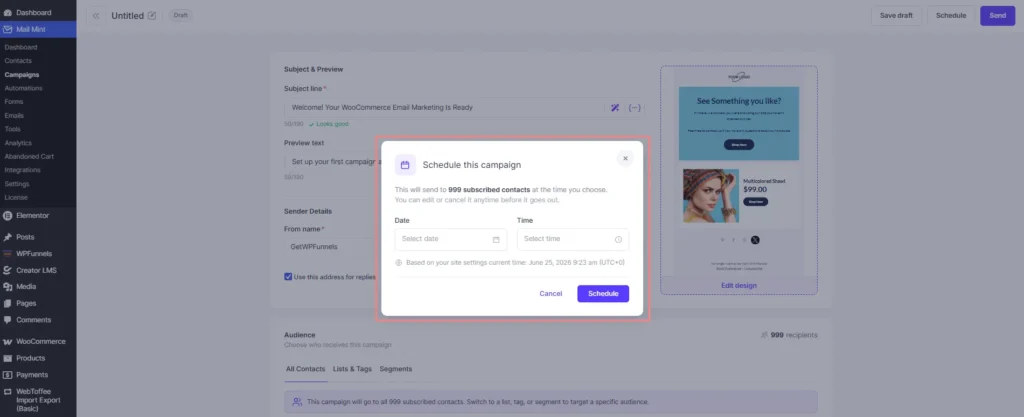
Step 9: Schedule Your Campaign
Rather than sending everything at once, schedule your campaign at a consistent time. A predictable sending pattern helps build long-term trust with mailbox providers.
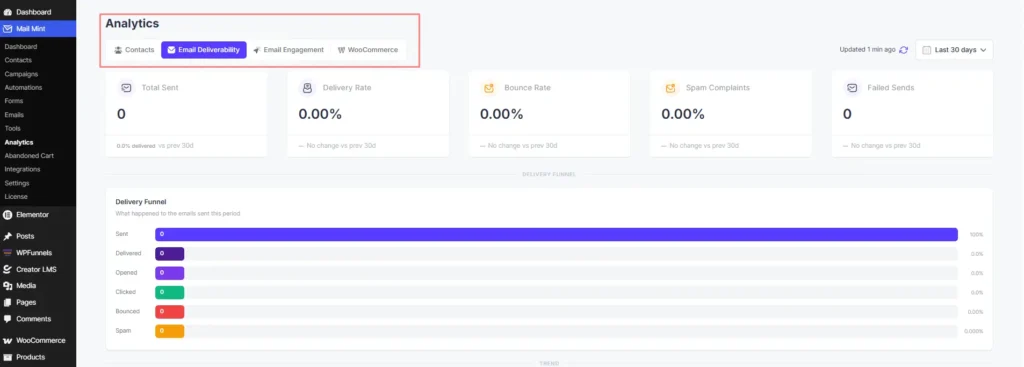
Step 10: Monitor the Results
Once your campaign is live, keep an eye on open rates, clicks, unsubscribes, and spam complaints. These metrics tell you what’s working and where you need to improve before your next campaign.
That’s really the entire process. Instead of manually handling every deliverability best practice, Mail Mint helps you build them into your workflow so you can focus on creating better campaigns.
Reliable Tool to Collect Quality Leads
By now, you’ve probably noticed that most of these best practices aren’t difficult; they’re just easy to overlook when you’re managing everything manually.
That’s why choosing the right email marketing tool matters. A good tool doesn’t just help you send emails. It helps you maintain the technical standards that keep your campaigns out of the spam folder.
Here’s how Mail Mint helps with the biggest deliverability challenges you’ll face:
| Problem you’ll run into | How Mail Mint solves it |
|---|---|
| Fake or bot signups are inflating your list | ReCAPTCHA integration on every lead capture form |
| Mistyped emails that bounce and hurt your score | Email format validation is built into lead forms |
| Subscribers who didn’t really confirm | Double opt-in confirmation email, automated |
| SMTP authentication setup is complicated | Self-hosted, works with your SMTP — SPF, DKIM, DMARC handled through your provider |
| Generic emails that feel like blasts | Segmentation by WooCommerce purchase data, order history, and engagement |
| Weak subject lines are hurting open rates | Built-in AI writing assistant connected to ChatGPT |
Mail Mint is built specifically for WordPress and WooCommerce. It reads directly from your WooCommerce database, meaning your customer data, purchase history, and order value are available for segmentation without any third-party sync layer or API delay.
That’s something SaaS email tools can’t match for store owners who want to send the right email to the right buyer at the right time.
It’s a flat annual price with no contact limits on any paid plan. You’re not paying more as your list grows.
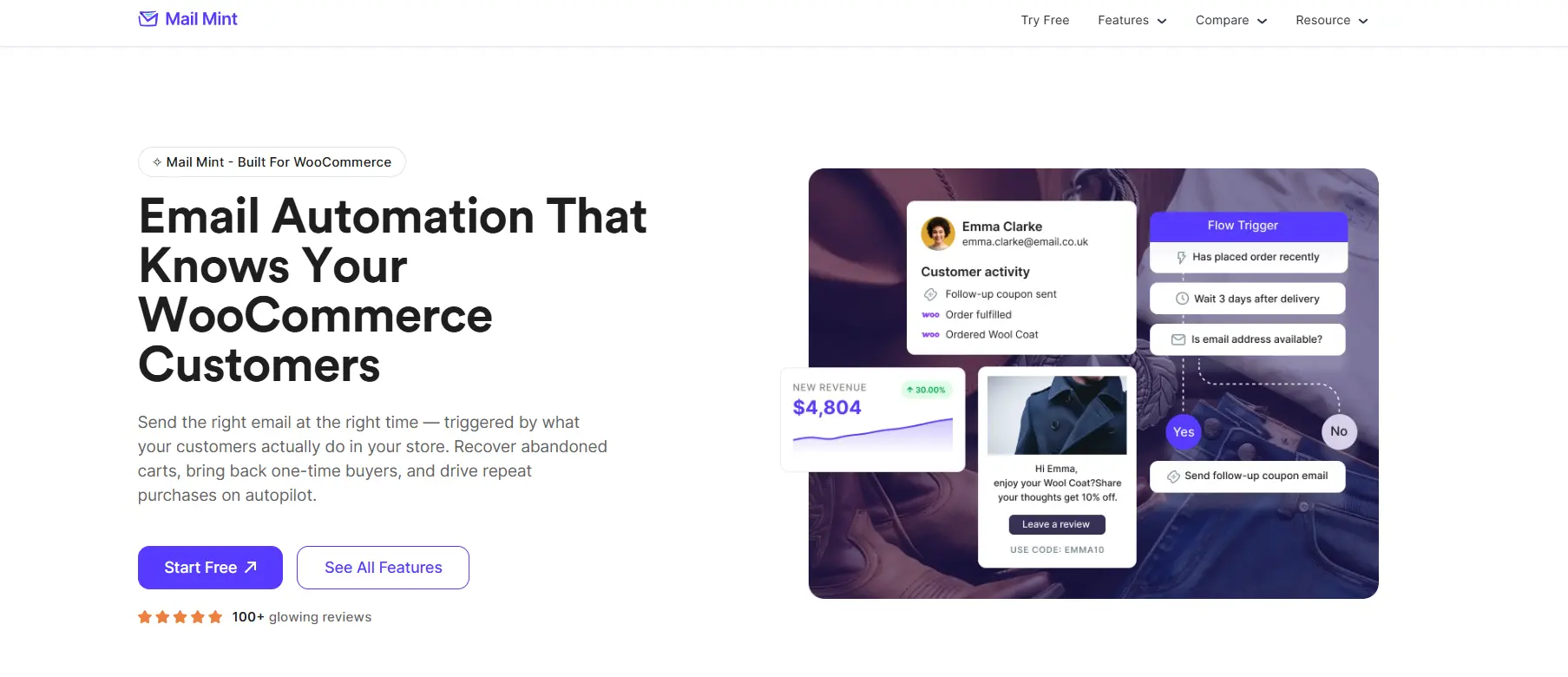
If you’re running a WooCommerce store and sending bulk campaigns, Mail Mint is worth looking at before you commit to a monthly per-subscriber SaaS tool.
Conclusion
Avoiding spam filters is key to successful bulk email marketing. Focus on quality leads and ethical practices, and you’ll see better deliverability and engagement.
Sending bulk emails is one of the easiest ways to reach a large audience, but to maximize conversions, your emails need to avoid spam filters.
If you’re looking for a simple way to improve your campaigns, try Mail Mint. It’s perfect for WordPress users.
Pair it with a reliable SMTP, and you’ll see higher deliverability and better results. Start sending bulk emails more smartly today with Mail Mint.
Frequently Asked Questions
How to Send Bulk Emails Without Spamming at The Lowest Cost?
If you’re looking for a cost-effective solution, choose a tool that doesn’t charge based on subscriber count and supports features like double opt-in, segmentation, and automation. For WordPress users, Mail Mint offers a free version and paid plans without contact-based pricing, making it a budget-friendly option as your email list grows.
What is the best way to maintain a good sender reputation?
Focus on consistent email sending frequency, engaging content, and a clean email address list. Avoid using a purchased email list, as it can lead to spam complaints and hurt your reputation. Always follow the CAN-SPAM Act regulations to stay compliant.
How can you avoid potential spam triggers in mass email campaigns?
Check your email copy for spam-like words, avoid excessive use of capital letters, and create a balanced email message with a plain-text version alongside HTML. Tools like GMass Spam Solver can help you assess your email’s spam level before sending.
What should you know about Gmail spam filters?
Gmail uses advanced spam filters to evaluate your sending domain, recipient behavior, and message content. Ensuring DMARC authentication, DKIM records, and a solid digital signature can boost your overall email deliverability rate.
Why is consistency important in mass email marketing?
Sending emails in low volumes initially and gradually increasing them helps build trust with email providers. Consistent branding, personalized links, and targeting your audience effectively will improve engagement and help you maintain an excellent reputation.
What is the best tool for bulk email in WordPress?
If you’re running WordPress or WooCommerce, Mail Mint lets you capture leads, segment subscribers, automate email campaigns, and manage everything from inside WordPress. It also works with SMTP providers and supports email authentication best practices like SPF, DKIM, and DMARC through your email service.
Can I send bulk emails from WordPress without using a third-party email marketing platform?
Yes, but you shouldn’t rely on WordPress’s default PHP mail() function for bulk email campaigns. Instead, use an SMTP provider with proper authentication (SPF, DKIM, and DMARC) and an email marketing plugin like Mail Mint to manage subscribers, campaigns, and automation from inside WordPress.