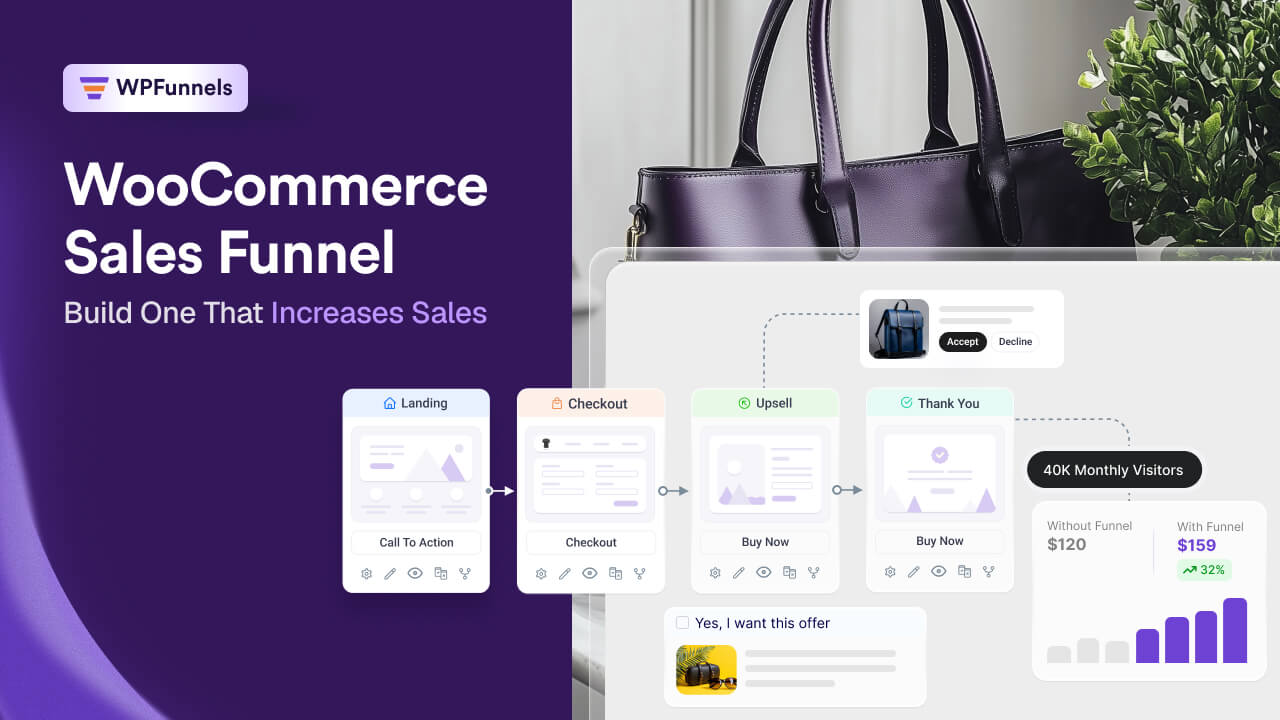

As a WooCommerce store owner, you’ve probably spent a lot of time trying to increase sales.
Maybe you’ve improved your product pages, experimented with discounts, worked on SEO, or even started running ads. And somewhere along the way, you’ve probably heard the same advice over and over again:
“Build a sales funnel.”
The problem is, nobody really explains what that means for a WooCommerce store.
Instead, you end up reading about webinar funnels, lead magnets, and marketing strategies that work for coaches or SaaS businesses… not stores that sell physical or digital products.
So naturally, questions start popping up.
- Do WooCommerce stores actually need a sales funnel?
- How is it different from a normal online store?
- If it really can increase sales, what should a WooCommerce sales funnel actually look like?
That’s exactly why I put together this guide.
Instead of talking about generic funnel concepts, I’ll show you how ecommerce sales funnels actually work, how successful WooCommerce stores use them to guide customers from product discovery to purchase, and how you can build one without changing the way your store already operates.
By the end of this guide, you’ll understand what a WooCommerce sales funnel is, why it works, which type makes sense for your store, and how to build one that helps you turn more visitors into customers.
The goal isn’t to create more steps. It’s to make every step of the buying journey feel intentional and remove as much friction as possible.
Quick Answer: A WooCommerce sales funnel is the buying journey your customers follow, from discovering a product to completing their purchase and eventually coming back to buy again. For most WooCommerce stores, that journey starts with a product page or landing page, moves through the cart and checkout, includes conversion boosters like order bumps and one-click upsells, and ends with a thank-you page that encourages the next purchase.
TL;DR: WooCommerce Sales Funnel
- A WooCommerce sales funnel is the buying journey customers follow from discovering a product to completing a purchase and eventually buying again.
- The journey usually starts with a product or landing page, moves through checkout, and may include order bumps, one-click upsells, and post-purchase follow-up when they make sense.
- Different stores need different funnel strategies. The right one depends on what you sell and how your customers buy.
- Small breaks in the buying journey can cost sales, but fixing those points can improve conversions and increase your average order value.
- Once you’ve mapped your funnel, you can build and publish it in about 15 minutes with WPFunnels.
Before we look at the different types of WooCommerce sales funnels and how to build one, let’s answer one important question first.
Are You Sure Building a WooCommerce Sales Funnel Is Indeed the Best Next Step for Your Store? Let’s Verify.
It would be easy for me to say, “Yes, every WooCommerce store needs a sales funnel.”
But that wouldn’t be true.
A sales funnel doesn’t magically create sales. Its job is much simpler than that. It helps more of your existing visitors become customers and encourages existing customers to spend a little more throughout their buying journey.
That’s why the first question I’d ask isn’t, “Do you have a sales funnel?”
I’d ask,
“Do you already have people moving through your store?”
Let’s look at a simple example.
| Store A | Store B | |
|---|---|---|
| Monthly Visitors | 5,000 | 5,000 |
| Conversion Rate | 1% | 2% |
| Orders | 50 | 100 |
| Average Order Value | $60 | $60 |
| Monthly Revenue | $3,000 | $6,000 |
Nothing changed except the conversion rate.
Store B didn’t spend more on ads or attract more visitors. It simply converted more of the traffic it already had.
That’s exactly the kind of problem a well-designed WooCommerce sales funnel is built to solve.
On the other hand, if your store gets very little traffic and hardly anyone is buying, I’d focus on attracting qualified visitors and validating your products first.
Once people are consistently showing buying intent, improving the buying journey becomes one of the fastest ways to grow revenue.
Good to Know According to Baymard Institute, the average ecommerce store loses nearly 70% of shopping carts before checkout. A well-built sales funnel won’t fix that number on its own, but it removes friction at the specific points, landing page, checkout, post-purchase, where you actually have control.
If you’re trying to turn more of your existing visitors into customers, a WooCommerce sales funnel is probably the right next step.
Now that we’ve answered when it makes sense to build one, let’s answer another question that confuses a lot of store owners.
What exactly is a WooCommerce sales funnel?
If you’ve searched online, you’ve probably come across terms like marketing funnel, customer journey, and sales funnel. They’re often used interchangeably, which makes it difficult to know what you’re actually supposed to build.
Let’s clear that up first.
Sales Funnel vs. Marketing Funnel vs. Customer Journey
By now, you might be wondering, “I’ve also heard people talk about marketing funnels and customer journeys. Are they the same thing?”
Not exactly.
A marketing funnel covers everything that happens before someone reaches your store. That includes ads, SEO, social media, email campaigns, and any other marketing channel that brings people to your products.
A customer journey is much broader. It includes every interaction someone has with your business, from discovering your brand to making a purchase, contacting support, leaving a review, and coming back again later.
A sales funnel sits in the middle. It’s the buying journey for a specific product, offer, or campaign. It starts when someone lands on a page designed to sell that offer and ends when they complete their purchase, with opportunities to encourage another purchase afterward.
When WooCommerce store owners search for “sales funnel,” this is usually what they’re looking for.
So what does that buying journey actually look like inside a WooCommerce store?
A WooCommerce sales funnel isn’t a separate system you bolt onto your store.
It’s the journey your customers already take from discovering a product to completing a purchase. The difference is that, instead of leaving that journey to chance, you intentionally improve each step to help more shoppers reach the finish line.
A typical WooCommerce sales funnel looks something like this.
| Stage | Purpose |
|---|---|
| Landing Page (optional) | Introduce a specific offer or campaign. |
| Product Page | Help shoppers decide whether the product is right for them. |
| Cart | Let customers review their order and continue with confidence. |
| Checkout | Complete the purchase with as little friction as possible. |
| Order Bump (optional) | Recommend a complementary product before payment. |
| One-Click Upsell (optional) | Present another relevant offer immediately after checkout. |
| Thank You Page | Confirm the order and guide customers toward the next step. |
| Follow-up Emails | Encourage repeat purchases and build long-term customer relationships. |
Keep in mind that this isn’t a fixed blueprint.
A single-product store might guide shoppers straight from the product page to checkout. A fashion brand may rely more on order bumps and one-click upsells, while a subscription business might put more focus on post-purchase emails to encourage repeat purchases.
What matters is that every step has a purpose.
Once you start looking at your store as one connected buying journey, it becomes much easier to spot where customers lose momentum and where you have opportunities to increase revenue.
Of course, the same funnel won’t work for every WooCommerce store.
The right one depends on what you sell, who you sell to, and how your customers prefer to buy.
Let’s look at the most common WooCommerce sales funnel types and when each one makes the most sense.
Common WooCommerce Sales Funnel Types (And How They Work)
By now, you know what a WooCommerce sales funnel is.
The next question is, what does that actually look like inside a WooCommerce store?
The answer depends on what you’re selling.
A single-product store won’t build the same funnel as a subscription business. A seasonal campaign won’t look the same as a bundle offer.
What changes is the offer at each step, not the buying journey itself.
Most WooCommerce sales funnels follow a structure like this:
Product or Landing Page → Cart (optional) → Checkout with Order Bump → One-Click Upsell → Thank You Page → Post-Purchase Follow-up (when it makes sense)
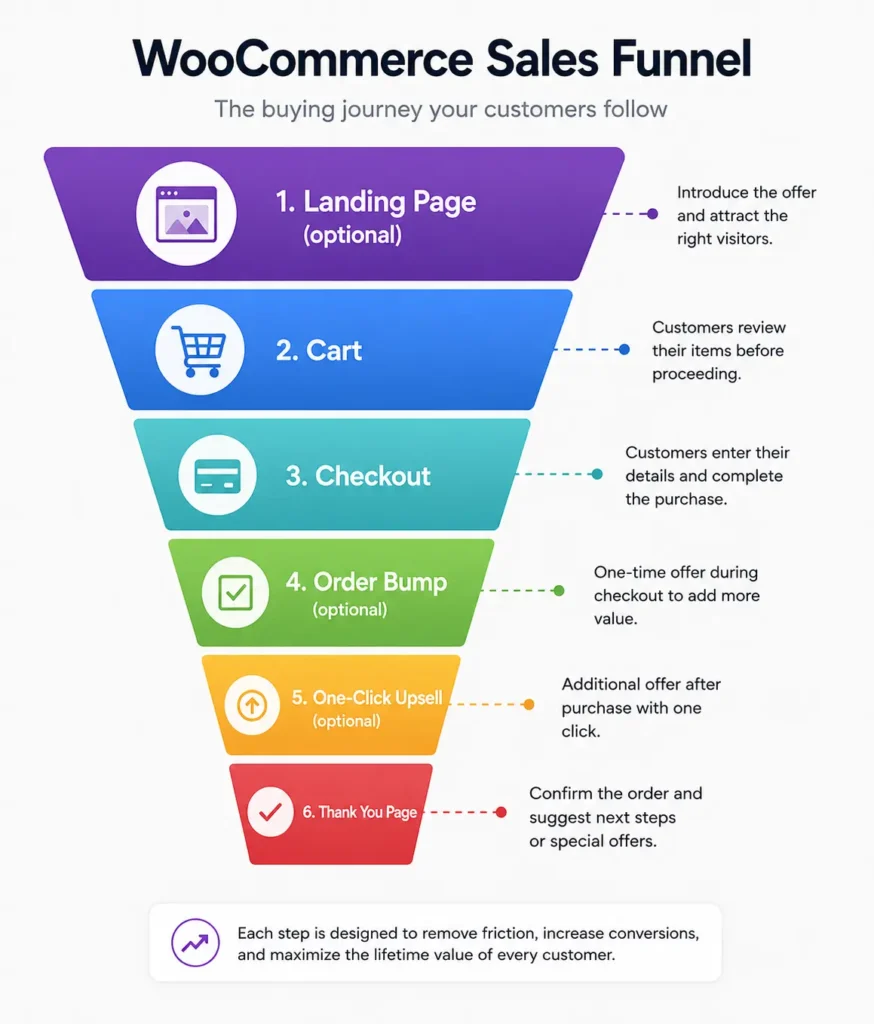
Let’s look at the most common WooCommerce sales funnel types and how that journey works in each one.
Best-Selling Product Funnel
This funnel starts with your best-selling product.
Instead of sending shoppers to your store homepage or shop page, traffic goes directly to a landing page built around that product. From there, shoppers move through checkout, see a relevant order bump, receive a one-click upsell, and finally reach the thank-you page.
A skincare store, for example, might send every ad to its bestselling serum, offer a cleanser as the order bump, and recommend a moisturizer as the upsell.
Category or Collection Funnel
Instead of promoting one product, this funnel starts with a curated collection.
A fashion store might use a New Season Essentials page that helps shoppers choose from a handful of products instead of browsing the entire catalog. Once they choose a product, the rest of the buying journey stays the same.
Bundle Funnel
Here, the landing page is built around a bundle instead of a single product.
A home and kitchen store might bundle a knife set with a cutting board. Because the starting order value is already higher, the upsell often becomes a premium version of the same bundle instead of another product.
Subscription or Replenishment Funnel
This funnel works well for products customers buy regularly, such as coffee, pet food, or supplements.
The first purchase gets the customer started. The upsell encourages them to subscribe, while the post-purchase follow-up reminds them when it’s time to reorder.
New Arrival Funnel
This funnel is built around a newly launched product.
Most stores send existing customers or warm audiences to the landing page first before expanding the campaign to paid traffic.
Restock Funnel
When a popular product comes back in stock, the landing page focuses on urgency rather than introducing the product again.
The funnel targets people who signed up for “Notify Me” alerts and guides them straight to checkout.
Seasonal Campaign Funnel
This funnel is built around a specific promotion, such as Black Friday, Eid, Christmas, or a summer sale.
The landing page, checkout, order bump, and upsell all support that campaign until it ends.
Key Takeaway: Every WooCommerce sales funnel follows the same buying journey. The difference is how each step is used based on the product you’re selling and the goal of the campaign.
For a deeper breakdown of getting the most out of each individual moment, we’ve covered order bumps, upsells, and checkout optimization in detail here.
Which WooCommerce Sales Funnel Should You Build?
Now that you know how WooCommerce sales funnels work, the next question is obvious.
Which one should you build?
The answer depends on what’s holding your store back.
If you’re struggling to convert visitors, your priority will be different from a store that’s already making consistent sales but wants to increase average order value. Likewise, a store that relies on repeat purchases needs a different approach from one selling products customers only buy once every few years.
That’s why I don’t usually start by talking about funnels.
I start by talking about the problem you’re trying to solve.
Once you identify that, choosing the right funnel becomes much easier.
Instead of picking a funnel because it sounds interesting, you’re choosing one that helps you solve your biggest opportunity for growth.
Here’s a simple way to think about it.
| If your goal is to… | Then consider… |
|---|---|
| Sell a single flagship product | Single Product Funnel |
| Increase the value of each order | Order Bump + One-Click Upsell Funnel |
| Recover shoppers who leave before buying | Cart Recovery Funnel |
| Bring existing customers back | Post-Purchase Funnel |
| Promote a specific campaign or product launch | Landing Page Funnel |
You’ll also notice that these funnels aren’t mutually exclusive.
As your store grows, you’ll probably use several of them together. You might start with a best-selling product funnel, introduce order bumps as sales become more consistent, and later add post-purchase follow-ups to encourage repeat purchases.
The important thing isn’t building every funnel today.
It’s building the one that solves your biggest problem right now.
Related read: We go deeper on this in More Traffic Won’t Fix Your WooCommerce Revenue Problem, where we explain when it’s better to focus on traffic, conversions, or average order value before scaling your store.
How to Build a WooCommerce Sales Funnel (15 Minutes, With WPFunnels)
At this point, you’ve seen how a WooCommerce sales funnel works and how different funnel types fit different business goals.
The next step is building one.
There are plenty of WooCommerce funnel builders available, and most of them follow a similar setup process. For this walkthrough, I’ll use WPFunnels because it’s easy to follow and lets us build the entire funnel visually. You can start with the free version from the WordPress repo. If you’re using another funnel builder, the overall process will be very similar.
We’ll build the best-selling product funnel from the previous section, but you can follow the same steps for almost any funnel type.
Step 1: Create a New Funnel
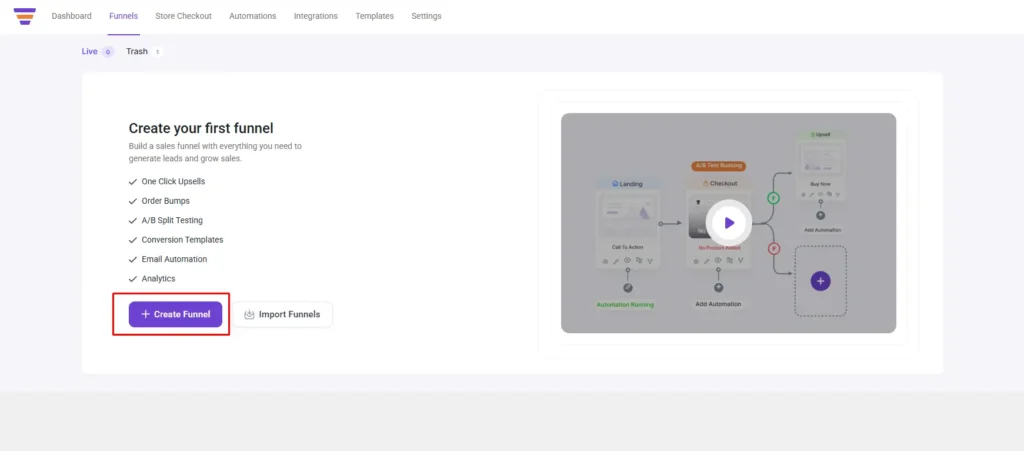
From your WordPress dashboard, go to WPFunnels and click Create Your First Funnel.
Step 2: Choose a Funnel Template
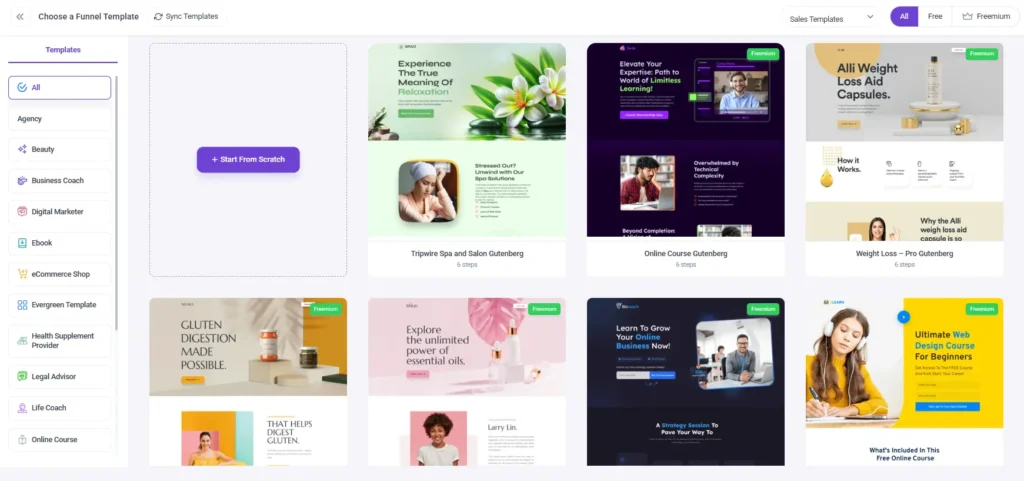
Choose a pre-built funnel template or start from scratch. If this is your first funnel, using a template is the quickest way to get started.
Once the template is imported, give your funnel a name.
Step 3: Customize the Landing Page
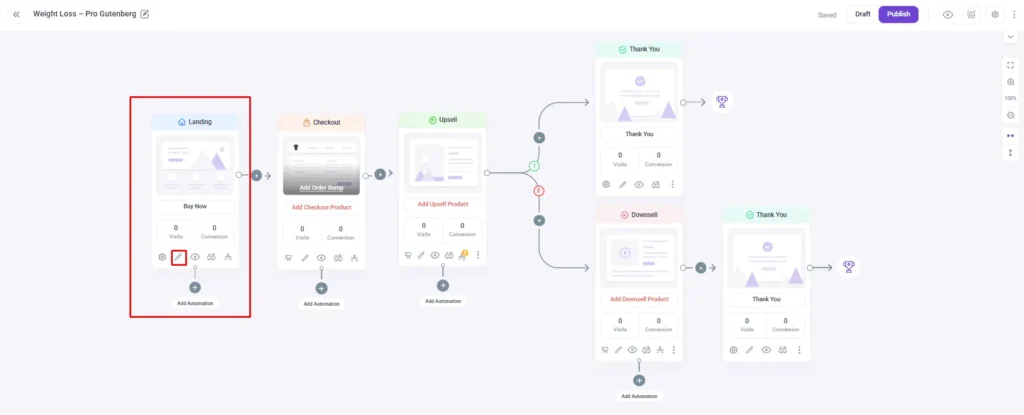
Click the Landing step to open its settings.
From here, you can change the page slug or open the page in your preferred page builder, Elementor, Divi, Oxygen, and Gutenberg are all supported, to edit the content.
Replace the placeholder content with your own headline, product images, benefits, pricing, and call-to-action. When you’re finished, save the page and return to the funnel canvas.
Step 4: Set Up the Checkout Page
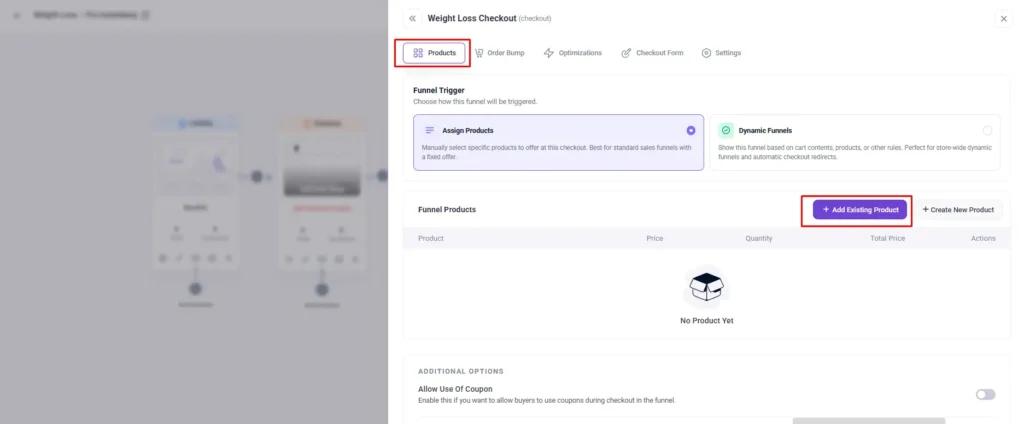
Open the Checkout step and go to the Product Tab.
Search for the WooCommerce product you want to sell and add it as the main offer.
Once the product is assigned, edit the checkout page to match your branding. You can customize the layout, content, and styling just like any other page on your site.
If you want to increase your average order value, this is also where you can configure an order bump by adding a relevant complementary product.
Save your changes and return to the funnel canvas.
Step 5: Add a One-Click Upsell (Optional)
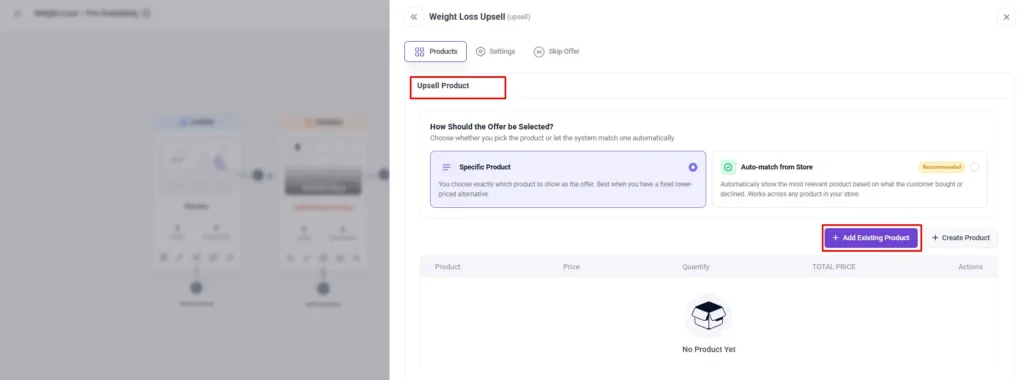
If your funnel includes a one-click upsell, add an upsell step after checkout and connect it to your funnel.
Choose a product that naturally complements the customer’s original purchase and customize the offer page before publishing.
Step 6: Customize the Thank You Page
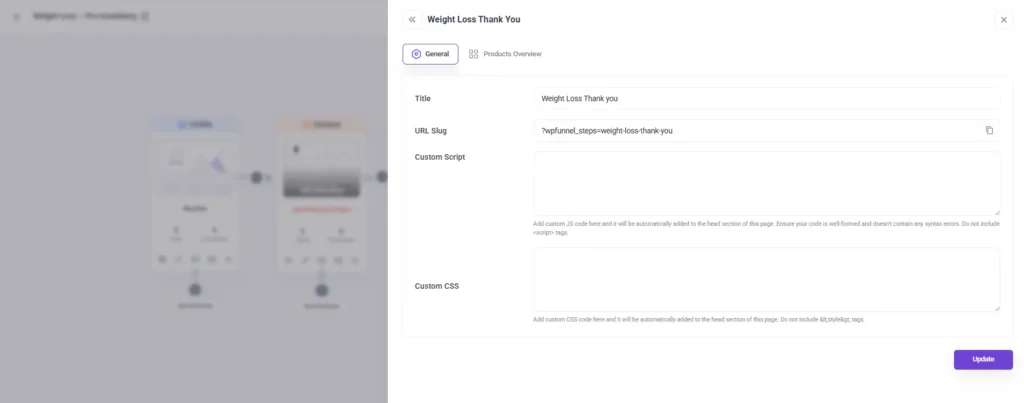
Open the Thank You step.
Choose which order details you want to display, then edit the page to match your branding.
Many stores also use this page to share a discount code, request a product review, or encourage customers to explore another product after completing their purchase.
Step 7: Preview and Publish
Before publishing, preview each step to make sure everything is connected correctly and the buying journey works as expected.
Once you’re happy with the result, publish the funnel and place a test order to confirm that the landing page, checkout, order bump, upsell, and thank-you page all work together.
That’s it. Your first WooCommerce sales funnel is live.
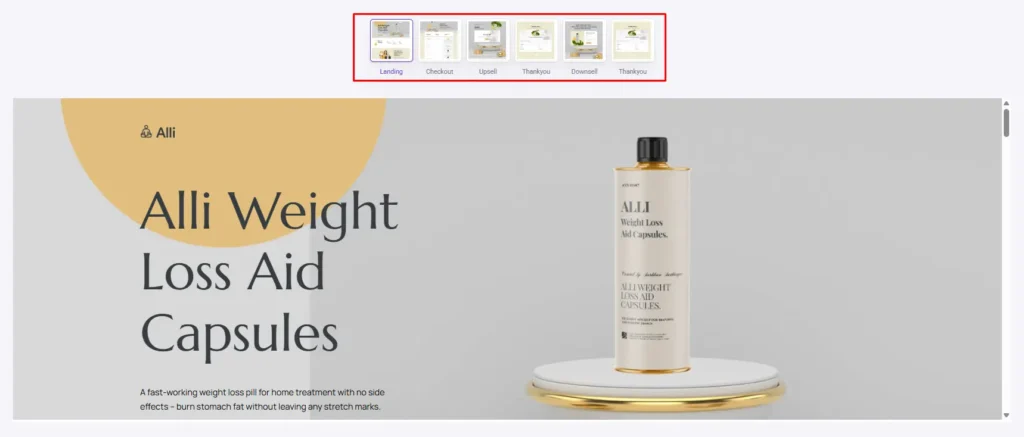
As customers start moving through the funnel, you’ll begin to see how they interact with each step. Some will complete the journey from start to finish. Others will leave somewhere along the way.
Those drop-off points are what people usually mean when they talk about a “leaky sales funnel.”
Where Customers Drop Off in the Buying Journey
Inside a WooCommerce store, those leaks usually appear at specific points in the buying journey.
One of the most common leaks happens on the product or landing page. If it still shows your site’s main navigation, a visitor who arrives for one offer can click Shop, start browsing the rest of your catalog, and never return to the original product.
Another common leak appears between the cart and checkout. A checkout page that feels different from the landing page or introduces unnecessary friction can interrupt the buying flow just before the purchase is completed.
The buying journey can also lose momentum after the purchase. Many WooCommerce stores stop at the default thank-you page, missing the chance to recommend another product, encourage a repeat purchase, or keep customers engaged.
Most improvements come from refining these parts of the journey over time rather than rebuilding the entire funnel.
Related read: This deserves its own guide, and we’ve written one: Hidden Revenue Leaks in WooCommerce You Probably Missed, where we cover cart abandonment, email follow-up, and other common revenue leaks beyond the sales funnel.
Final Thoughts
If you’ve made it this far, you probably have a much clearer picture of how WooCommerce sales funnels actually work.
Hopefully, you’ve also noticed that a sales funnel isn’t something separate from your store. It’s simply a better way of guiding customers through the buying journey.
You don’t have to build every funnel we covered in this guide, and you don’t have to get everything perfect on the first try.
Pick the funnel that makes the most sense for your store, build it, see how your customers move through it, and make changes as you learn what works.
That’s how most WooCommerce stores improve over time.
If you’re ready to build your first funnel, WPFunnels gives you everything you need to create the entire buying journey inside WooCommerce, from landing pages and checkout to order bumps, one-click upsells, and thank-you pages.
Frequently Asked Questions
What Is a Sales Funnel?
A sales funnel is the buying journey customers follow from discovering your business to making a purchase. It guides shoppers through each step with the goal of turning more visitors into paying customers.
Do I need a separate SaaS tool to build a sales funnel with WooCommerce?
No. If you already use WooCommerce, you don’t need a separate SaaS platform. A WooCommerce sales funnel plugin lets you build and optimize your buying journey inside your existing store, without replacing your products, checkout, or payment system.
What’s the difference between an ecommerce sales funnel and a general sales funnel, like a webinar or coaching funnel?
General sales funnel content, quiz funnels, webinar funnels, application funnels, is built for coaches, course creators, and lead-generation businesses selling through a booking call or a payment link, not a cart. An ecommerce sales funnel runs through actual store infrastructure, a product page, cart, and checkout, so the structure and the tools you need are different, even though both get called “sales funnels.”
How long does a WooCommerce sales funnel take to build?
The journey covered in this guide typically takes 15 to 30 minutes to map and publish with a visual funnel builder, longer the first time, faster once you’re reusing a template for a second product or campaign.
What is the difference between B2B and B2C funnels?
A B2B (Business-to-Business) funnel involves longer sales cycles, multiple decision-makers, and a focus on logic and ROI. A B2C (Business-to-Consumer) funnel, on the other hand, is shorter and more emotion-driven. Knowing your audience helps you adjust your approach for better results.