

My store is in WooCommerce, but my customer data and automation are somewhere else.
If you’ve had that thought, you already know the friction.
Every customer action in your store, a purchase, an abandoned cart, a new subscription, has to travel to a separate platform before anything can be triggered. A platform that doesn’t know your store, runs on its own schedule, and charges more as your list grows.
So you start asking the obvious question. Your products live in WordPress. Your customers live in WordPress. Your orders live in WordPress.
Does your email marketing really need to live somewhere else?
For most WooCommerce stores, no.
That’s why self-hosted email marketing plugins are quietly replacing SaaS tools for stores like yours. They keep your contacts, your campaigns, and your automations inside the same WordPress install your store already runs on. Same dashboard. Same database. No sync layer.
The hard part isn’t deciding to keep email inside WordPress. It’s picking the plugin that actually fits how your store operates. The next 30 seconds get you to a starting answer.
Find Your Best Self-Hosted Email Plugin in 30 Seconds
| Your situation | Best plugin | Why |
|---|---|---|
| WooCommerce store, want email marketing inside WordPress and replace SaaS email tools | Mail Mint | Self-hosted email marketing with unlimited contacts, native WooCommerce automation, and customer data stored on your own WordPress site |
| Contact management depth matters as much as sending | FluentCRM | Full CRM records, behavioral segmentation, tag-based routing |
| Want self-hosted without configuring SES yourself | MailPoet | Built-in sending service, no SMTP setup required |
| Membership site, LMS, or multi-stage automation | Groundhogg | Handles conditional branching and complex lifecycle flows |
| Just need reliable broadcast sending, nothing else | Newsletter Plugin | Minimal setup, low overhead, does one thing well |
Want to skip the full reviews and go straight to side-by-side comparisons? Jump to the Feature Comparison Table or the Pricing Comparison Table at the bottom of this page.
Found your row? Good. But before you commit to a plugin, it’s worth understanding what’s actually pushing WooCommerce owners away from SaaS in the first place, because that’s what decides whether any of these plugins will solve your problem at all.
Why WooCommerce Owners Move Email Marketing Into WordPress
You didn’t wake up wanting to run a mail server. You’re running a store, and you hit one of three walls.
1. Your bill went up, and it kept going up.
Mailchimp and Klaviyo charge by contact count. Past 5,000 subscribers, the monthly cost becomes a real line item.
Past 10,000, it’s a meaningful chunk of your monthly software budget, paid to a vendor for storing data that originated in your own store.
2. The sync is breaking things.
A customer abandons a $180 cart. Your recovery sequence is supposed to start within 15 minutes, while their card is still in their hand.
But your WooCommerce store has to push the cart data to your email platform first, and that sync runs on a delay. By the time the email goes out, the customer is on the couch.
Order-triggered sequences fire for the wrong products. You’ve started placing test orders yourself because you can’t trust automation.
3. You want your subscriber data on your own server.
GDPR. Customer privacy. Or just not wanting a vendor holding the list you spent years building.
For businesses operating in the EU, UK, and other regions with strict privacy regulations, where customer data is stored can become a compliance consideration. A self-hosted email plugin gives you more control over where subscriber data lives and who processes it.
Whatever the reason, the goal is the same. Your contacts live in your database, not theirs.
A WordPress-native email plugin solves all three. The same store data your WooCommerce checkout writes is the data your email automation reads.
If you’re still unsure whether a WordPress email plugin can genuinely replace platforms like Mailchimp or Klaviyo, we’ve compared WordPress email plugins and SaaS email marketing tools in detail.
That’s the architecture. But before evaluating five different plugins, there’s a question most store owners ask quietly. Can this approach actually hold up at scale? Because that’s where SaaS feels safer.
Can a WordPress Email Plugin Handle 50,000 Contacts?
A WordPress user recently put exactly that question on r/WordPress.
50,000 contacts. 500,000 emails a month. Kinsta hosting. Performance, reliability, deliverability, maintenance, and real-world stability. Could a self-hosted setup actually handle it?
The thread that followed is more useful than any vendor’s marketing page.
- On performance. A commenter put it plainly: the contact list isn’t what slows down your WordPress admin. Log data does. Every email opens, clicks, and trigger gets recorded, and without a cleanup policy, that table grows fast. The fix is straightforward, but you have to set it up intentionally.
- On the real bottleneck. WP Cron, not the plugin. WP Cron fires when someone visits your site. Mid-campaign on a quiet site, the queue stalls. Switch to a real server cron running every one to five minutes, or your sends will stutter exactly when you don’t want them to.
- On a real production scale with Mail Mint. One developer ran a 30,000-contact list for a client on Mail Mint with a dedicated Postfix server. Bi-weekly newsletters, bi-monthly promo campaigns, and no deliverability issues on a properly configured domain. What they specifically called out was the integrated dashboard. WooCommerce, Mail Mint, and WPFunnels in one place, everything where they expected it.
- On list hygiene. Multiple commenters flagged this independently. Amazon SES has zero tolerance for bounces. If you migrate a dirty list, your account gets paused before your second campaign. Run it through a verification service first. Not after.
The thread answered all five original questions. Self-hosted WordPress email at 50,000 contacts is production-viable. It just requires you to own the maintenance, not only the data.
So the architecture works. What separates one plugin from the next? It comes down to five things you should check before you install anything.
5 Things That Actually Separate One WordPress Email Plugin from Another
Not every plugin in this category solves the same problem. Before evaluating individual options, these are the five things that actually matter for a WordPress store.
- Native WooCommerce integration. Cart recovery, order triggers, and post-purchase sequences should fire from your actual store data, not a synced copy of it. Plugins that connect through standard hooks work fine for most stores. Plugins that read your WooCommerce database directly work better when timing matters, like cart recovery.
- Flat or unlimited contact pricing. If the plugin charges by subscriber count, you are paying the same scaling tax as SaaS charges. The whole point of going self-hosted is to remove that tax, not replicate it.
- External SMTP support. The plugin queues your emails. An external service like Amazon SES, SendGrid, or Postmark delivers them. Any plugin that tries to send through your server’s local mail agent at scale will get your IP flagged.
- Active maintenance. A plugin handling live customer data needs a vendor who patches issues quickly. Read recent reviews before installing anything. The track record matters more than the feature list.
- A real free or trial path. You should be able to test the plugin on your actual WordPress install before paying. Every plugin on this list lets you do, which is rare for software handling this much business-critical data.
With those five filters in mind, here’s how each of the five real options stacks up.
The 5 Best Self Hosted Email Marketing Software Options for WordPress
Each of these plugins keeps your store data and your email automation inside WordPress. The difference is what each one prioritizes, who it’s built for, and what trade-offs come with it.
The first one is built around the exact problem most WooCommerce owners run into with SaaS: the sync delay between their store and their email tool.
1. Mail Mint — Best for WooCommerce Stores
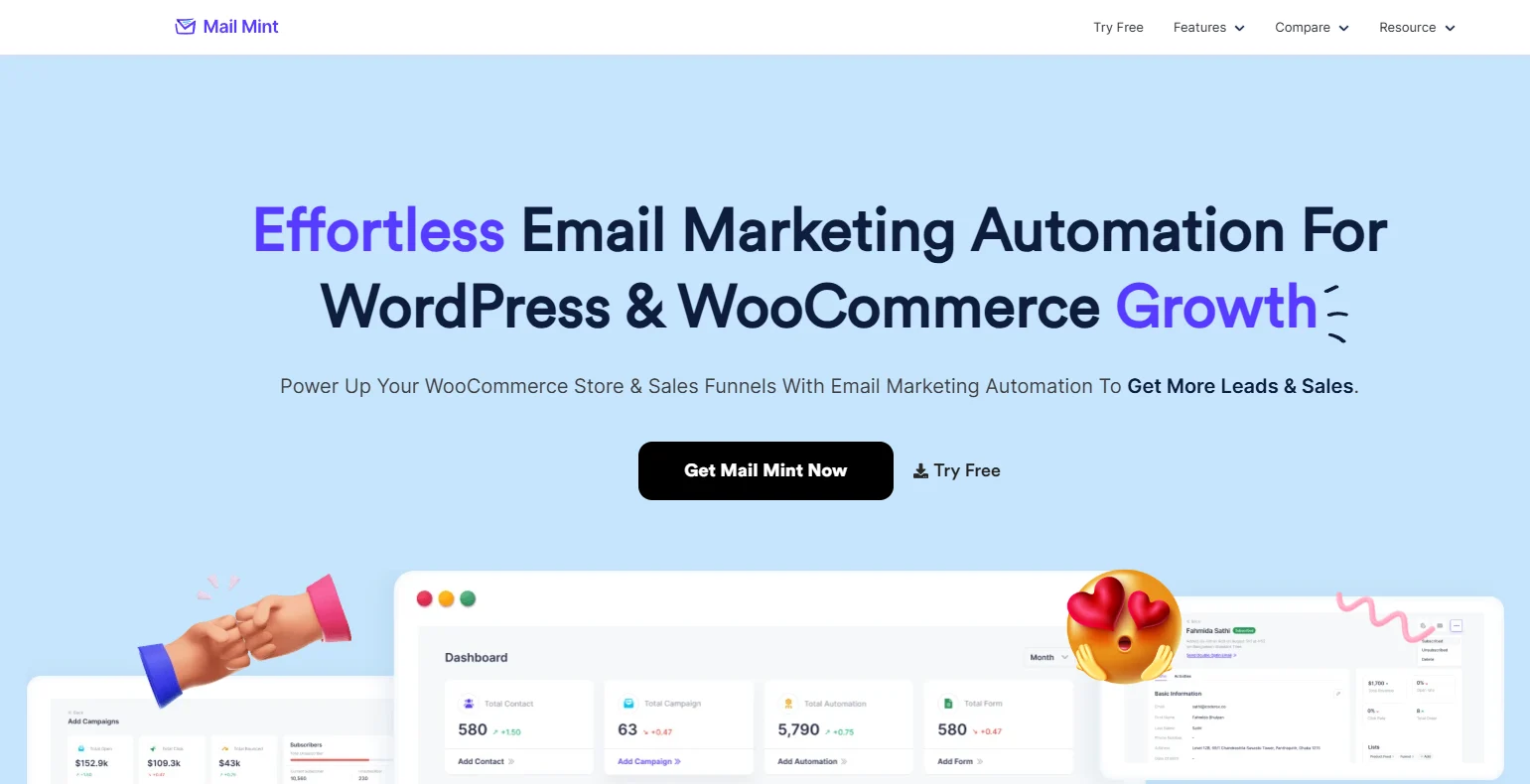
Mail Mint is built around one idea: your store data and your email automation should not need a sync layer between them.
It’s a WordPress plugin, so it reads from the same database WooCommerce writes to. When a cart is abandoned, Mail Mint sees it immediately.
When an order is placed, the post-purchase sequence triggers off the actual order, not a copy of it that arrived ten minutes late.
The big move is the WPFunnels integration. If you’re running sales funnels on WordPress, Mail Mint, and WPFunnels share a single visual canvas. The funnel page, the cart logic, and the email sequence that follows it are all configured in one place.
You’re not checking whether the trigger in one tool fired the sequence in another. It runs from the same install.
That’s not a feature page claim, by the way. The 30,000-contact Reddit case mentioned above is on Mail Mint specifically.
Someone built it, ran it in production, reported back, and the integrated dashboard was what they called out as the difference.
What Mail Mint actually does:
- Abandoned cart recovery that reads directly from your WooCommerce database
- Order-triggered automations based on what customers actually purchased
- Post-purchase sequences tied to specific products, categories, or order values
- Visual automation canvas, no coding required
- Drag-and-drop email builder with templates
- Segmentation, lead forms, analytics, and transactional emails
- AI writing assistant is built into the editor
- WPFunnels integration on a single visual canvas
What to know before you switch:
You’ll need an external SMTP provider like Amazon SES or SendGrid before you can send. The SES setup takes about 15 minutes. Mail Mint is WordPress-only. If your store is on Shopify, Klaviyo is the better fit.
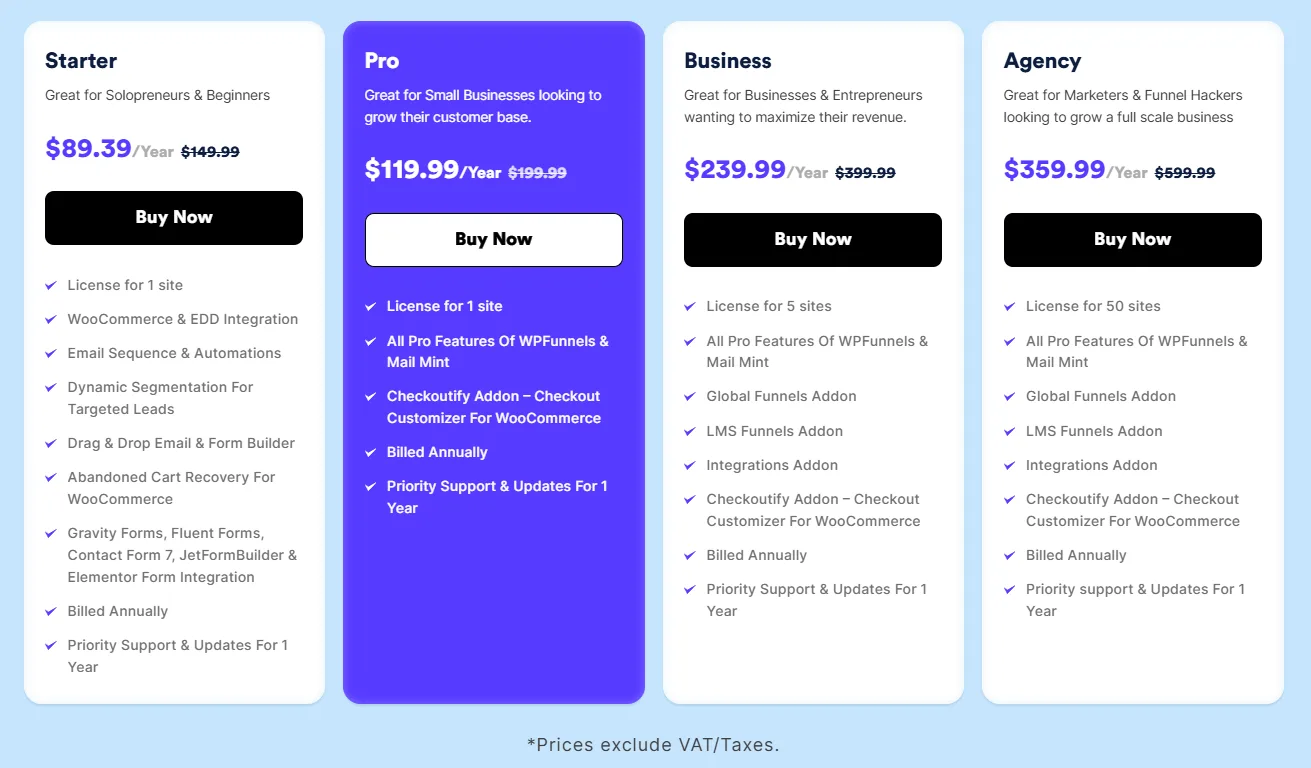
Mail Mint Pricing:
- Starter: $149.99/year, 1 site
- Pro: $199.99/year, 1 site (Mail Mint + WPFunnels bundle)
- Business: $399.99/year, 5 sites
- Agency: $599.99/year, 50 sites
Free version available on WordPress Repo with core features.
Best for: WooCommerce store owners who want cart recovery, order triggers, and email automation running from the same dashboard as their store.
Mail Mint’s strength is WooCommerce automation. But if what matters more to you is what your contacts have done across every channel, not just inside your store, the next plugin is built around that question.
2. FluentCRM — Best for Contact Management Depth
FluentCRM treats your contacts the way a CRM treats them, not the way an email list treats them.
You get full activity history per contact, tag-based segmentation, pipeline-style views, and automation built around behavioral triggers. If you need to know not just who’s on your list but exactly what every person on it has done, which products they bought, which sequences they completed, which tags they carry, FluentCRM is built for that.
On cart recovery specifically, FluentCRM connects to WooCommerce through standard hooks rather than reading the database directly. For most store setups, that timing difference is small. Where FluentCRM earns its place is when the contact record matters as much as the email goes out.
The bug-fix speed has been called out by users running it in production. For a plugin handling live customer data, that’s worth more than it sounds.
What FluentCRM actually does:
- Full CRM contact records with complete activity history
- Tag-based segmentation with multi-condition filtering
- Behavioral automation triggers (purchases, page visits, tag changes)
- WooCommerce integration via standard WooCommerce hooks
- Visual automation builder
- Email sequences and broadcast campaigns
What to know before you switch:
You’ll need an external SMTP provider, the same as Mail Mint. FluentCRM is built more for contact management depth than ecommerce-first automation, so if WooCommerce cart recovery is your single biggest priority, Mail Mint’s direct database reads will feel more native. Plan for an hour of setup to understand tags, lists, and segments before your first automation goes live.
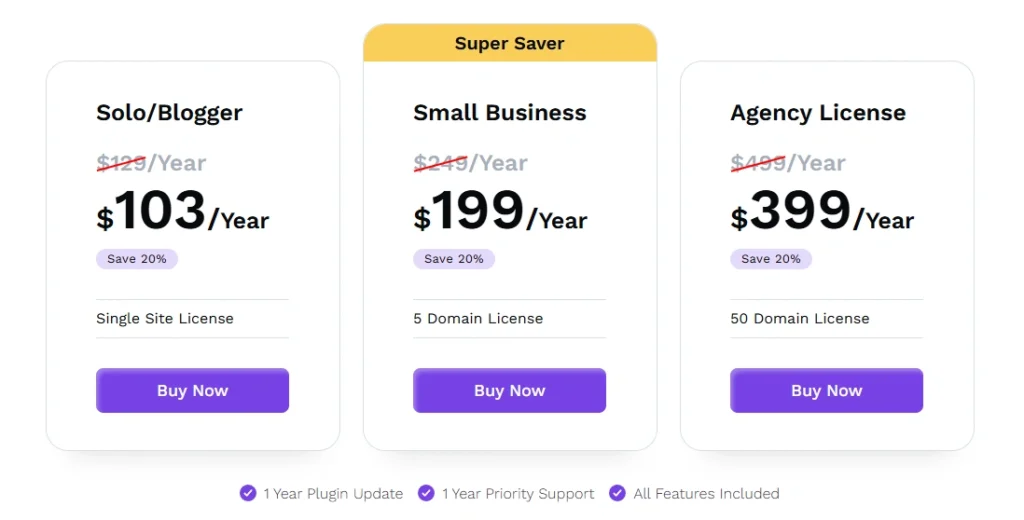
FluentCRM Pricing:
- Solo Entrepreneur: $129/year, 1 site
- Small Business: $249/year, 5 sites
- Agency: $499/year, 50 sites
Free version available on WordPress Repo.
Best for: Store owners and teams where tagging, behavioral segmentation, and CRM-style contact history are central to how you manage your list.
Both Mail Mint and FluentCRM require you to wire up an external SMTP provider before sending. If that setup step is what’s been keeping you from going self-hosted, the next plugin removes it entirely.
3. MailPoet — Best If You Want Self-Hosted Without the SMTP Setup
Every other plugin on this list requires you to wire up an external SMTP provider before you can send a single email.
MailPoet is the exception. It has its own built-in sending service. Install the plugin, connect your list, and send. No SES account, no DNS records to configure, no deliverability research before your first campaign. For WordPress users who want the data-ownership benefits of a self-hosted plugin without the infrastructure step, MailPoet is the fastest path to a working setup.
The trade-off is cost at volume. MailPoet’s sending service has its own pricing that scales with send frequency. If you’re running big campaigns regularly, running your own SES setup eventually works out cheaper. But for getting started without the technical overhead, this removes the main barrier.
What MailPoet actually does:
- Optional built-in sending service (no SMTP setup required)
- WooCommerce integration covering cart, post-purchase, and order status emails
- Drag-and-drop email builder
- Automated welcome sequences and newsletters
- List segmentation by WooCommerce order history
- Maintained by Automattic, closely integrated with WordPress core
What to know before you switch:
The built-in sending service is convenient for small volumes, but pricing scales with subscribers. If your list grows past a few thousand active contacts, running your own SES setup usually works out cheaper. If you choose the Creator plan, you still need to wire up an external SMTP provider yourself. Automation depth is lighter than FluentCRM or Groundhogg, so if you need conditional branching across a multi-stage customer journey, MailPoet will feel limiting.
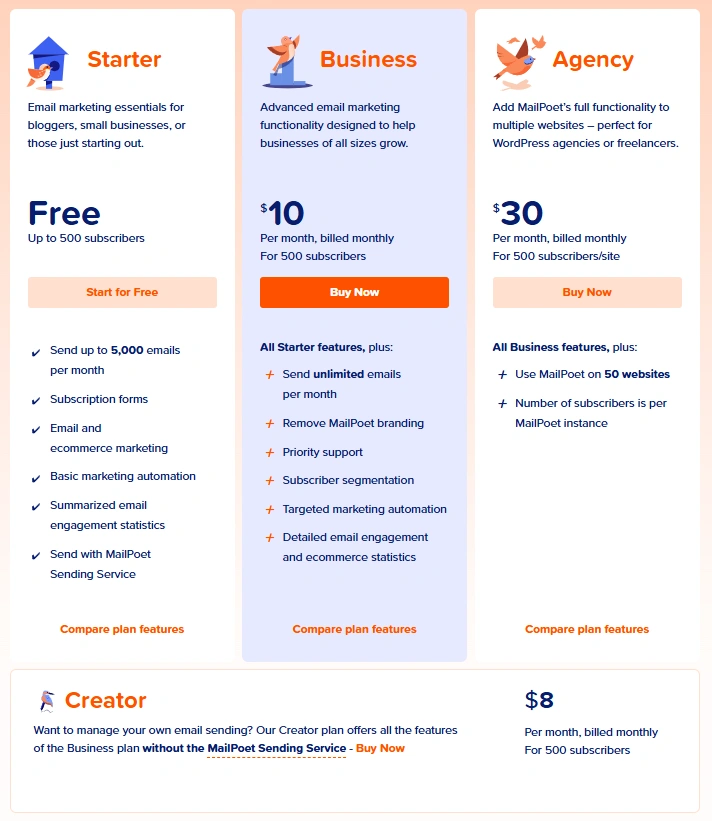
MailPoet Pricing (scales with subscribers, listed at 500):
- Free: Up to 1,000 subscribers, 5,000 emails/month
- Creator: $8/month, your own SMTP
- Business: $10/month, includes MailPoet sending service
- Agency: $30/month, multi-site for agencies
Free version available on WordPress Repo.
Best for: WordPress users who want self-hosted email marketing without configuring their own SMTP layer. Good fit for smaller WooCommerce stores that want minimal setup.
MailPoet keeps things simple. But if your customer journey is more complicated than purchase-and-follow-up, if you’re running courses, memberships, or anything with stages, you’ll outgrow it quickly. That’s where the next plugin earns its place.
4. Groundhogg — Best for Membership Sites and Complex Automation
A standard WooCommerce store running abandoned carts and post-purchase sequences doesn’t need Groundhogg. The learning curve is real, and the setup time reflects how much the tool can actually do.
But if your customer lifecycle goes beyond purchase and follow-up, if you’re running courses, memberships, subscriptions, multi-stage onboarding, Groundhogg handles logic that the other plugins on this list can’t.
The automation engine supports conditional branching, date-based delays, and funnel-style sequences. A student finishes module 3 of a course but doesn’t start module 4 within 7 days. Groundhogg fires a check-in email. Three more days, no return, it tags them “at risk,” moves them into a re-engagement sequence, and pings the instructor. That kind of branching, multi-stage logic is what Groundhogg is built for.
What Groundhogg actually does:
- Conditional branching in automation sequences
- Date-based delays and multi-stage lifecycle flows
- Custom events, hooks, and direct API access
- Funnel-style sequences spanning course completions, subscription tiers, and renewal stages
- WooCommerce is one trigger among many, not the primary focus
What to know before you switch:
Budget a weekend, not an afternoon, to understand the automation builder before going live. Groundhogg needs an external SMTP provider for delivery. Amazon SES, SendGrid, and Postmark all integrate cleanly. WooCommerce is supported, but Groundhogg isn’t ecommerce-first, so if cart recovery and post-purchase sequences are your only need, a WooCommerce-native plugin like Mail Mint will get you there faster.
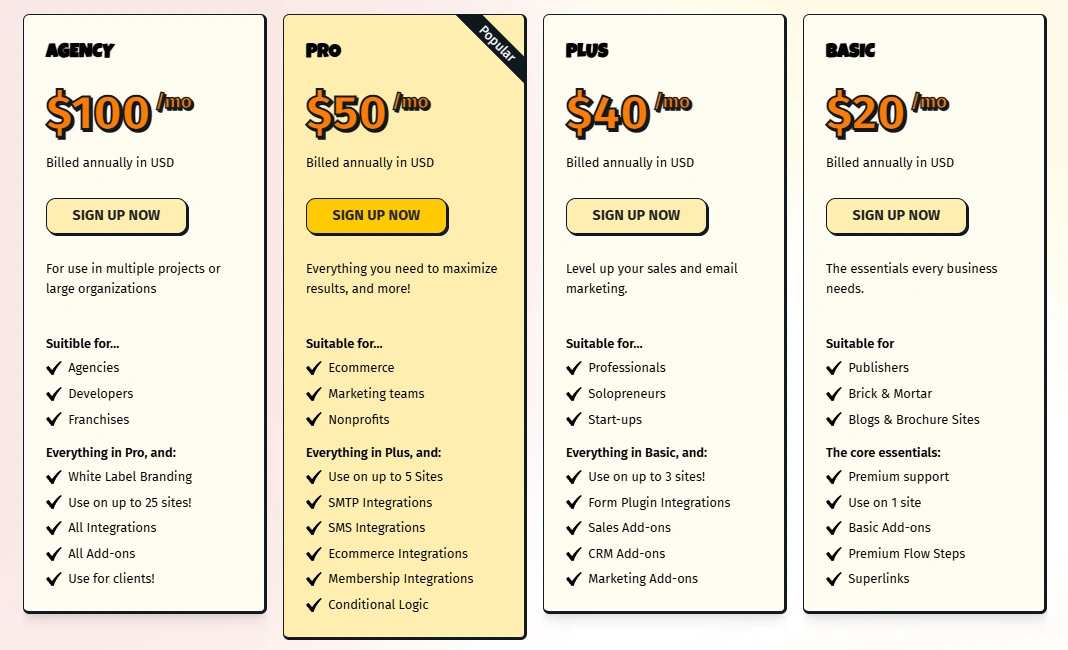
Groundhogg Pricing (billed annually):
- Basic: $20/month, 1 site
- Plus: $40/month, 3 sites
- Pro: $50/month, 5 sites
- Agency: $100/month, 25 sites with white-label
Free version available on WordPress Repo.
Best for: Membership sites, LMS platforms, and developers building custom automation where WooCommerce is one trigger among several.
Groundhogg is complexity for complex needs. But what if you don’t have complex needs at all? What if you just send a newsletter on Sundays? The last plugin is built for exactly that.
5. Newsletter Plugin — Best for Broadcast-Only Sending

If you send newsletters and that’s the full extent of your email marketing, no cart recovery, no order triggers, no automation sequences, the Newsletter Plugin does the job without adding overhead you don’t need.
It’s been in the WordPress repository for years. Subscription forms, list management, campaign sending, and basic reporting. The automation features are limited compared to every other plugin on this list, and that’s the point. For a broadcast-only operation, simpler plugins break less, take less time to learn, and stay easier to maintain.
A WordPress recipe blog with 4,000 subscribers sending one newsletter every Sunday morning doesn’t need cart logic, CRM fields, or automation builders that would never get used. That’s Newsletter Plugin’s reader.
What Newsletter Plugin actually does:
- Subscription forms and list management
- Campaign sending with basic reporting
- Minimal configuration required
- Long, reliable track record in the WordPress repository
- Unlimited subscribers on every paid plan
What to know before you switch:
This plugin is built for newsletters, not automation. Cart recovery, order triggers, and CRM-style segmentation aren’t its strengths. You’ll connect an external SMTP service to send at any real volume, and if your needs grow beyond broadcasts, you’ll likely outgrow Newsletter Plugin and need to migrate. That isn’t a flaw, it’s the trade-off you accept in exchange for simplicity right now.
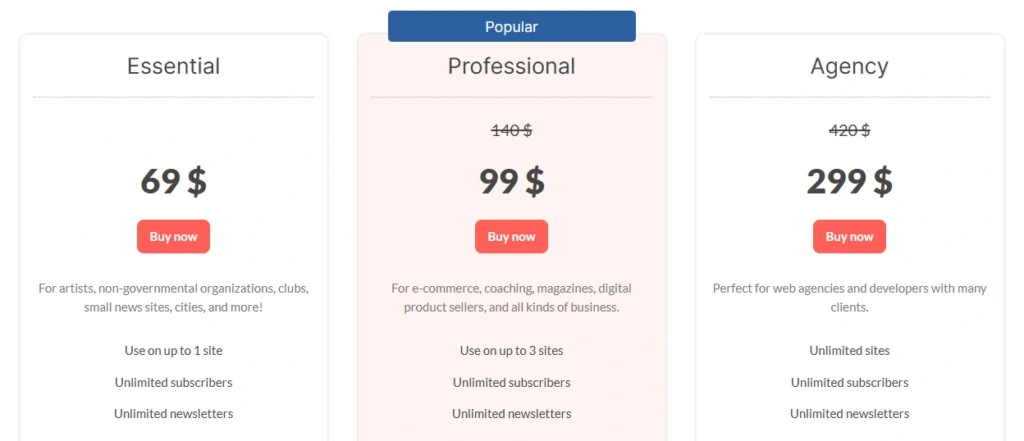
Newsletter Plugin Pricing:
- Free: Unlimited subscribers, core features
- Essential: $69, 1 site
- Professional: $140, 3 sites
- Agency: $F420, unlimited sites
Free version available on WordPress Repo.
Best for: WordPress site owners who primarily send newsletters and don’t need WooCommerce-driven automation.
Those are the five WordPress plugins worth comparing. If your search led you to standalone platforms instead of WordPress plugins, the next short section explains why we didn’t review them here.
Side-by-Side Feature Comparison of the 5 WordPress Email Plugins
| Feature | Mail Mint | FluentCRM | MailPoet | Groundhogg | Newsletter Plugin |
|---|---|---|---|---|---|
| Native WooCommerce cart recovery | Yes | Partial | Yes | No | No |
| WooCommerce-first automation architecture | Yes | Partial | Partial | No | No |
| Built-in sending service | No | No | Yes | No | No |
| CRM-style contact records | No | Yes | No | Partial | No |
| Conditional automation branching | Yes | Yes | No | Yes | No |
| Data stays on your server | Yes | Yes | Yes | Yes | Yes |
| Developer API access | Partial | Yes | Partial | Yes | No |
| Unlimited contacts (free plan) | Yes | Yes | No | No | Yes |
Features tell you what each plugin does. The next table tells you what each one costs as your list grows.
Pricing Comparison of the 5 Self-Hosted Email Plugins for WordPress
| Plugin | Free plan | Entry paid price | Contact tiers? |
|---|---|---|---|
| Mail Mint | Unlimited contacts | $149.99/year | No |
| FluentCRM | Unlimited contacts | $129/year | No |
| MailPoet | Up to 1,000 subscribers | $8/month | Yes |
| Groundhogg | Limited | $20/month | No (flat) |
| Newsletter Plugin | Unlimited | $69/year | No |
All five use flat pricing or a free core with optional paid add-ons. The architecture is the reason. Your contacts already live in your WordPress database, so there’s no third-party platform billing you for storage as your list grows.
That flat-pricing difference is small at 1,000 contacts. At 25,000 contacts, it’s the entire business case.
How Self-Hosted Pricing Compares to SaaS
| List size | Typical SaaS cost (Mailchimp) | Typical self-hosted cost |
|---|---|---|
| 1,000 contacts | ~$26/month | $129–$200/year (flat) |
| 5,000 contacts | ~$75/month | $129–$200/year (flat) |
| 10,000 contacts | ~$110/month | $129–$200/year (flat) |
| 25,000 contacts | ~$300/month | $129–$200/year (flat) |
The pattern matters more than the exact numbers. SaaS pricing scales with list size, self-hosted pricing is flat. At 1,000 contacts, the difference is modest. At 25,000 contacts, the gap is significant.
That’s the case for self-hosted in numbers. But you may have noticed something on your way here: a lot of the tools that come up in search for “self-hosted email marketing” aren’t WordPress plugins at all. Those are worth a quick note before going deeper.
Tools Worth Knowing About That Didn’t Make This List
If you searched “self-hosted email marketing software” before landing here, you probably saw these names. They’re good tools, but they aren’t WordPress plugins, which is why this article doesn’t cover them in depth.
- Sendy. Built around Amazon SES. Extremely low sending cost. Strong fit for newsletters at volume, limited automation. Runs as a standalone PHP application, not a WordPress plugin.
- Listmonk. Open-source, fast, lightweight. Built for technical teams, comfortable running a Docker container or a Go binary. No native WooCommerce integration because it isn’t a WordPress tool.
- Mautic. Open-source marketing automation platform with serious depth. Self-hosted, but standalone. Most WordPress store owners find it heavier than they need.
- MailWizz. Popular with agencies sending at high volume. Standalone PHP application, not a WordPress plugin.
- phpList. One of the oldest open-source list managers. Mature, but designed for broadcast newsletter sending, not WooCommerce-style automation.
If you want email marketing inside WordPress, the five plugins reviewed above are the relevant options. If you’re willing to run a separate server-side application, the tools in this section are worth investigating on their own terms.
Architecture is the next thing worth understanding. Why does self-hosted feel structurally different from SaaS, even when the surface-level features look similar?
What Self-Hosted Email Marketing Software Actually Means for WordPress
Self-hosted means the software runs on your server, not someone else’s. For WordPress, that means a plugin, not a standalone application.
This is where most people get confused comparing self-hosted to SaaS. With Mailchimp or Klaviyo, your subscriber list sits on their infrastructure. You pay them to hold it, and the bill climbs as the list grows.
With a self-hosted plugin, that same list sits in your database. If the plugin company disappears tomorrow, your data is still there. You export it and move on.
That separation gets even more important if your business operates outside the US, where data residency isn’t just a preference, it’s a legal requirement.
Data Sovereignty and Why It Matters Outside the US
If you’re operating in the EU, UK, Canada, or Australia, where your customer data physically lives isn’t only an architectural choice. It’s a compliance one.
With a SaaS email platform, your subscriber list sits on the vendor’s infrastructure, often in US data centers. For EU and UK businesses, that means your customer data is leaving the jurisdiction every time you sync.
GDPR allows it under specific contractual safeguards, but you are the one responsible for proving those safeguards exist and that the vendor honors them.
Self-hosted changes that calculation. Your contacts live in your WordPress database, hosted wherever you choose to host it. There’s no third-party transfer to documents, no Data Processing Agreement to negotiate, no Schrems II workaround to maintain.
Canadian businesses get the same benefit for CASL. California stores get the same for CCPA. Self-hosted doesn’t automatically make you compliant with any of these laws, but it removes the cross-border data transfer question from your compliance work entirely.
For a lot of EU and UK store owners, that single fact is the reason to switch.
But sovereignty only matters if the system actually runs reliably. Which brings the article back to the practical question: what does it take to make self-hosted email work day-to-day?
The Three Setup Decisions That Affect Deliverability Most
These apply to every self-hosted WordPress email setup. Get them wrong, and no plugin performs reliably.
1. Real server cron over WP Cron.
WP Cron fires when someone visits your site. At volume, that means your email queue only processes when someone loads a page. If your site is quiet during a campaign, the queue stalls.
Set up a system-level cron job through your hosting control panel that runs every one to five minutes. On Kinsta, this is available through the dashboard.
2. External SMTP, not local sending.
The plugin queues. An external SMTP service delivers. Amazon SES is the standard at scale. The cost is low, and deliverability is strong on a clean domain.
SendGrid and Postmark are both solid alternatives. Routing high-volume sends through your server’s local mail agent will get your IP flagged within weeks.
3. List hygiene before your first send.
SES measures your bounce rate from your very first campaign. A list that hasn’t been cleaned in two years will hit its threshold fast.
Run it through a verification service before touching your SES account. After setup, configure automatic bounce removal so the system stays clean on every subsequent send.
Get those three right, and any plugin on this list will run cleanly. Which leaves the actual question: which one fits you?
Which Self-Hosted Email Marketing Plugin Is Right for You?
You’ve seen the comparison. Here’s the short version of who each plugin is genuinely for.
Choose Mail Mint if:
- WooCommerce is the center of your business
- You want abandoned cart recovery without a sync layer
- Your automations depend on what customers actually purchase
- You’re running funnels through WPFunnels
- You want unlimited contacts at a flat annual price
Choose FluentCRM if:
- The contact record matters as much as the email
- You manage your list with tags and behavioral segments
- You need CRM-style depth more than native WooCommerce triggers
Choose MailPoet if:
- You want self-hosted solution without setting up your own SMTP
- You’re starting out and want the simplest path to a working setup
- Your list size fits comfortably inside MailPoet’s sending service pricing
Choose Groundhogg if:
- You run a membership site, LMS, or course platform
- Your customer journey has multiple stages beyond purchase
- You need conditional branching and developer-level customization
Choose Newsletter Plugin if:
- You only send newsletters
- You don’t need cart recovery, order triggers, or CRM logic
- You want the simplest possible install
Conclusion
Self-hosted email marketing is really a question about where your customer journey should live.
If WooCommerce is the center of your business, keeping your customer data, your automations, and your campaigns inside the same environment usually creates a simpler, more connected setup than running them across two platforms with a sync layer in between. That’s the architecture argument for self-hosted, and it’s the reason a growing number of WooCommerce stores have moved to plugins like Mail Mint.
Whichever WordPress email marketing plugin you pick, fix the infrastructure first. Real server cron. External SMTP. A clean list before your first send. Those three decisions affect your results more than the plugin selection does.
You started this article with a thought. My store is in WooCommerce, but my customer data and automations are somewhere else. Your store already lives in WordPress. Your products, your customers, your orders, your checkout, your funnels are all in there.
The only real question left is whether your email marketing has any reason to live somewhere else.
For a growing WooCommerce store, it usually doesn’t.
Frequently Asked Questions
Is “self-hosted email marketing” the same as “open-source email marketing”?
No. Self-hosted means the software runs on your server. Open-source means the code is public and modifiable. A plugin can be one without being the other.
What’s the difference between a self-hosted email plugin and an SMTP plugin?
An SMTP plugin delivers your WordPress system emails like password resets. A self-hosted email marketing plugin adds the full campaign and automation system. You typically need both.
Will a large contact list slow down my WordPress site?
The contacts won’t. Log and event data will, if you don’t clean it up. Set a retention policy before your first large campaign.
What happens to my contacts if the plugin is discontinued?
Your data stays in your WordPress database. You export it and move it to another tool. Your list is always yours.
Can I run a WordPress email plugin and Mailchimp at the same time during migration?
Yes. Keep Mailchimp active until every automation is confirmed working in the new setup, then cancel. Test on a small segment first to avoid duplicate sends.