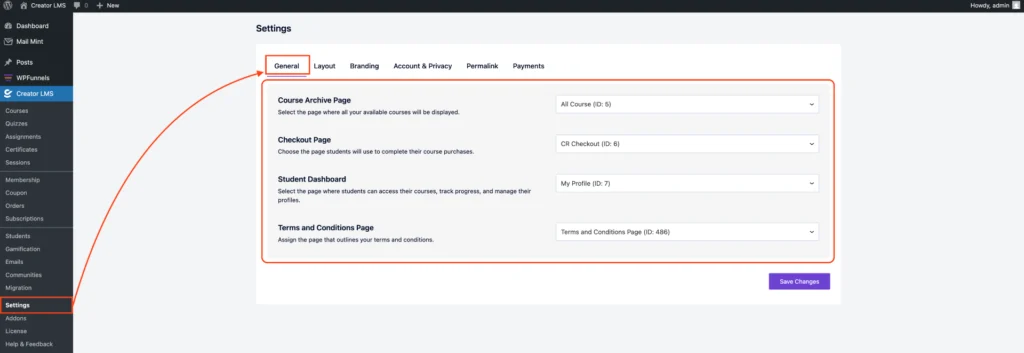
The General Settings section of Creator LMS (CLMS) allows you to configure essential pages for your LMS, such as the course archive, checkout, student dashboard, and terms & conditions.
Setting these pages correctly ensures a smooth experience for your students and proper functionality of your courses.
Step 1: Access General Settings
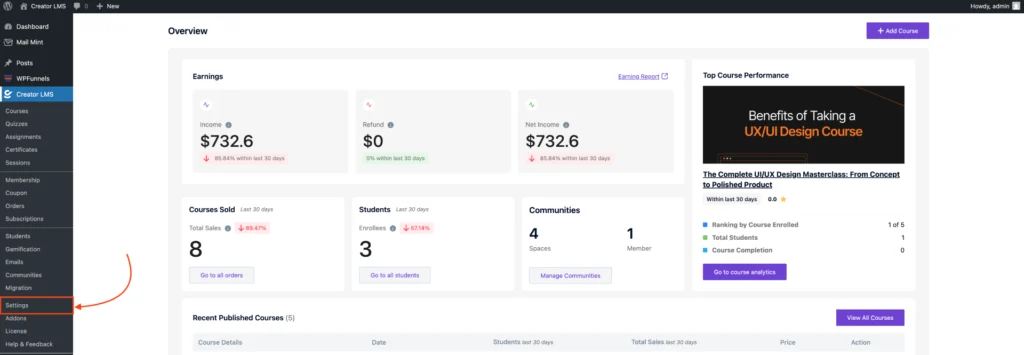
- Log in to your WordPress dashboard and go to Creator LMS → Settings from the left-hand menu.
Step 2: Assign Key Pages
- Course Archive Page: Select the page where all your available courses will be displayed (e.g.,
All Courses (ID: 5)).
- Checkout Page: Choose the page students will use to complete their course purchases (e.g.,
CR Checkout (ID: 6)).
- Student Dashboard: Select the page where students can access their courses, track progress, and manage their profiles (e.g.,
Dashboard (ID: 154)).
- Terms and Conditions Page: Assign the page that outlines your terms and conditions (e.g.,
My Profile (ID: 7)).