
The Contact Analytics section in Mail Mint gives you a deep look into your audience – how your contact list is growing, where your contacts are coming from, and how engaged they are with your emails. It helps you make informed decisions about your email strategy based on real data.
To access it, go to Mail Mint → Analytics → Contacts tab.
All data on this page is filtered by a date range – by default, it shows the Last 30 days. You can change this using the date range picker in the top-right corner to view data for a different period.
At the top of the page, five key metrics give you an at-a-glance summary of your contact list:
- Total Contacts – The total number of contacts currently in your list.
- Net Growth – The net change in contacts over the selected period. A positive number means your list is growing.
- Subscribed – The number of contacts with an active subscribed status.
- Unsubscribed – The number of contacts who have opted out.
- Pending – Contacts who have not yet confirmed their subscription.
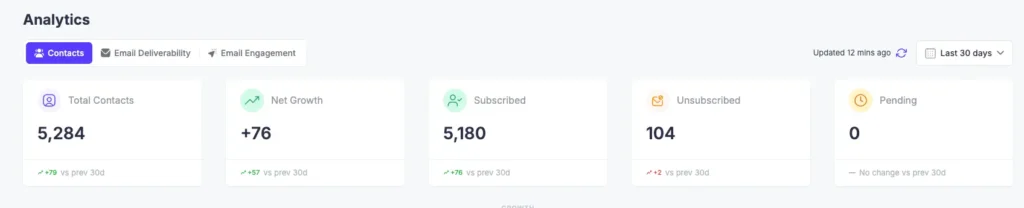
Each card also shows a comparison to the previous period (e.g., +79 vs prev 30d) so you can quickly see whether things are trending up or down.
Contact Growth Chart
The Contact Growth chart shows how your contact list has changed over time within the selected date range. It plots three lines:
- Total Contacts – the cumulative size of your list
- New Contacts – contacts added each day
- Unsubscribed – contacts who opted out each day
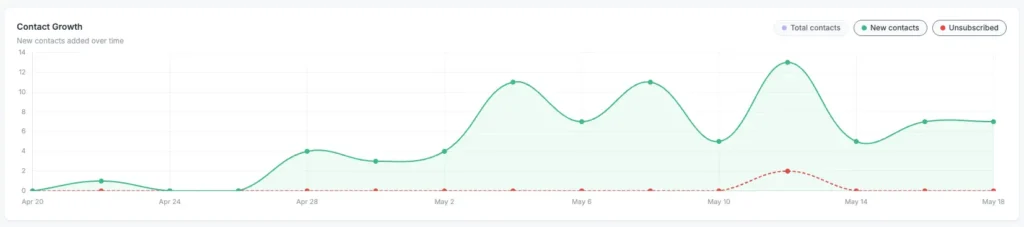
Use this chart to spot growth spikes (e.g., after a campaign or lead magnet launch) or identify periods where unsubscribes picked up.
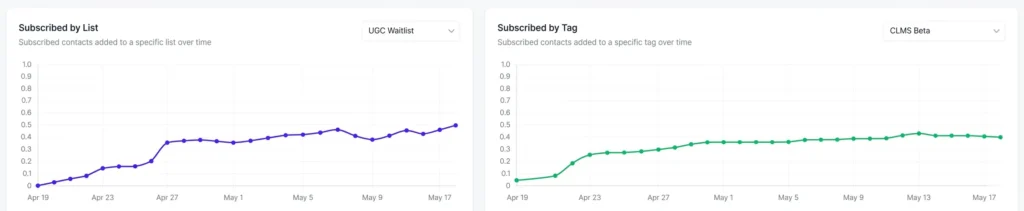
Subscribed by List & Tag
These two charts let you drill down into subscribed contact growth for a specific list or tag over time. Use the Select a list or Select a tag dropdown on each chart to choose what you want to analyze.
This is useful for tracking the growth of individual segments — for example, seeing how a particular opt-in form, campaign, or tagged audience is performing over time.
Audience Overview
The Audience Overview section breaks down the current state of your contacts in two ways:
Status Breakdown
A donut chart showing the distribution of all contacts by their current status:
- Subscribed – actively opted in
- Inactive – no recent activity
- Unsubscribed – opted out
- Pending – awaiting confirmation
- Bounced – emails could not be delivered
- Complained – marked your email as spam

Engagement Breakdown
Shows how your subscribed contacts are engaging with your emails, grouped into four levels:
- Highly engaged – contacts who open and click regularly
- Occasionally open – contacts who open emails now and then
- Inactive (90d+) – contacts who haven’t engaged in over 90 days
- Never engaged – contacts who have never opened or clicked any email
This breakdown helps you identify how healthy your list really is beyond just the subscriber count.
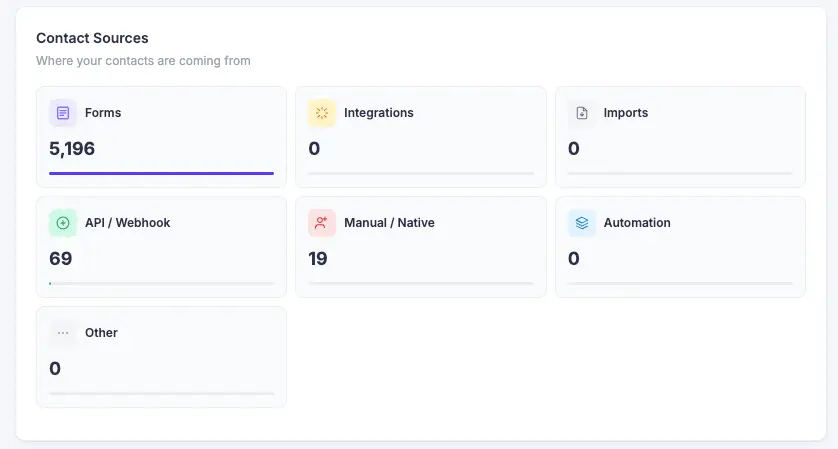
Contact Sources
The Contact Sources section shows where your contacts are coming from. Each source is displayed with its total count:
- Forms – contacts captured through Mail Mint opt-in forms
- Integrations – contacts added via third-party integrations
- Imports – contacts added through manual CSV imports
- API / Webhook – contacts added programmatically
- Manual / Native – contacts added directly from the admin
- Automation – contacts added through automation sequences
- Other – any other source not categorized above
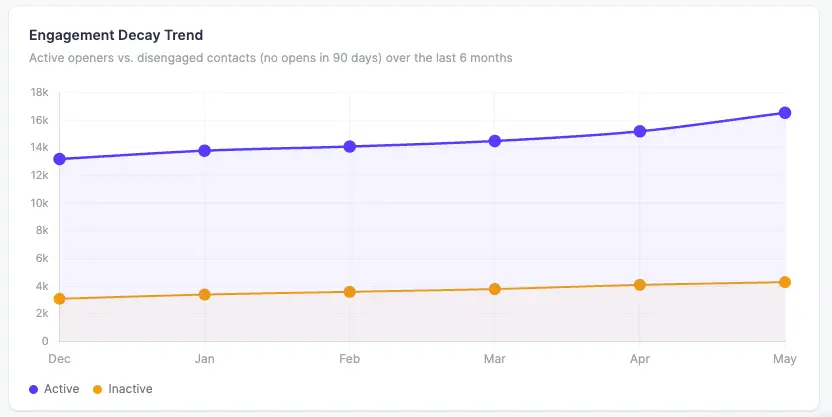
Engagement Decay Trend
The Engagement Decay Trend chart tracks active openers vs. disengaged contacts (those with no opens in 90 days) over the last 6 months. It plots two lines:
- Active – contacts who are still opening emails
- Inactive – contacts who have gone quiet
This chart is particularly useful for spotting list fatigue early. If the inactive line is rising steadily while the active line stays flat, it may be time to run a re-engagement campaign.
This is all about the contact analytics in Mail Mint.
