
The Email Deliverability tab gives you a clear picture of how well your emails are actually reaching your audience. It tracks delivery rates, bounces, spam complaints, and how subscribers are opening your emails – helping you identify and fix any deliverability issues before they impact your sender reputation.
Click the Email Deliverability tab under Mail Mint → Analytics to access this page.
Like the Contacts tab, all data is filtered by date range – defaulting to the Last 30 days – which you can change using the date range picker in the top-right corner.
Overview KPI Cards
Five key metrics summarize your deliverability performance at a glance:
- Total Sent – The total number of emails sent in the selected period.
- Delivery Rate – The percentage of sent emails that were successfully delivered.
- Bounce Rate – The percentage of emails that failed to deliver due to invalid addresses or server rejections.
- Spam Complaints – The percentage of recipients who marked your email as spam.
- Failed Sends – The total number of emails that could not be sent at all.

Each card compares the current period to the previous one (e.g., — vs prev 30d) so you can track whether your deliverability is improving or declining.
Delivery Funnel
The Delivery Funnel shows exactly what happened to every email sent during the selected period. Each stage is shown as a horizontal bar with a count and percentage:
- Sent – Total emails dispatched
- Delivered – Emails that reached the recipient’s inbox
- Opened – Recipients who opened the email
- Clicked – Recipients who clicked a link inside the email
- Bounced – Emails that could not be delivered
- Spam – Emails marked as spam by recipients
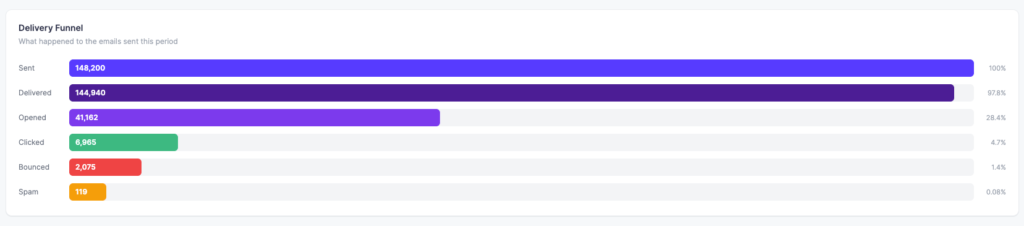
This funnel helps you pinpoint where drop-offs are happening – for example, high delivery but low opens may indicate a subject line problem, while high bounces may signal a list quality issue.
Deliverability Trend
The Deliverability Trend chart plots three metrics over time so you can see how your deliverability health is changing day by day:
- Delivery Rate – shown in green
- Bounce Rate – shown in red
- Spam Complaints – shown in orange

A healthy account should show a consistently high delivery rate with bounce and spam lines staying flat near zero. Any sudden spikes in bounce or spam are worth investigating immediately.
Audience Insights
The Audience Insights section tells you how and where your subscribers are opening your emails.
Opens by Device
Shows the breakdown of email opens by device type — Desktop, Mobile, and Tablet — with a count and percentage for each. This helps you understand whether your emails need to be optimized for mobile readers.
Opens by Email Client
Shows which email clients your subscribers are using to open your emails (e.g., Gmail, Outlook, Apple Mail). This helps you prioritize which email clients to test your designs against.

This is a brief overview of the Email Deliverability analytics in Mail Mint.
