

Mail Mint’s Email Archive feature lets you display a public list of your sent campaigns on any WordPress page using a shortcode. Subscribers can browse past emails directly on your site — useful for newsletters, product announcements, and any content you want to keep publicly accessible.
The archive works in two parts: a global shortcode you place on a page to display the archive, and a per-campaign toggle that controls whether each individual campaign appears in that archive.
Setting Up the Archive Page
Step 1: Configure the Archive Shortcode
From your WordPress admin, go to Mail Mint → Settings → Campaigns. The Archive page shortcode section lets you configure what the archive displays and filter which campaigns are shown.
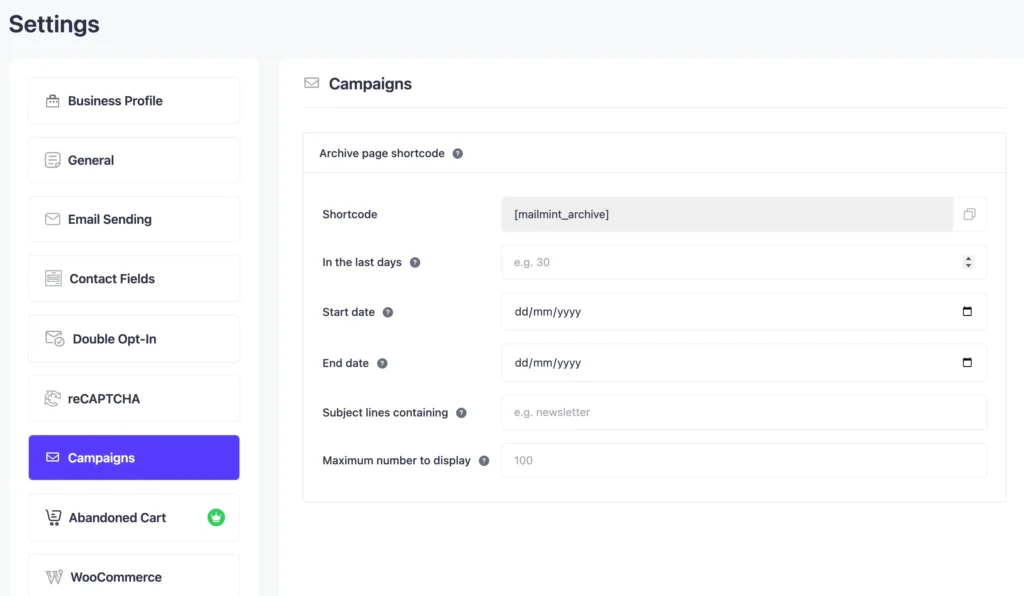
The available settings are:
- Shortcode – The shortcode to embed on your page:
Oops! There are no emails to display. - In the last days – Only show campaigns sent within the last N days (e.g.
30shows the last 30 days) - Start date – Only show campaigns sent on or after this date
- End date – Only show campaigns sent on or before this date
- Subject lines containing – Filter to only show campaigns whose subject line contains a specific keyword (e.g.
newsletter) - Maximum number to display – Cap the number of campaigns shown (default: 100)
Configure the filters to match what you want displayed, then save.
Step 2: Add the Shortcode to a Page
- In your WordPress admin, go to Pages → Add New (or edit an existing page).
- Add a Shortcode block and paste in
Oops! There are no emails to display.. - Publish or update the page.
The archive will now display all campaigns that have the Show in archive toggle enabled and match the filters you configured in Step 1.
Controlling Which Campaigns Appear
Each campaign has its own toggle to control whether it shows up in the archive.
Enabling Show in Archive for a Campaign
When creating or editing a campaign, scroll down to the Additional Settings section and switch on the Show in archive toggle.
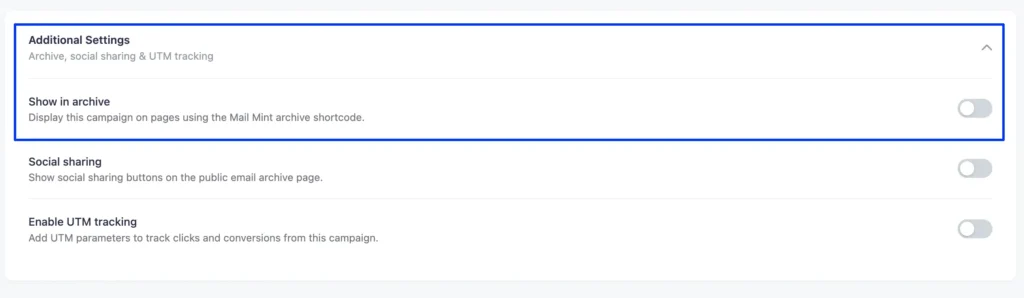
Switch on Show in archive to include this campaign in the public archive. If the toggle is off, the campaign is excluded from the archive even if it matches the shortcode filters.
